🗺️ Overview






🌱 ACORN1 is a Rust CLI and library for validating research activity data (RAD), adding linked-data context, and exporting records as PDF, PowerPoint, CFF, Markdown, JSON, YAML, or ZON. Its source records are portable files that can be version controlled and processed locally.
ACORN is context-aware at the data and workflow level. It keeps project descriptions with their identifiers, provenance, and relationships so people and software can interpret records in context. That awareness can unlock a fuller understanding of the work by making documented connections and gaps visible.
ACORN’s validation, formatting, linking, and export workflows are deterministic. Optional AI tooling can discover and download local GGUF models, configure them for OpenCode, VS Code, Goose, and llama-swap, and provide compatible agents with ACORN-specific operating instructions through acorn skill.
Note
AI assistance disclosure, Level 4. ACORN uses AI in accordance with
VisidataMachineAssistanceLevel::Significant: humans author most project code, while AI tools may directly create or edit auxiliary files such as documentation and tests. Humans retain review and decision authority. AI-assisted contributions at this level must identify the model and version used and the responsible human operator in the contribution metadata.
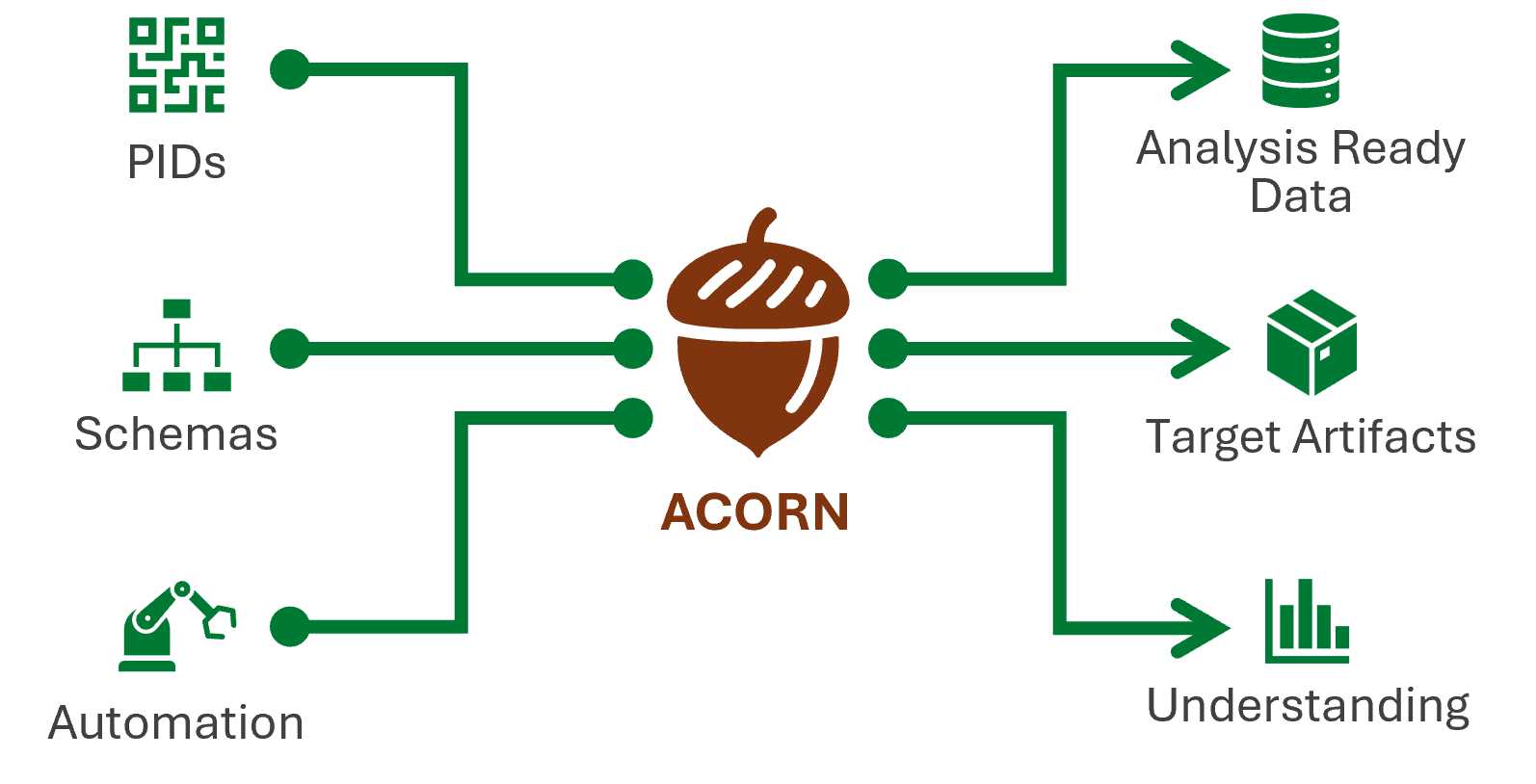
Choose your trail
Start with the outcome closest to your work:
| I am a… | Start here | You will learn to… |
|---|---|---|
| Researcher | Validate your first RAD | check, improve, link, and export a project record |
| Developer | Build with ACORN | use schemas, prompt and model APIs, agent skills, external Python bindings, and WebAssembly |
| Platform engineer | Operate ACORN | operate local models, agent tools, runners, and automation services |
Not sure yet? The role guide shows every trail at a glance.
Explore ACORN
Choose a route to explore its concepts and commands.
Research activity data
Explore: research activity data · check and format · linked data · shareable artifacts
Persistent identifier lifecycle
Explore the persistent identifier lifecycle →
Local AI and agent tooling
Explore: local models · application sync · agent skill · …but is it agentic?
-
ACORN stands for “Accessible Content Optimization for Research Needs” ↩
Why ACORN?
ACORN helps researchers and communicators describe projects as analysis-ready research activity data. Its schemas record what the research does, how it works, and how it relates to people, organizations, publications, funding, and other projects.
The schemas use statically typed and dynamically validated data structures implemented in memory-safe Rust. Persistent identifiers1 connect records to established research systems and support open science practices.
The problem
Scientific work is often represented through publications, people, approvals, timelines, and budgets. Each source records part of a project:
- Publications2 omit projects that have not produced a paper and may not show how projects relate.
- People3 move between groups, change roles, and leave organizations.
- Approval and timeline systems may not integrate with other persistent identifiers or research systems.
- Budgets rarely contain enough scientific detail to explain the work.
Publication pressure can favor output quantity and discourage researchers from sharing negative results or data that does not support a hypothesis.4 When underlying data and code are unavailable, other researchers may be unable to reproduce otherwise useful results.5
Project-level records
ACORN uses the project as the primary research object. A project record links the people, publications, organizations, funding, approvals, data, code, methods, and results that other systems hold separately. ACORN supplements those systems by giving their records shared project context.
This context helps readers understand a project’s purpose, evidence, participants, and outputs as parts of the same activity. It also makes relationships between projects easier to follow and gives people and software more evidence for finding gaps or conflicting information.
The resulting structure supports project-level search, reporting, gap analysis, and machine processing. The source record remains available as a portable file instead of depending on one hosted application.
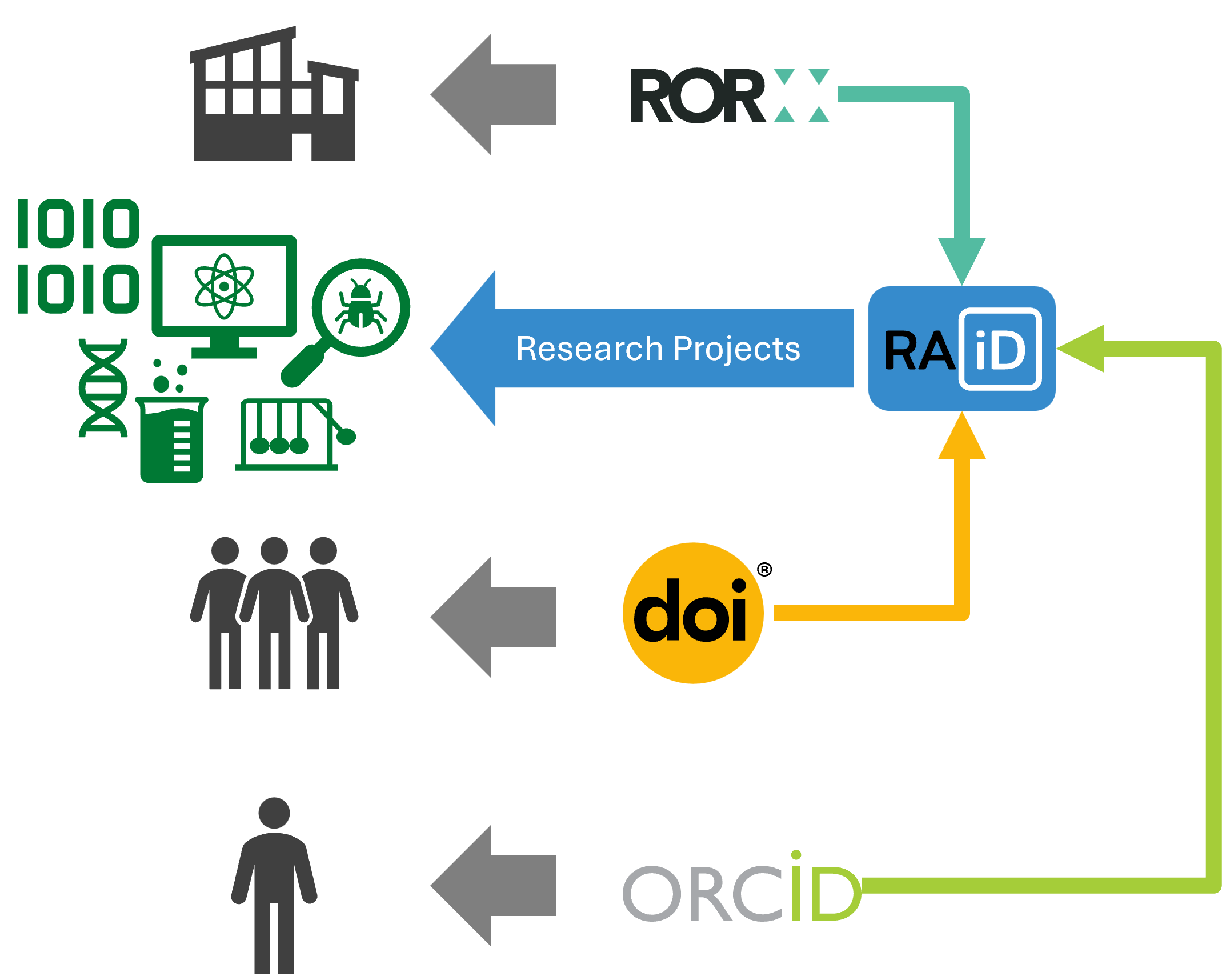
Risks and durability
ACORN can store sensitive research data, so deployments must control access and follow the guidance in SECURITY.md. Continued development also depends on adoption, funding, and available maintainers.
The file-based design limits the effect of a discontinued service. Records remain readable files that can be versioned with their assets and validated against an open JSON Schema. Citation, PDF, and PowerPoint outputs can then be regenerated without an ACORN-hosted service.
Using ACORN
Researchers can submit project metadata through a form and generate fact sheets in PDF, web, or PowerPoint form. The resulting JSON file becomes the maintained source for each project.
When the schema changes, run acorn format to apply formatting and controlled-vocabulary migrations, then review the diff. acorn check reports incompatible data. Existing JSON remains readable as a flat file, and CI templates can pin an ACORN version so each bucket adopts updates explicitly. See ACORN schemas and CHANGELOG.md.
-
ACORN supports CURIEs and research activity identifiers (RAiDs). ↩
-
D. R. Grimes, C. T. Bauch, and J. P. A. Ioannidis, “Modelling science trustworthiness under publish or perish pressure,” Royal Society Open Science, vol. 5, no. 1, p. 171511, Jan. 2018, doi: 10.1098/rsos.171511. ↩
-
M. Baker, “1,500 scientists lift the lid on reproducibility,” Nature, vol. 533, no. 7604, Art. no. 7604, May 2016, doi: 10.1038/533452a. ↩
🚀 Getting started
Important
Local install is optional. If you only need automated validation or publishing, configure ACORN in CI with the example
.gitlab-ci.yml. The sections below are for running ACORN directly on your workstation or in a container.
Installation
If you are running ACORN locally, choose one method from the table below. For background on the concepts behind these workflows, see Concepts.
Choose an installation method
| User or environment | Recommended option | Best when… |
|---|---|---|
| CI pipeline | CI template | You only need automated validation or publishing; no local installation is required. |
| Windows workstation | Scoop | You want straightforward installation and upgrades. |
| macOS workstation | Homebrew | You want a managed installation; standalone macOS binaries are not available. |
| Linux workstation | Homebrew or a pre-compiled binary | Use Homebrew for managed upgrades or the binary for minimal dependencies. |
| Rust developer | Cargo | Rust is already installed or you want a source-built executable. |
| Containerized environment | Docker or Podman | You want isolation, reproducibility, or a pinned ACORN version. |
| ACORN contributor | Install from source | You plan to modify, test, or debug ACORN itself. |
Install with Scoop (Windows only)
Use this if you are on Windows and want straightforward
scoop updateupgrades.
-
Ensure you have Scoop installed.
-
Open your terminal and add the extras bucket to Scoop
scoop bucket add extras -
Run the following command to install ACORN
scoop install acorn -
After installation, you can verify the installation by running:
acorn help -
You can keep ACORN up to date with Scoop by running:
scoop update acorn
Install with Homebrew (Linux and macOS)
Use this if you are on macOS or Linux and want a managed install via
brew.
-
Add the custom tap:
brew tap research-enablement/acorn https://code.ornl.gov/research-enablement/homebrew-acorn.git/ -
Trust the custom tap:
brew trust research-enablement/acorn -
Install ACORN:
brew install acorn-cli -
Verify installation:
acorn help -
Upgrade to the latest version:
brew update
brew upgrade acorn-cli
Install with Cargo
Use this if you already have Rust and Cargo or want a source-built binary.
-
Ensure you have Rust and Cargo installed. If not, you can install them using rustup.rs.
-
Open your terminal and run the following command to install ACORN
cargo install --locked acorn-cli -
After installation, you can verify the installation by running:
acorn help
Run inside a container
Use this if you want isolation or a pinned version without a local install.
-
Ensure you have Docker1 installed.
-
Pull the latest ACORN image with Docker1
docker pull savannah.ornl.gov/research-enablement/acorn/runner -
Run ACORN using Docker1
docker run --rm savannah.ornl.gov/research-enablement/acorn/runner help
Tip
You will probably need to mount a volume to use ACORN with your local files. For example:
docker run --rm -v $(pwd):/data savannah.ornl.gov/research-enablement/acorn/runner:latest check /data/project
Download pre-compiled binary
Use this if you want a single binary with minimal dependencies.
- Download the latest release from the ACORN GitLab Releases page
-
🪟 Windows
-
Open a PowerShell terminal, visit the releases page to find the latest version, and run:
irm -OutFile acorn.exe -Uri https://code.ornl.gov/api/v4/projects/16689/packages/generic/x86_64-pc-windows-gnu/v<version>/acorn.exe -
Test the downloaded executable:
.\acorn.exe help
-
-
🐧 Linux
-
Open a terminal, visit the releases page to find the latest version, and run:
curl -LO https://code.ornl.gov/api/v4/projects/16689/packages/generic/x86_64-unknown-linux-musl/v<version>/acorn -
Make the downloaded file executable:
chmod +x acorn -
Test the downloaded executable:
acorn help
-
-
🍎 macOS
-
Install from source
Use this if you are contributing to ACORN itself.
-
Clone the ACORN repository
git clone https://code.ornl.gov/research-enablement/acorn.git cd acorn -
Install
acorncommandcargo install --locked --path ./crates/acorn-cli -
After installation, you can verify the installation by running:
acorn help
-
These instructions will work with any OCI-compliant container runtime, such as Docker or Podman. ↩ ↩2 ↩3
Choose your path
ACORN spans research writing, data tooling, and platform operations. Pick a trail now; switch trails whenever your work changes.
| Trail | First win | Suggested route |
|---|---|---|
| Researcher | Turn one project record into checked, reusable artifacts | 5 stops |
| Developer | Use ACORN’s schemas and libraries in an application | 5 stops |
| Platform engineer | Run repeatable ACORN workflows across a team | 5 stops |
If you want to see ACORN work before choosing, take the 10-minute Quick Quest.
Next stop: Plant your first project in the Quick Quest.
Researcher trail
Goal: describe a project once, improve it safely, and create outputs for people and machines.
- Read why ACORN treats projects as first-class research objects.
- Complete the Quick Quest with a small research activity record.
- Learn what
checkevaluates and how to run it offline. - Follow the persistent identifier lifecycle to find and enrich project connections.
- Choose an
exporttarget such as CFF, PDF, Markdown, or PowerPoint.
Your finish line is a version-controlled RAD file that passes the checks you selected and produces at least one shareable artifact.
Next stop: Begin with the hands-on Quick Quest.
Developer trail
Goal: integrate ACORN’s data model, validation, and optional agent tooling into your own tool.
- Install ACORN and inspect
acorn help. - Learn the ACORN research activity model.
- Use the
acorn-libRust crate for native and agent-enabled applications, and extract ACORN’s operating instructions withacorn skill. - For Python workflows, follow the standalone
acorn-pyproject. - Review the WebAssembly-supported surface before targeting a browser or edge runtime.
When adding a CLI integration, prefer the generated CommandLineHelp.md in the repository as the exact option reference and the curated command pages for workflow guidance.
Next stop: Start building with the acorn-lib crate.
Platform engineer trail
Goal: make ACORN repeatable across repositories, services, and local inference tools.
- Define sources and defaults with ACORN configuration.
- Aggregate versioned buckets with
download. - Follow the model workflow from metadata import through weight selection.
- Route downloaded models to applications with
sync. - Use
servefor supported GitLab bot automation, the local Model Context Protocol (MCP)1 server, or authenticated JSON-RPC and gRPC endpoints. Distributeacorn skillfor compatible agents, and keepdoctornearby as the rescue guide.
For CI commands that support it, use global --offline mode when the job must be deterministic and ensure every required network-backed asset is cached or configured explicitly. Commands reject offline mode when they cannot honor that guarantee.
Next stop: Define the workflow in ACORN configuration.
-
Model Context Protocol, “Architecture” and “Server features”. ↩
Quick Quest: Validate your first RAD file
In about 10 minutes, you will take one research activity data (RAD) file through ACORN’s core loop:
📥 Download the project
Download the quest fixture, or fetch it from the documentation repository with ACORN:
acorn download https://code.ornl.gov/research-enablement/acorn \
  --filter '^docs/src/_assets/quick-quest/' \
  --flatten \
  --output acorn-quick-quest
cd acorn-quick-quest
Your tiny project contains one RAD record and its fact-sheet graphic:
quick-quest/
├── index.json
└── lazer-kitten.png

Key fields in the record look like this:
{
  "meta": {
    "id": "quick-quest",
    "media": [{ "contentUrl": "lazer-kitten.png" }]
  },
  "title": "Lazer Kitten Research Lab",
  "subtitle": "A tiny experiment in reusable research storytelling"
}
🔎 Check it
acorn --offline check index.json --skip prose
You should get a successful exit and no schema findings. ACORN may still offer a readability coaching note. --offline makes the lab deterministic; --skip prose avoids synchronizing the optional prose analyzer.
✨ Preview, then format
acorn format index.json --dry-run
acorn format index.json
The first command shows a diff without writing. The second applies normalized formatting and controlled-vocabulary values. A second dry run should show no remaining changes.
📤 Export shareable files
acorn --offline export index.json --format cff --skip prose
acorn --offline export index.json --format pdf --skip prose
Expected artifacts: CITATION.cff, beside index.json, and export/quick-quest.pdf. The PDF uses the downloaded lazer kitten graphic and the full project narrative. Both files come from the same source record, so you can update one file and reproduce every output.
🏆 Quest complete
You now have one human-maintainable source plus citation and PDF outputs.
Next stop: Explore the full Check, Format, and Export guides.
Concepts
These pages describe the data model and design ideas behind ACORN. Start with Why ACORN? for the problem the project addresses, then use this section as a reference for its schemas, standards and formats, identifiers, and technology classifications.
Research enablement
ACORN is managed by the Research Enablement Initiative (REI) at Oak Ridge National Laboratory (ORNL). REI aims to improve the way scientific research is conducted, shared, and evaluated. It is a team of developers, communication experts, and information scientists passionate about open science, transparency, and improving the researcher experience.
REI provides:
- A cross-domain model of research activity data (RAD)
- A Rust command-line application,
acorn-cli - Rust libraries for schemas and RAD workflows,
acorn-schemaandacorn-lib - An independently maintained Python package,
acorn-py - The ORNL research activity catalog, research.ornl.gov (currently in preview; contact REI for access)
Buckets
RAD lives in versioned folder collections called “buckets”. Each bucket contains a set of files and media assets that describe research activities. For multiple examples, see ORNL’s buckets.
The ACORN CLI combines buckets through a flat-file1 configuration file. This lets users aggregate multiple sources and generate reports from the combined data.
Buckets can be stored in a version-controlled GitLab or GitHub repository or on a local file system. They do not require a cloud provider.
Organizations can combine buckets across teams while retaining control over each repository’s access and permissions.
Tip
See the research enablement wiki for more information on buckets.
-
A flat-file is a simple text file that contains data in a structured format, such as JSON or YAML. Flat-files are easy to read and write, and can be used to store configuration data for applications. ↩
ACORN Schemas and Ontologies
The research activity schema organizes identity, metadata, technology context, narrative sections, contact information, and extension notes into one portable record. Field names below follow the serialized JSON, YAML, and ZON form.
Context awareness
ACORN’s context awareness comes from explicit data. A research activity record places its narrative alongside project identity, persistent identifiers, people, organizations, technology, media, and relationships. Linked-data mappings and provenance show how that information connects and where it came from.
Commands use this context for different purposes. acorn check evaluates values against the appropriate schema and rules, acorn format normalizes controlled values, acorn link maps fields to defined ontologies, and acorn export carries the same project information into other formats. Optional model and agent workflows can receive the record, relevant evidence, and validation results as task context.
Draft authoring
RAD can begin as a draft and become stricter as it matures. Input may omit meta.archive and meta.draft; ACORN defaults them to false and true, respectively. Narrative sections may be omitted while draft is true, but a non-draft record must provide them.
List-shaped metadata is also permissive at the authoring boundary. keywords, technology, and every optional metadata vector accept either one item or an array. ACORN normalizes a single item to a one-item array. For optional vectors, an omitted or null value means absent, while [] remains explicitly empty. Canonical JSON, YAML, ZON, and Markdown output uses arrays; empty keywords and technology fields are omitted.
Context-aware operation does not mean that ACORN knows facts absent from its inputs or that it has consciousness. Missing or unsupported information remains missing until a person or a defined provider supplies it. This boundary lets context reveal documented connections and gaps without turning an inference into project data.
Note
See Standards, formats, and interoperability for the metadata models, ISO and RFC representations, field profiles, crosswalks, artifact formats, and protocol boundaries that ACORN implements. Persistent identifier lifecycle documents each local identifier check and resolver boundary.
ACRE
Application Configuration for Research Enablement (ACRE) is ACORN’s versioned configuration format. It keeps application settings—such as data sources, model downloads, synchronization targets, runners, and deployment policy—separate from Research Activity Data (RAD). ACRE files can be reused by other research-enablement applications.
Use an ACRE file
Create .acorn.json, .acorn.jsonc, .acorn.yaml, or .acorn.yml in the project directory. ACORN checks those names in that order. New files should declare schema version 1.0.0:
schemaVersion: 1.0.0
models:
  - Qwen/Qwen2.5-0.5B-Instruct-GGUF
whitelist:
  models:
    - Qwen/Qwen2.5-0.5B-Instruct-GGUF
Use --config <FILE> when a command should load another filename. Validate and format ACRE independently of RAD:
acorn check .acorn.yaml
acorn format .acorn.yaml --standard acre --dry-run
acorn export --schema --standard acre
Canonical filenames are detected automatically by acorn check. For a custom filename or piped input, add --standard acre.
Attributes
Every top-level attribute is optional. Unknown attributes and unsupported explicit schema versions are rejected.
| Attribute | Description |
|---|---|
schemaVersion | Schema version. Use 1.0.0; omission is accepted as 1.0.0 for compatibility. |
buckets | Research-activity collections to import or download, as source strings or detailed repository objects. |
config | llama-swap, OpenCode, VS Code, and Goose targets updated by acorn sync. |
endpoints | Named HTTP API endpoints with authentication settings and templated resources. |
models | Model IDs, paths, URLs, or detailed download entries. |
powerAutomate | PowerAutomate project routing, package, environment-variable names, and callback settings. |
registries | Named OCI or Harbor profiles used by model sources; credentials remain in environment variables. |
runners | CI/CD runner definitions, including repository scope, executor, tags, and local or remote container host. |
whitelist | Optional bucket and model allowlists. An empty whitelist allows all items. |
workflow | Deployment allowlist for repository workflow paths, formats, actions, outputs, and external effects. |
scriptManifest | Deployment manifest filename or inline authorization policy for executable hooks. |
scripts | Ordered Rhai script paths and their check, format, link, enrich, or validate hooks. |
The complete ACRE specification describes every object field and accepted shorthand. See CLI configuration for working examples, Model workflows for downloads, and Rhai exec for constrained script hooks.
ASPECT
A Scientific Paradigm for the Efficient Classification of Technology

portability | autonomy | maturity | motivity
The ASPECT framework classifies technology across portability, maturity, autonomy, and motivity. It gives projects a shared vocabulary for describing capabilities and requirements.
The same classifications apply to automation, AI and machine learning, and classical software.
Tip
Components
Primary attributes
Expand an attribute to see its levels.
📦 Portability
- Limited (level 0)
- Source (level 1)
- Containerized (level 2)
- Installer (level 3)
- Package manager (level 4)
- WebAssembly (level 5)
🪴 Maturity
- Unvalidated (level 0)
- Discovery (level 1)
- Concept (level 2)
- Development (level 3)
- Prototype (level 4)
- Proven (level 5)
🤝 Autonomy
- Manual (level 0)
- Machine-assisted (level 1)
- Human-as-primary (level 2)
- Machine-as-primary (level 3)
- Human-supervised (level 4)
- Machine-only (level 5)
🦾 Motivity
- Inert (level 0)
- Computational (level 1)
- Perceptive (level 2)
- Projective (level 3)
- Reactive (level 4)
- Adaptive (level 5)
Data
Data is recorded separately from the four primary attributes.
Its dimensions include:
- Real or synthetic
- Availability
- Modality
- Quality
Example
The following fictional project shows how four levels form one ASPECT classification.
| Attribute | Level | Details |
|---|---|---|
| 📦 Portability | Level 1 | Source |
| 🪴 Maturity | Level 3 | Development |
| 🤝 Autonomy | Level 1 | Machine-assisted |
| 🦾 Motivity | Level 2 | Perceptive |
Badge visualization
An ASPECT badge gives project portfolios a compact view of the four attribute levels.

ASPECT badge for a project
The annotated version identifies the position of each attribute. The same badge can be used in dashboards, reports, and presentations.
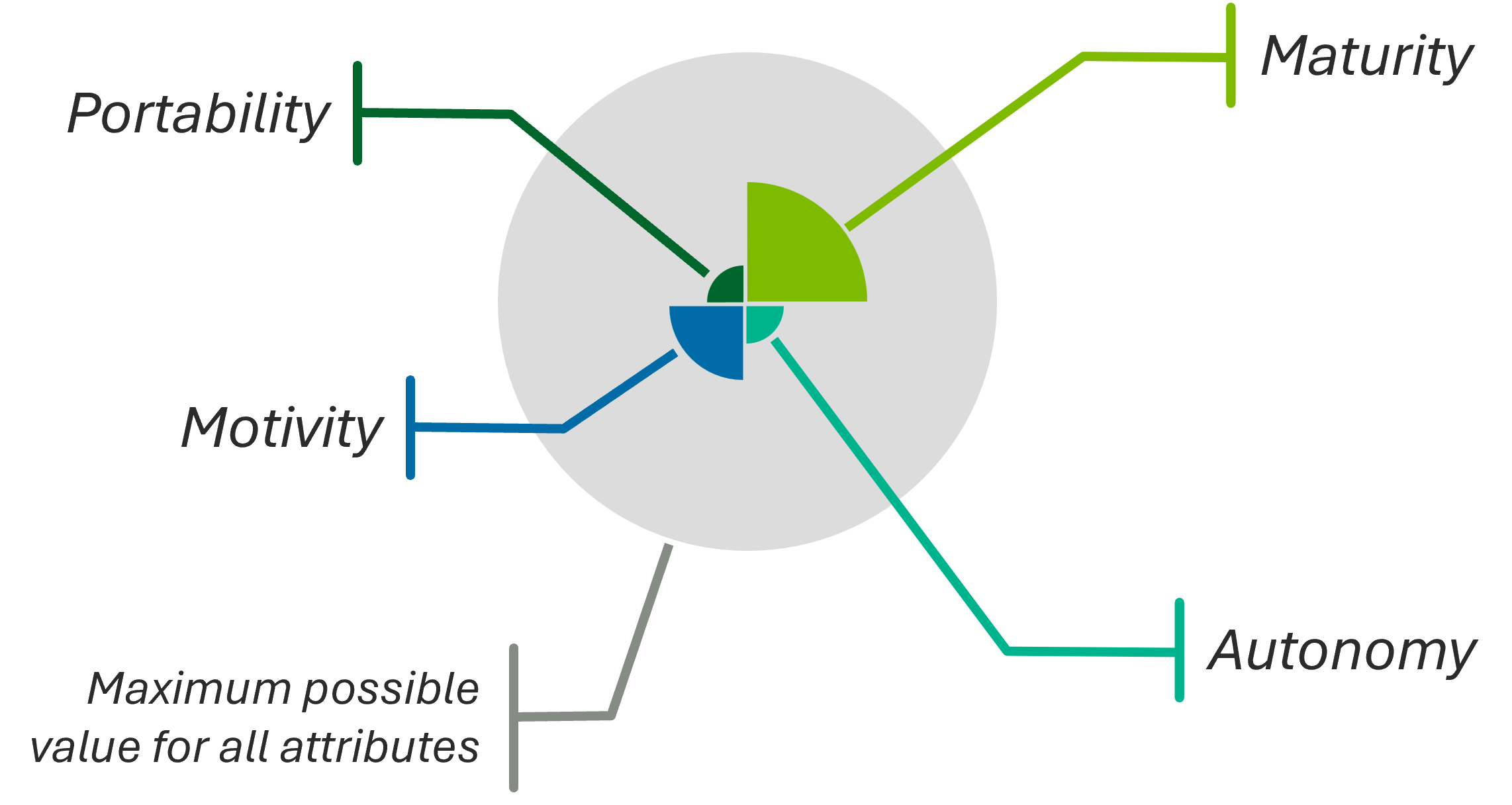
Annotated ASPECT badge
📦 Software Portability
Software portability describes how easily software can move across platforms and run in different environments with little or no modification. In ASPECT, this attribute helps measure whether software can work across different hardware, operating systems, and cloud setups.
Levels of Portability
Limited (Level 0)
Software at this level is tied to a specific environment. Running it elsewhere often requires major code or configuration changes. It may depend on platform-specific hardware, operating systems, or libraries that are hard to reproduce.
Source (Level 1)
Software at this level can be compiled and run on different platforms when the required compiler and build tools are available. In most cases, only minor changes are needed. Some platform-specific dependencies may still need attention during build or setup.
Containerized (Level 2)
Software at this level is packaged and run in containers such as Docker1, Podman2, or Apptainer3. Containers isolate dependencies and provide a consistent runtime. As a result, deployment and scaling are easier across local, on-premise, and cloud environments when a compatible container runtime is available.
Installable (Level 3)
Software at this level is designed to be installed and configured on multiple platforms, usually through installers or setup scripts. Some manual setup may still be required, but the process is generally user-friendly. Platform-specific installers or options are often provided to support different operating systems and hardware.
Automated Installation Available (Level 4)
Software at this level is distributed through one or more package managers such as npm4, Homebrew5, Scoop6, or the Ubuntu advanced package management tool7. It is typically published to package repositories so users can install and update it with standard tools. This approach improves deployment speed and ongoing maintenance across many environments.
WebAssembly8 (Level 5)
Software at this level is compiled to WebAssembly (WASM)9, which allows it to run in modern browsers and other environments that support a WebAssembly runtime. It can often run across desktop, mobile, and server targets without platform-specific changes. Because runtime support is broad and growing, WebAssembly is often treated as a leading portability target.
🤝 Autonomy
In the context of ASPECT, “autonomy” characterizes a technology’s level of human-machine teaming (HMT) and describes the adaptive, bi-directional interaction among humans and machines that augments human capabilities for improved outcomes. This attribute builds on prior work by the Society of Automotive Engineers’ six levels of driving automation1 and expands on ISO definitions to partition technology into distinct and employable categories.
Tip
ISO 229892 defines human-machine teaming as “integration of human interaction with machine intelligence capabilities.”
This attribute is important for understanding how well a technology can operate independently of human intervention, as well as the level of human oversight and control required for its operation. By categorizing technologies based on their autonomy, we can better understand their capabilities and limitations and make informed decisions about their use in various applications. The Visidata project popularized its own similar “level of machine assistance” characterizing LLM involvement in code changes3, and ASPECT’s autonomy attribute builds on this work to provide a more comprehensive framework for understanding the relationship between humans and machines in technology.
Tip
The
acorn-libcrate provides conversion utilities to seemlessly integrate Visidata’s AI collaboration levels into ASPECT’s autonomy attribute.
Levels
Manual (HMT 0)
This level is characterized by the execution of a script where the deterministic outcome is fully known and controlled by the human operator.
Machine-assisted (HMT 1)
In this level, the machine assists the human operator in executing a task. The human remains in full control of the task execution, with the machine offering support or suggestions as needed. This might include an iterative script that augments the input during each iteration based on prior outputs.
Human as primary (HMT 2)
Human directs execution while the machine proposes next steps and executes subtasks under continuous human approval. The human retains decision authority throughout.
Machine as primary (HMT 3)
Machine directs execution while the human intervenes on exceptions, policy checks, or contested steps. The machine carries the workflow.
Human supervisor (HMT 4)
Machine operates independently and the human monitors progress, sets bounds, and provides supervisory override. Human attention is on oversight rather than step execution.
Machine only (HMT 5)
Machine executes end-to-end with no human in the loop. All perception, decision, and action are machine-controlled within its authorized scope.
-
SAE J3016 Taxonomy and Definitions for Terms Related to Driving Automation Systems: https://www.sae.org/standards/j3016_202104-taxonomy-definitions-terms-related-driving-automation-systems-road-motor-vehicles ↩
-
ISO/IEC 22989:2022 Information Technology — Artificial Intelligence Concepts and Terminology ↩
-
Visidata AI Collaboration Levels: https://www.visidata.org/blog/2026/ai/ ↩
🪴 Maturity
Discussion
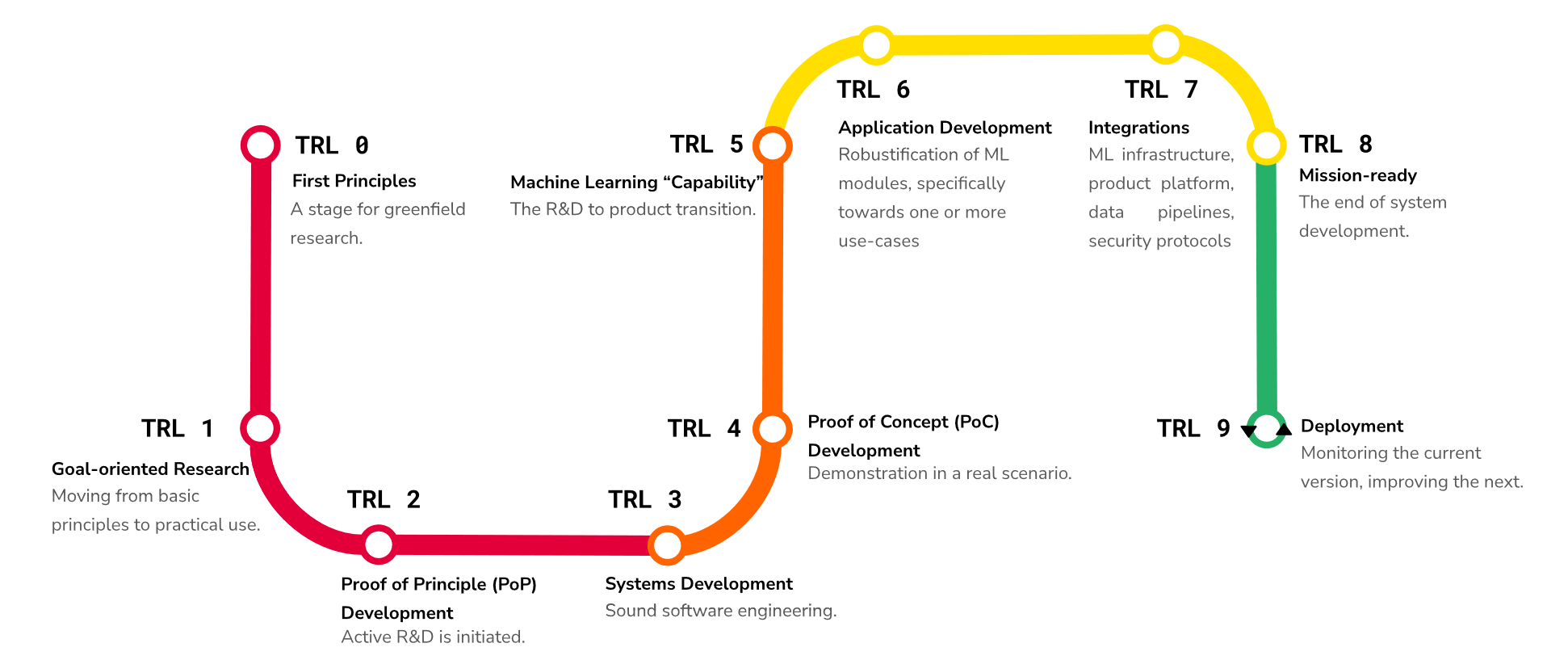
ASPECT leverages a simplified mapping from augmented technology readiness levels (TRL). Wikipedia1 defines TRLs as “a method for estimating the maturity of technologies during the acquisition phase of a program. TRLs enable consistent and uniform discussions of technical maturity across different types of technology.” The U.S. federal acquisitions community widely uses TRLs to assess the maturity of a particular technology. ASPECT also incorporates work2 that adapted TRLs to directly address the particular nuances of machine learning systems. Moreover, ASPECT maturity levels work well with the capability maturity model but go beyond maintenance processes and efficiency to characterize a technology’s maturity in practice. Specifically, ASPECT’s openness and portability attributes create a well-defined understanding of a given technology.
Maturity in ASPECT reflects the degree to which a system has been tested, validated, and proven in real-world scenarios, as well as its readiness for deployment and integration into existing workflows. In combination with the other ASPECT attributes, ASPECT’s maturity attribute provides a holistic view of the system under consideration, beyond a technology’s age or quality.
Levels
| Maturity Level | TRL Mapping | Description |
|---|---|---|
| Unvalidated | N/A | Technology has not been assessed or lacks sufficient evidence of readiness. |
| Discovery | 0-1 | Early exploration and basic research to establish foundational principles. |
| Concept | 2-3 | Concept is defined and initial feasibility is demonstrated. |
| Development | 4-5 | Technology is built and validated through low- to high-fidelity development. |
| Prototype | 6-8 | Working prototype is demonstrated in a relevant environment through operational integration. |
| Proven | 9 | System is proven through successful real-world operation. |
Tip
-
Technology Readiness Level: https://en.wikipedia.org/wiki/Technology_readiness_level
 ↩
↩ -
A. Lavin et al., “Technology readiness levels for machine learning systems,” Nat Commun, vol. 13, no. 1, p. 6039, Oct. 2022, doi: 10.1038/s41467-022-33128-9. ↩
Motivity
Motivity classifies how a technology receives information from its environment, acts on that environment, and retains state. It uses three primitives: perception for input, projection for output, and comprehension for internal state and computation.
This attribute is related to autonomy, but the two measure different properties. Motivity describes a system’s interaction and state. Autonomy describes how humans and machines divide responsibility.
Note
“Motivity” is uncommon in software classification. ASPECT uses it for a system’s capacity to produce change through input, output, and internal state.
Levels
Motivity has six ordinal levels ordered by interaction complexity. Perception is one-way input, projection is one-way output, and comprehension is internal state and computation.
Note
Throughout this document, “comprehension” refers to a technology’s ability to receive, store, and act on data. It does not imply general intelligence, consciousness, or AGI. A hash function, a state machine, and a lookup table exhibit comprehension in this limited sense because they maintain internal state that affects their behavior.
Stateless means no memory between interactions; stateful means the technology retains internal state that influences future behavior.
| Level | Name | Perception | Projection | Comprehension | Stateless/Stateful | Examples |
|---|---|---|---|---|---|---|
| 0 | Inert | ✗ | ✗ | ✗ | None | A hammer or simple pulley system |
| 1 | Computational | ✗ | ✗ | ✓ | Stateful (internal) | Digital model1, simulation |
| 2 | Perceptive | ✓ | ✗ | ✗ | Stateless | Data shadow1, sensor log |
| 3 | Projective | ✗ | ✓ | ✗ | Stateless | Cron job that emails status |
| 4 | Reactive | ✓ | ✓ | ✗ | Stateless | Smart light switch, relay |
| 5 | Adaptive | ✓ | ✓ | ✓ | Stateful | Digital twin1, autonomous agent |
Inert (level 0)
Technology at this level has no computational capability and no interaction with the environment. It is purely passive. Examples include a hammer, a simple pulley system, or any purely physical tool with no embedded intelligence.
Computational (level 1)
Technology at this level performs self-contained computation but has no input from or output to the environment. Comprehension (internal processing) is present, but neither perception nor projection are. Examples include a digital model or simulation that runs in isolation.
Perceptive (level 2)
Technology at this level receives input from the environment (one-way input binding) but produces no output and has no internal comprehension. The technology observes but does not process or act. Examples include a data shadow or a sensor that logs readings to storage without analyzing them.
Projective (level 3)
Technology at this level produces output to the environment (one-way output binding) but receives no input and has no internal comprehension. A cron job that emails a status report projects information without sensing or reasoning about its environment.
Reactive (level 4)
Technology at this level has two-way binding with the environment (perception and projection) but is stateless. It responds to input without an internal model or memory of past interactions. Examples include a smart light switch that turns lights on when motion is detected and a relay that closes a circuit when a threshold is crossed.
Adaptive (level 5)
Technology at this level has full two-way binding (perception and projection) with internal comprehension. It maintains state, builds an internal model of its environment, and changes its behavior based on accumulated experience. Examples include a digital twin that continuously synchronizes with a physical system and predicts future states and an autonomous agent that plans and adapts.
-
Y. K. Liu, S. K. Ong, and A. Y. C. Nee, “State-of-the-art survey on digital twin implementations,” Adv. Manuf., vol. 10, no. 1, pp. 1-23, Mar. 2022, doi: 10.1007/s40436-021-00375-w. ↩ ↩2 ↩3
💾 Data
Discussion
When discussing data, we can evaluate four core aspects:
- Origin — Where does the data come from, and how was it produced?
- Availability — How accessible is the data to intended users and systems?
- Modality — What forms of information does the data contain?
- Quality — How well does the data support its intended use?
Attributes
Origin
Data origin describes whether the data is collected from real-world observations (real) or generated synthetically (synthetic). Real data is often considered more valuable for certain applications, such as training machine learning models, because it captures the complexity and variability of the real world. However, synthetic data can be useful for testing, simulation, and augmenting real datasets, especially when real data is scarce or sensitive.
NVIDIA Omniverse Replicator1 is an example of a tool that can generate synthetic data, particularly in the context of computer vision and robotics. By creating realistic virtual environments and scenarios, it allows researchers to generate large amounts of labeled data without costly and time-consuming real-world data collection.
Availability
Availability describes the extent to which data can be accessed and used. It is strongly related to “openness” and the “presumed open principle” for data.
While openness is characterized as open, public, shared, or closed, ASPECT data availability takes a more direct approach to describing the actual availability of data, which may be “open” but still unavailable due to other factors (e.g., technical or legal barriers).
Modality
Data modality describes the type or format of data, which can include:
- 📕 Text — Unstructured or structured textual data, such as documents, articles, or social media posts
- 🎵 Audio — Sound recordings, such as music, speech, or environmental sounds
- 🖼️ Image — Visual data, such as photographs or scanned images
- 🎬 Video — Moving image data, such as movies or surveillance footage
- 📈 Signal — Time-series data, such as sensor readings or financial market data
- 🕸️ Graph — Structured data representing relationships between entities, such as social networks or knowledge graphs
Multi-modal data combines multiple modalities, such as video with audio or text with images, to provide richer context and insights. In the context of ASPECT, data modality is a list, and multi-modal data can be described by including multiple modalities in the list (e.g., [“text”, “image”] for research activity data that relies on both textual and visual data).
Quality
Data quality leverages a precious metals metaphor to describe data quality.
Data quality describes the level of processing and readiness of the data for analysis and use. The levels were developed with inspiration from data readiness levels 2 and analysis-ready data3. For example, the transition from gold to platinum maps nearly directly to a transition from band B to band A in the data readiness levels. The key difference is ASPECT’s quality levels are more intuitive and directly actionable for researchers working with data in the context of research activities. See the geospatial data section below for an example of how data processing levels relates to data quality.
🌎 Geospatial Data
Geospatial data describes features and events tied to location. Common formats include raster data, such as satellite imagery, and vector data, such as points, lines, and polygons. These datasets support mapping, navigation, and spatial analysis. For geospatial work, data processing level is an important additional quality dimension.
For many electro-optical imagery collections, NASA’s Data Processing Levels4 define the following processing levels. SAR and other modalities use different level schemes, and not all providers adhere to NASA levels; NASA and several commercial providers publish similar level metadata.
- Level 0 — Raw
- Level 1A — Annotated
- Level 1B — Processed Annotated
- Level 1C — Spectral Variables
- Level 2 — Derived Geophysical
- Level 2A — Derived Surface
- Level 2B — Processed Derived Surface
- Level 3 — Gridded
- Level 3A — Periodic Summaries
- Level 4 — Model Output
Many remote sensing sources provide metadata that may include the data processing level, depending on the provider. Processing the geospatial data with techniques such as atmospheric correction, pansharpening, and orthorectification can change the usability of the data for various applications, thereby changing its associated processing level. For example, orthorectification corrects for terrain-induced distortions, improving the spatial accuracy of the data and changing its processing level from Level 1B to Level 2B.
Geospatial data processing level relates to ASPECT’s data quality attribute, but higher levels do not automatically mean higher quality. Level 1B data (closer to raw) preserves measured values more faithfully, while Level 2B data trades some fidelity for usability through additional processing. Which is “higher quality” depends on use case — analysis-ready workflows may prefer Level 2B, calibration work may prefer Level 1B. The specific quality designation (e.g., gold, silver) would depend on additional factors such as the use case and the presence of any remaining artifacts or limitations in the data. For example, orthorectification might be the difference between silver and gold quality data for AI/ML applications.
-
NVIDIA Omniverse Replicator: https://docs.omniverse.nvidia.com/extensions/latest/ext_replicator.html ↩
-
Data Readiness Levels: https://arxiv.org/abs/1705.02245 ↩
-
Analysis Ready Data (ARD): https://ieeexplore.ieee.org/document/8899846 ↩
-
NASA Data Processing Levels: https://www.earthdata.nasa.gov/learn/earth-observation-data-basics/data-processing-levels ↩
Standards, formats, and interoperability
ACORN reads several metadata models and produces research records, linked data, archives, documents, and service messages. Support is specific to the part of a standard that ACORN uses. A successful local check does not certify an implementation, confirm that an identifier exists in a registry, or prove that a repository will accept a deposit.
How to read this page
The terms below describe separate capabilities.
| Term | Meaning in ACORN |
|---|---|
| Parse | Decode a supported representation into ACORN’s typed model. |
| Validate | Check modeled structure, field values, and cross-field rules without contacting an external certification authority. |
| Format | Parse and serialize a file canonically. Formatting performs additional value normalization only where this page says so. |
| Crosswalk | Map the fields for which ACORN defines a relationship between two metadata models. Warnings identify known losses. |
| Generate | Produce an artifact, schema, or protocol message in a supported representation. |
| Resolve | Contact an external registry or provider. Resolution is separate from local syntax validation and respects offline mode. |
Versions appear where ACORN pins one. An unversioned name describes the implemented compatibility surface, not every version or extension of that format.
Metadata models
acorn check runs schema and semantic validation for the implemented models below. acorn format supports a smaller set. For CFF, DataCite, and InvenioRDM, formatting means parse and canonical reserialization. RAD formatting also normalizes controlled values and contact data, while ACRE formatting preserves comments and property order where its format permits.
| Model or profile | Accepted representations | check | format | Interchange and generation |
|---|---|---|---|---|
| Research Activity Data (RAD) | JSON, JSONC, YAML, ZON, and ACORN Markdown; JSON Lines for batches | Structure, modeled fields, cross-field rules, quality, links, prose, and optional FAIR evidence | Canonical serialization plus controlled vocabulary, organization, affiliation, telephone, and contextual media normalization | RAD to DataCite, RAiD, CFF, JSON-LD, and document or archive exports; RAiD to RAD |
| Application Configuration for Research Enablement (ACRE) 1.0.0 | JSON, JSONC, and YAML | Schema validation | Two-space layout, LF line endings, and final newline; comments, property order, and existing trailing commas are retained where supported | JSON Schema generation |
| Citation File Format 1.2.0 | CITATION.cff, YAML, and JSON | Structure, dates, identifiers, nested authors and references, prose, and links | Canonical serialization | Generated from RAD as CITATION.cff; no general CFF crosswalk target |
| DataCite Metadata Schema 4.7 | JSON and YAML | Modeled structure, required fields, present recommended metadata, controlled values, identifiers, dates, rights, and relations | Canonical serialization | Direct conversion to DCAT, InvenioRDM, and HuWise; conversion from those models; RAD to DataCite |
| CKAN package and Action API | JSON and YAML for direct checks; JSON, JSON Lines, YAML, and ZON in crosswalk batches | Modeled package, resource, organization, tag, temporal, and spatial fields | No | CKAN package to DCAT Dataset only |
| Data Catalog Vocabulary 3 | JSON and YAML | Modeled Dataset, Distribution, DataService, checksum, temporal, spatial, identifier, and relation fields | No | Direct conversion to DataCite; conversion to InvenioRDM and HuWise through DataCite |
| HuWise dataset metadata | JSON and YAML | Modeled dataset, contributor, funding, resource, rights, date, identifier, and relation fields | No | Direct conversion to DataCite; conversion to DCAT and InvenioRDM through DataCite |
| InvenioRDM record metadata | JSON and YAML | Modeled record, creators, contributors, funding, rights, dates, identifiers, and CodeMeta fields | Canonical serialization | Direct conversion to DataCite; conversion to DCAT and HuWise through DataCite |
| RAiD metadata, governed by ISO 23527:2022 | JSON, JSONC, and YAML | Modeled RAiD metadata, identifiers, dates, roles, organizations, subjects, and related objects | No | RAD to RAiD and RAiD to RAD |
| KitOps Kitfile and resolved ModelKit configuration | Authoring YAML and resolved JSON | Structure, manifest compatibility, paths, layer identities, digests, local package readiness, and referenced MCP Bundles | No general metadata formatting | Kitfile resolution and OCI ModelKit packaging |
| Dublin Core | In progress | In progress: recognized as a CLI standard name, but no analyzer is implemented | No | No generated schema or crosswalk yet |
Document and text selectors are analysis sources. They let check extract or analyze prose, but they are not metadata models.
Schema generation
acorn export --schema --standard <STANDARD> prints JSON Schema for ACRE, RAD, CFF, CKAN, DataCite, DCAT, HuWise, InvenioRDM, RAiD, Kitfile, ModelKit, document, and text models. Dublin Core support is in progress and does not yet have a generated schema.
Validation levels
ACORN keeps three questions separate:
- Is the record valid for its own typed model?
- Does a RAD contain the fields needed for the supported RAD to RAiD mapping?
- Is a DataCite record deposit-ready under ACORN’s required-property checks?
DataCite recommended and optional properties are validated when present. Their absence does not fail ordinary model validation. Crosswalk output should be checked against its target model before deposit or publication.
Crosswalk boundaries
The structured crosswalk command accepts JSON, JSON Lines, YAML, and ZON. Its supported paths are:
Each arrow is a direct mapping. Conversions between DCAT, InvenioRDM, and HuWise follow two arrows through DataCite.
- RAD to DataCite or RAiD, and RAiD to RAD.
- CKAN to DCAT.
- DataCite directly to DCAT, InvenioRDM, or HuWise.
- DCAT, InvenioRDM, and HuWise directly to DataCite. Conversions between those three models use DataCite as the intermediate representation.
--strict rejects output when the conversion reports a warning. Warning coverage is strongest for direct conversions; loss reporting for routes through DataCite remains incomplete. CKAN conversion produces ACORN’s flexible DCAT Dataset representation. It does not produce a DCAT Catalog or CatalogRecord and does not claim DCAT-US conformance.
Field-level standards and profiles
Metadata models share validators from acorn-schema. Each schema chooses which rule applies to a field, so a rule listed here is not automatically applied to every string with a similar name.
ISO and RFC representations
| Standard | ACORN enforcement |
|---|---|
| ISO 8601 | Calendar dates use YYYY-MM-DD. The reusable modern-date rule accepts years 1950 through 2029 and checks the supported month and day ranges. Year-only fields use four digits and, when a host clock is available, reject future years. ACORN does not implement the full set of ISO 8601 intervals, durations, reduced precision, or recurring dates. |
| RFC 3339 | Timestamp fields require a complete date and time with Z or a numeric UTC offset. Timestamp formatting normalizes accepted values to microsecond precision. |
| ISO 3166-1 | Country fields that use the shared country rule must match an embedded alpha-2 code, case-insensitively. |
| ISO 639:2023 | DataCite and DCAT language fields use the alpha-2 codes historically published as ISO 639-1. InvenioRDM’s general language-code rule accepts embedded alpha-2 or alpha-3 codes. Region subtags are outside these rules. |
| ISO 2108:2017 | ISBN fields use ACORN’s ISBN-13 parser and check digit validation. ISBN-10 is not accepted. |
| ISO/IEC 7064:2003 | ISNI and ORCID use MOD 11-2 checksums. ROR uses its defined MOD 97-10 and Crockford Base32 representation. |
| ISO 23527:2022 | RAiD metadata and identifiers use the modeled RAiD representation. Local validation checks the identifier form and metadata rules; it does not query the RAiD service. |
| ISO/IEC 18670:2025 | SWHIDs use the canonical v1.2 identifier model supported by ACORN. Resolution is a separate network operation. |
| RFC 6902 | acorn-diff exposes all six JSON Patch operation shapes. Generated patches use deterministic key ordering and the add, remove, and replace subset. |
| RFC 8493 | BagIt import, download, and export validate the declaration, safe payload paths, complete manifests, and SHA-256 or SHA-512 checksums before publishing payload data. |
The year and date rules are intentionally different. A standalone year may represent older material, while the shared calendar-date rule is a narrower modern-date profile. Individual metadata models may add stricter range or chronology checks.
Persistent identifiers
ACORN has local parsers for ARK, arXiv, DOI, Handle, ISBN, ISNI, ORCID, RAiD, ROR, RRID, SWHID, United States patent identifiers, and HTTP(S) URLs. Structured person and organization identifiers also check that known scheme names, scheme URIs, and identifier values agree.
These checks establish syntax, normalization, checksum, or scheme coherence. They do not establish ownership, registry status, publication status, or a relationship to the research activity. See Persistent identifier lifecycle for each parser, canonical form, and resolver boundary.
Other scalar profiles
Typed models also enforce required values, collection cardinality, string length, numeric range, nested validation, and whole-record conditions. Public metadata structs generally reject unknown fields where the external model has a closed shape. Open extension points retain their documented additional values.
| Field family | Enforced profile |
|---|---|
| URI and URL | General URI fields require parseable absolute references where their schema permits them. The stricter uri rule requires HTTP or HTTPS with a nonempty authority. This is the ACORN field profile, not a claim that every RFC 3986 production is accepted everywhere. |
| The local part is nonempty, contains the supported ASCII character set, and is at most 64 characters. Domains use valid labels, IDNA conversion, or an IP literal. This is not a complete implementation of RFC 5322 or RFC 6531. | |
| Telephone | The parser rejects known placeholder values and accepts ACORN’s supported North American or international shape. Formatting emits the canonical dotted form where applicable. |
| UUID | UUID fields require the 36-character hyphenated shape. ACORN does not use this rule to certify every RFC 9562 version and variant bit. |
| Semantic Versioning | Version fields use the supported major.minor.patch shape. A leading v is accepted only in models that explicitly define it, such as Kitfile’s manifestVersion. |
| SPDX licenses | Fields documented as SPDX license identifiers currently require a nonempty value. ACORN can download SPDX license data for enrichment, but the shared schema rule does not prove list membership. |
| Media type and file format | Some schemas use controlled enums; other fields preserve nonempty media types, extensions, or format labels supplied by the source. A value’s presence does not prove that its payload matches the declared media type. |
| Geospatial data | Latitude and longitude use numeric bounds. Polygon values must contain coordinate pairs and close the first and final point. These checks do not perform coordinate reference system transformation. |
| Source revisions and digests | Commit values contain 7 through 64 hexadecimal characters. Portable digest fields require a lowercase sha256: value with 64 hexadecimal characters; artifact workflows also compare declared sizes and digests with transferred bytes. |
| Network addresses | IPv4 and IPv6 fields use parsed address values. Email domain literals use the same address parsers. ACORN does not apply these parsers to ordinary host names. |
| Names and embedded values | Selected fields enforce camelCase, kebab-case, snake_case, numeric text, JSON syntax, ZON-safe text, or a restricted stable-identifier character set. These are field-specific application rules. |
| Regions and postal codes | The shared state or province rule accepts two ASCII letters. Postal codes accept a non-negative integer or up to 20 letters, digits, spaces, and hyphens. Neither rule verifies the value against a postal authority. |
| Image paths | Image fields that use the shared extension rule accept PNG, JPEG, GIF, WebP, TIFF, or SVG extensions. The extension check does not decode the file. |
Vocabularies and linked data
RAD formatting resolves known keywords, technologies, sponsors, partners, organizations, and affiliations against ACORN’s configured or embedded vocabularies. Metadata models also contain controlled enums for roles, resource types, date types, relation types, title types, and similar standard-specific values.
acorn link writes JSON-LD context for RAD using terms from Schema.org, Dublin Core Terms, CodeMeta, DCAT, FOAF, BIBO, PROV-O, SKOS, and SPDX where the schema defines a mapping. A mapped term records the intended vocabulary relationship. It does not assert that every RAD record is a complete RDF graph for each vocabulary.
Contributor roles can use the CRediT taxonomy. Infrastructure metadata can record a referenced standard, its authority and version, the asserted relationship, and whether the claim is declared, inferred, or verified. Verified claims require evidence. OCP contribution, recognition, and management-profile records preserve authority data and test evidence; ACORN does not infer recognition or grant conformance.
Product-wide formats and protocols
The metadata layer sits inside a wider set of interoperability boundaries.
Serialization, documents, and archives
| Format | ACORN use and enforcement |
|---|---|
| JSON and JSONC | Metadata, configuration, API, manifest, and linked-data representations. Typed readers reject malformed input and, for models that deny unknown fields, unknown properties. ACRE’s JSONC formatter preserves comments and property order. |
| YAML | Metadata, ACRE configuration, CFF, and Kitfile authoring. Typed readers apply the selected schema after parsing. |
| JSON Lines | Batch RAD and crosswalk records. Each nonblank physical line must contain one complete JSON value; blank or malformed records fail with a record location. |
| JSON-LD 1.1 | Generated linked RAD with defined context mappings. ACORN generates its supported graph shape rather than acting as a general JSON-LD processor. |
| JSON Schema | Generated from ACORN’s typed models for inspection and integration. The generated schema complements runtime semantic validation; it does not encode every cross-field or external check. |
| ZON | ACORN’s deterministic, strict representation of the JSON data model. ZON is an ACORN profile, not an ISO or RFC standard. |
| Markdown | RAD authoring and export, prompt and skill content, and extracted document text. RAD Markdown requires ACORN’s frontmatter discriminator or a recognized legacy representation. |
| PDF and OOXML | PDF, DOCX, and PPTX are read or generated by specific document workflows. ACORN validates the data and the parts it consumes or creates, but does not certify general PDF, WordprocessingML, or PresentationML conformance. |
| 7z, ZIP, TAR, and TAR.GZ | Containers for BagIt and other bounded workflows. Container parsing is separate from BagIt payload and checksum verification. |
Research and model artifacts
| Format or specification | ACORN use and enforcement |
|---|---|
| OCI Image Specification and Distribution Specification | Model downloads parse schema version 2 manifests and indexes, validate media types, descriptor sizes, SHA-256 digests, and safe layer paths, then use ORAS with OCI Distribution-compatible registries. Runnable container images, ambiguous indexes, malformed descriptors, and unsafe paths fail closed. Digest integrity establishes content identity, not publisher authenticity. |
| KitOps ModelKit | ACORN implements the portable KitOps v1.15.0 Kitfile shape with manifestVersion: v1.0.0, authoring YAML, resolved JSON layer identities, and OCI packaging. Unsupported manifest versions produce compatibility warnings where the workflow can continue safely. |
| CNCF ModelPack | Model downloads recognize the implemented ModelPack manifest, configuration, role, and layer media types for weights, weight configuration, documentation, code, and datasets. Raw, TAR, gzip, and Zstandard layer forms are bounded and path-checked. |
| GGUF | ACORN checks the magic value, supported container version, bounded metadata, tensor declarations and data bounds, and split-file consistency before using a model. This is a safe-consumption check, not validation of every model architecture or tensor semantic. |
| MCP Bundle | Generated and inspected .mcpb archives follow manifest version 0.3 at ACORN’s pinned upstream revision. ACORN checks the root manifest, required identity and server fields, safe archive paths, in-archive entry point, and SHA-256 identity where used. Bundle creation and inspection never execute the server. |
Service and agent protocols
| Protocol or profile | ACORN boundary |
|---|---|
| Model Context Protocol | ACORN provides a local stdio server and an outbound client for configured stdio and Streamable HTTP servers. Native initialization, tool discovery, JSON Schema input, calls, cancellation, and shutdown remain MCP messages. Policy controls offline and mutation capabilities. |
| Agent Client Protocol v1 | The ACP client supervises one-shot external-agent sessions, readiness and capability negotiation, streamed updates, model selection, cancellation, and fixed-policy permission responses. ACP is the default inference backend for bounded fix suggestions. |
| JSON-RPC 2.0 | The HTTP endpoint requires JSON-RPC 2.0 request envelopes and validates method parameters against the shared operation registry before dispatch. Authentication, body limits, offline policy, and mutation policy are transport controls around the JSON-RPC contract. |
| Protocol Buffers and gRPC | The optional acorn.rpc.v1.AcornRpc contract exposes the shared operation registry through generated Protobuf messages over gRPC. It enforces authentication, message limits, deadlines, HTTP/2, and TLS for non-loopback endpoints. |
| OpenAPI 3.1 | The importer reads YAML or JSON descriptions with a paths object and creates ACORN resource entries. It is a focused import adapter, not a complete OpenAPI validator or client generator. |
| OpenAI-compatible HTTP APIs | Completion, chat-completion, response, embedding, image, and audio operations use the implemented OpenAI-style JSON request and response shapes. Compatibility describes an API profile and does not imply that a server is operated by OpenAI or implements every OpenAI endpoint. |
| Dotprompt and Agent Skills | ACORN embeds .prompt templates and distributes SKILL.md packages for compatible consumers. These files carry versioned instructions and resources; their presence does not grant tools or permissions. |
MCP1, ACP2, JSON-RPC, and gRPC share selected ACORN operations and policy metadata, but each keeps its native framing, discovery, session, and error semantics. Compatibility with one transport does not imply wire compatibility with another.
Where ACORN enforces a rule
Use the command that matches the question:
# Validate a record against one metadata model
acorn check metadata.json --standard datacite

# Preview canonical formatting without modifying the file
acorn format index.json --dry-run

# Convert metadata and fail if a known loss is reported
acorn export metadata.json --from datacite --to dcat --format json --strict --dry-run

# Inspect the generated schema for a model
acorn export --schema --standard raid

# Generate linked RAD as JSON-LD
acorn link index.json --dry-run
Network-backed resolution and enrichment are separate operations. Use global --offline when validation must remain local and reproducible.
-
Model Context Protocol, “Architecture” and “Server features”. ↩
-
Agent Client Protocol, “Architecture”. ↩
Persistent identifier lifecycle
ACORN treats a persistent identifier (PID) as evidence that moves through several distinct stages. Finding a PID does not by itself prove that it is valid, and parsing it does not contact its registration authority.
Together steps 1-7 form the evidence pipeline that turns unstructured text into candidate research activities: steps 1-4 prepare and clean identifiers locally; steps 5-7 decide their role, optionally enrich from authorities, and persist exact identities. The pipeline is local-first and additive — resolution and persistence are optional extensions.
%%{init: {'themeVariables': {'fontSize': '16px'}}}%%
flowchart LR
    input["Text<br/>or metadata"] --> find["Find<br/>candidates"]
    find --> parse["Parse<br/>components"]
    parse --> validate[Validate]
    validate --> normalize[Normalize]
    normalize --> classify[Classify]
    classify --> report["Report<br/>and retain"]
    classify -->|Project identity| persist["Create<br/>or enrich"]
    classify -. optional .-> resolve["Resolve<br/>metadata"]
    resolve --> report
    resolve -->|Project identity| persist
    persist -. exact identity .-> merge["Merge<br/>deterministically"]
Supported identifiers
The typed Rust API supports ARK, arXiv, DOI, Handle, ISBN, ISNI, ORCID, RAiD, ROR, RRID, SWHID, and US patent parsing. The generic Identifier representation also recognizes HTTP(S) URLs. PIDINST and Unknown are classification values, but they do not currently have typed parsers.
About the table: Role indicates what the identifier proves — Project identity can create or match a research activity, while Supporting evidence, Person evidence, and Organization evidence are retained in reports but do not form candidates on their own. Validation describes the local type-checking performed (syntax, components, and checksum where the spec defines one) — it does not contact a registry. Normalized is the display form stored in RAD fields and reports (contrasted with the namespaced identity_key used for exact matching, e.g., doi:10...). Display forms that are bare identifiers or URLs reflect the canonical output for that kind.
Validation is local. It checks syntax, components, and a checksum where the implemented identifier specification defines one; it does not resolve the identifier or confirm that a registration record exists.
| Kind | Validation | Normalized | Role |
|---|---|---|---|
| ARK | NAAN and assigned-name structure | ARK, retaining a supplied resolver | Project identity |
| arXiv | Modern or legacy arXiv identifier structure | arXiv: identifier with an optional version | Project identity |
| DOI | DOI prefix and suffix structure | Bare DOI | Project identity |
| Handle | Naming-authority prefix and non-empty local name | Bare Handle, preserving case | Supporting evidence |
| ISBN | ISBN-13 length and check digit | Hyphenated ISBN components | Project identity |
| ISNI | Length and ISO 7064 check digit | https://isni.org/isni/... | Person or organization evidence |
| ORCID | Length and ISO 7064 check digit | https://orcid.org/... | Person evidence |
| RAiD | DOI-like prefix and suffix structure | Bare RAiD DOI | Project identity |
| ROR | Crockford Base32 length and check digits | https://ror.org/... | Organization evidence |
| RRID | Explicit RRID: label, bounded opaque payload, and approved resolver form | RRID:<payload> | Research-resource evidence |
| SWHID | SWHID v1 core and qualifier rules | swh:1:<type>:<object-id> with canonical qualifiers | Software project identity |
| Patent | Supported US number and kind-code structure | Spaced US patent number | Project identity |
| URL | HTTP(S) syntax | URL without a trailing slash | Supporting evidence |
ACORN’s regression suite maintains shared test-vector parity with Metadata Tools for arXiv, DOI, ISBN, ISNI, ORCID, RAiD, and ROR, and with idutils for ARK, arXiv, DOI, Handle, ISBN, ISNI, ORCID, RAiD, ROR, RRID, and SWHID. Here, parity means ACORN runs corresponding upstream cases for these overlapping identifier types; it does not mean the libraries have identical APIs, normalization policies, or support for other identifier families.
Schema validation recognizes ISNI in RAD agent identifiers; DataCite name, affiliation, publisher, and funder identifiers; InvenioRDM person or organization identifiers; and RAiD contributors whose schemaUri is https://isni.org. For known ISNI, ORCID, and ROR schemes, the declared scheme, scheme URI, and identifier value must agree. Explicitly named extension schemes remain available for identifiers outside those known registries.
A. Prepare evidence locally (steps 1-4)
Steps 1-4 are preparatory sub-components that clean and standardize evidence before any persistence decision.
1. Find candidates
Each typed PID implements PersistentIdentifierParse::find_all. The finder scans unstructured text with the PID’s recognition pattern and returns parsed values. Full API at docs.rs — PersistentIdentifierParse.
Implementation detail — Rust
#![allow(unused)]
fn main() {
use acorn_schema::pid::{DOI, PersistentIdentifier, PersistentIdentifierParse};

let text = "The dataset is available at https://doi.org/10.11578/dc.20250604.1.";
let found = DOI::find_all(text);

assert_eq!(found.len(), 1);
assert_eq!(found[0].identifier(), "10.11578/dc.20250604.1");
}
The gather command runs the supported finders across file, document, URL, standard-input, and literal-text content. It removes duplicate normalized discoveries from the report while retaining the source reference for discovery history. ISNI and ORCID share the same 16-character number and checksum shape, so unstructured discovery requires an ISNI or ORCID label or the corresponding registry URL; ACORN does not guess the type of an unlabeled compatible value. Callers that already specify the PID type can still parse bare, spaced, or hyphenated values. To avoid classifying ordinary paths as Handles, unstructured discovery requires hdl: or an hdl.handle.net resolver URL; structured fields and direct parsing also accept bare Handles. RRID discovery similarly requires an explicit RRID: label or an approved N2T/SciCrunch resolver URL. Bare registry payloads such as SCR_003512 are not discovered as RRIDs.
2. Parse components
from_string decomposes one value into a typed structure. Parsing is intentionally separate from validation: malformed input can produce an empty or partial value, so callers that require a usable PID must validate it. See docs.rs — PersistentIdentifierParse::from_string.
Implementation detail — Rust
#![allow(unused)]
fn main() {
use acorn_schema::pid::{DOI, PersistentIdentifier, PersistentIdentifierParse};

let doi = DOI::from_string("https://doi.org/10.11578/dc.20250604.1");

assert_eq!(doi.prefix().as_deref(), Some("10.11578"));
assert_eq!(doi.suffix().as_deref(), Some("dc.20250604.1"));
assert_eq!(doi.url(), "https://doi.org/10.11578/dc.20250604.1");
}
The PersistentIdentifier trait provides common component access through identifier, prefix, suffix, check_digit, schema_uri, and url. The meaning of a component depends on the PID specification.
3. Validate locally
Use the typed is_valid method when a boolean is convenient. For ergonomic string checks, use PersistentIdentifierConvert; for validator composition, use validation::rules which returns Result<(), ValidationError>. See docs.rs — PersistentIdentifierConvert.
Implementation detail — Rust
#![allow(unused)]
fn main() {
use acorn_schema::pid::{DOI, PersistentIdentifierConvert, PersistentIdentifierParse};

assert!(DOI::is_valid("10.11578/dc.20250604.1"));
assert!("10.11578/dc.20250604.1".is_doi());
assert!(!"not-a-doi".is_doi());
}
The local checks do not make a network request. Identifier resolution is a later, optional operation.
4. Normalize a representation
format parses a value and renders the type’s standard display form. It is a formatting operation, not a validity result. See docs.rs — Identifier::normalized.
Implementation detail — Rust
#![allow(unused)]
fn main() {
use acorn_schema::pid::{DOI, ISNI, ORCID, PersistentIdentifierParse};

assert_eq!(DOI::format("https://doi.org/10.11578/dc.20250604.1"), "10.11578/dc.20250604.1");
assert_eq!(ISNI::format("0000 0004 9229 9539"), "https://isni.org/isni/0000000492299539");
assert_eq!(ORCID::format("0000-0002-2057-9115"), "https://orcid.org/0000-0002-2057-9115");
}
For discovery and ingestion, Identifier::normalized is the safer combined boundary. It trims surrounding prose punctuation, parses according to the declared kind, formats the result, validates it, and returns None when the value is unsupported or invalid. PID::Unknown asks ACORN to detect a supported kind.
#![allow(unused)]
fn main() {
use acorn_schema::pid::{Identifier, PID};

let raw = Identifier {
    kind: PID::DOI,
    value: "<https://doi.org/10.11578/dc.20250604.1>".to_string(),
};
let Some(normalized) = raw.normalized() else {
    panic!("expected a valid DOI");
};

assert_eq!(normalized.value, "10.11578/dc.20250604.1");
assert_eq!(normalized.identity_key(), "doi:10.11578/dc.20250604.1");
}
This distinction matters: the normalized display is suitable for RAD fields and reports, while the identity key is suitable for exact matching.
arXiv identifiers convert to their work-level DataCite DOI with DOI::from(arxiv), producing the 10.48550/arXiv.* namespace and omitting any revision suffix. The reverse conversion uses ARXIV::try_from(doi) because publisher DOIs and other DOI namespaces do not encode an arXiv identifier.
Research activity metadata stores both DOI and arXiv publication identifiers in meta.doi; validation and export classify each value by its format. Handles are stored in meta.handle and cross into CFF as other identifiers. SWHIDs are stored separately in meta.swhid and exported to CFF with identifier type swh. Authored RRIDs use meta.relatedResources with a TypedIdentifier whose scheme is RRID and an explicit relation; the hardware/compute resources field is unchanged.
B. Decide, enrich, and persist — primary purposes (steps 5-7)
Important
Classification, optional resolution/enrichment, and exact-identity persistence are the primary purposes of the lifecycle. Steps 1-4 prepare evidence; steps 5-7 decide what it proves and whether it creates candidate research activities.
5. Classify the evidence
PID records what an identifier identifies. ACORN currently divides discoveries into two groups:
- arXiv, DOI, RAiD, ISBN, patent, ARK, and SWHID values are project-like identifiers. Each can independently create or match a research activity candidate. Versioned arXiv identifiers retain their revision in evidence but share the unversioned work identity.
- Handle, ISNI, ORCID, ROR, RRID, PIDINST, unknown identifiers, and arbitrary URLs are entity or supporting evidence. They remain in reports and discovery history but cannot independently create or merge a candidate. RRIDs specifically identify research resources and never serve as project identities.
A provider can explicitly relate person or organization evidence to a project, but ACORN does not infer that relationship merely because the values occur in the same input.
6. Resolve and enrich optional metadata
acorn gather --resolve runs after local discovery and contacts authorities per identifier kind:
- arXiv / DOI → CiteAs
- Handle → public Handle proxy REST API
- ISNI → public ISNI SRU registry
- ORCID → ORCID API
- RAiD → RAiD resolver
- SWHID → Software Heritage resolver
- RRID → local-only (no remote resolver; normalized and retained as evidence)
Use the RRID portal to confirm or search RRIDs. ACORN does not send SciCrunch API keys because the published machine-API material supports query-string credentials and does not document the operational, lifecycle, and retention guarantees required for a credential-safe provider.
ISNI resolution sends one exact anonymous lookup per unique normalized identifier to the OCLC-hosted public SRU service and accepts only one assigned record whose canonical or merged identifiers account for the request. The typed outcome preserves the public person-or-organization kind, canonical and merged ISNIs, confidence, names, locations, organization types, source identifiers, and original XML as provenance. Resolution confirms an assigned public registry record; it does not prove legal identity, copyright ownership, affiliation, or a relationship to a research activity. Registry diagnostics, unavailable or malformed responses, and ambiguous or missing matches produce a failed resolution while retaining the locally valid discovery.
Handle resolution retains the complete public record as provenance and maps only direct HTTP(S) URL string values to websites on a project candidate found in the same source; it does not interpret 10320/loc or make a Handle project identity. SWHID resolution confirms archive presence and returns resolver metadata, not citation data. A successful response contributes only values with a direct candidate mapping: identifiers, title, description, websites, keywords, sponsors, partners, and related activities. A resolver failure does not turn a locally valid identifier into invalid evidence. In --raw output, resolved arXiv and DOI values use the citation family selected by --citation-format, then ACORN_CITATION_FORMAT, then IEEE; resolved ISNIs use Public Name (canonical ISNI URL) when the registry supplies a usable name, and resolved ORCIDs use Given Family (normalized ORCID) with public credit name as fallback. Failed resolutions retain the original normalized identifier while reporting a failure on stderr.
Remote DOE CODE project matches enter the same candidate pipeline with a provider identity such as osti-project:<code_id> and a DOI when one is available. DOE CODE supplies project descriptions, websites, and role-separated organization names. A --lab filter additionally associates the selected laboratory’s known ROR. With --resolve, valid ORCIDs enrich person reports, project DOIs and person ORCIDs receive structured resolver outcomes and resolved raw rendering, repository URLs can contribute provider-reported programming languages, and provider-confirmed links are checked for liveness. These optional online operations retain the original DOE CODE result when they fail. DOE CODE people and organization searches remain report-only.
GitLab work-item intake uses the same artifact candidate representation but is separate from the gather command. An embedded or repository CITATION.cff can contribute normalized DOI and other supported identifiers, title, abstract, author names, an explicitly declared singular contact, landing and repository websites, canonical keywords, and repository languages. It does not infer sponsors, partners, or a contact from the author order. Dates, contributor roles, licenses, and award identifiers are not currently mapped or placed in notes; dedicated typed schema fields are planned.
All enrichment follows the same merge rules:
- Accept values only from a provider field with a defined semantic mapping; do not infer relationships from proximity or list order.
- Normalize recognized identifiers before identity or field mapping.
- At database persistence, prefer an existing populated scalar value and fill only missing scalar values.
- Union and deduplicate list values, using the URL as the identity for websites; normalize keywords and technologies through their controlled vocabularies.
- When resolver or provider evidence is persisted, retain it as provenance; do not coerce an unsupported value into an unrelated field.
RAiD organization roles are mapped independently from ROR name resolution. Funder produces a sponsor relationship; every supported non-funder organization role produces a partner relationship. A mixed-role organization can therefore be both. A single organization without a role is treated as the RAiD default lead organization, but roleless entries in a multi-organization record are not classified. The organization name is emitted only when its ROR is present in ACORN’s embedded sponsor or partner vocabulary; an unknown ROR remains organization evidence without a guessed name.
7. Build exact identities and persist candidates
Before persistence, project identifiers become namespaced identity keys such as doi:10.11578/dc.20250604.1 or arxiv:2106.09685. A qualified SWHID uses swhid:<core-swhid> so origin, path, and fragment context do not change byte identity; the complete qualified value remains in evidence. ACORN lowercases the namespace. arXiv versions are removed from identity keys, while normalized evidence retains them. DOI, arXiv, RAiD, ISBN, patent, and SWHID identity values are compared case-insensitively; ARK and provider-specific values preserve their value case. Keys are sorted and deduplicated.
Bucket ingestion also adds a repository-qualified RAD identity, and providers can add their own project identity. These are identity keys rather than new PID types.
Persistence uses exact identity overlap:
- No matching row creates a candidate with a portable NanoID.
- One matching row fills missing fields and unions unique arrays and identities.
- Repeated identical evidence leaves the row unchanged.
- Conflicting populated values keep the stored value and add the observation to provenance.
- Evidence matching multiple rows reports a conflict and does not mutate them.
Use acorn gather to inspect this lifecycle from the command line. Add global --no-local-database when you want discovery and reporting without history or candidate persistence.
Calculate local SWHIDs
The host CLI can hash working-tree objects or traverse an existing local SHA-1 Git repository. It never clones, fetches, changes refs, or writes working-tree files.
acorn swhid README.md --raw
acorn swhid ./src --kind directory --raw
acorn swhid . --kind revision --reference HEAD --raw
acorn swhid . --kind git-tree --reference HEAD --raw
acorn swhid . --kind release --reference v1.0.0 --raw
acorn swhid . --kind snapshot --raw
--verify <SWHID> recalculates the selected object and compares core identifiers. Qualifiers are intentionally ignored for that byte/object comparison. Directory calculation traverses the supplied filesystem directory and does not apply Git ignore rules; use --kind git-tree for committed tree state.
Metadata enrichment
ACORN enrichment uses trusted metadata services to fill gaps in research activity data (RAD). It is additive: populated values are preserved, arrays are deduplicated, ambiguous identity matches are left unchanged, and provider failures do not discard successful results from earlier providers.
Enrichment is opt-in because it performs network requests and may add externally asserted metadata. Preview changes before writing when possible:
acorn format path/to/project/index.json --enrich --dry-run
acorn format path/to/project/index.json --enrich
Global --offline mode cannot be combined with enrichment. For a configured bucket, download or copy its files locally before running the enrichment workflow; enrichment does not enumerate bucket configuration.
Providers
Without --provider, acorn format --enrich runs every provider in this deterministic order: OSTI, OpenAlex, CiteAs, ORCID, then ROR. Use repeated or comma-delimited --provider values to select a subset:
acorn format index.json --enrich --provider openalex,citeas
acorn format index.json --enrich --provider orcid --provider ror
Provider names are case-insensitive.
| Provider | When it applies | Data it can add | Environment variables |
|---|---|---|---|
| OSTI | meta.identifier is osti-<code> or the RAD has a DOI | Missing subtitle and DOI metadata from DOE CODE | None |
| OpenAlex | The RAD has one or more DOIs | Structured research outputs: OpenAlex ID, DOI, title, type, publication date, contributors and affiliations, funding, locations, keywords, and access metadata | OPENALEX_API_KEY is optional but recommended. OPENALEX_API_HOST optionally overrides api.openalex.org. |
| CiteAs | A DOI is not already represented in meta.outputs | A basic research output with identifier, DOI, title, type, publication year, and CiteAs URL | CITEAS_API_TOKEN is optional. CITEAS_SERVER_HOST optionally overrides citeas.org. |
| ORCID | The contact has complete names but no identifier, or an identifier with a missing given or family name | An ORCID for one unambiguous exact name match, or missing names from an exact ORCID profile | ORCID_API_TOKEN is optional. ORCID_SERVER_HOST optionally overrides pub.orcid.org. |
| ROR | meta.ror is missing and the contact has an affiliation or organization | A ROR for one unambiguous active organization match | ROR_API_TOKEN is optional. ROR_SERVER_HOST optionally overrides api.ror.org. |
The public defaults work without provider environment variables. Tokens are sent only when configured. Host overrides are mainly useful for proxies, compatible deployments, and tests.
In the default order, OpenAlex supplies the richer scholarly-output record and CiteAs acts as a fallback when OpenAlex does not produce an output for a DOI. gather --enrich always uses the complete default provider sequence; provider selection is available on format --enrich.
# Recommended for OpenAlex usage
OPENALEX_API_KEY=replace-with-your-key

# Optional public-API tokens
CITEAS_API_TOKEN=replace-with-your-token
ORCID_API_TOKEN=replace-with-your-token
ROR_API_TOKEN=replace-with-your-token
Do not commit secrets in .env files. Environment variables set by the shell take effect through the same provider configuration.
Matching and conflict safeguards
OpenAlex merges missing metadata into an existing output with the same normalized DOI. CiteAs adds an output only when that DOI is not already represented. Existing non-empty scalar values and non-empty collections win over provider candidates.
ORCID identifier discovery requires an exact normalized given-name and family-name match. When several records match, ACORN uses the contact email or organization to disambiguate; otherwise it reports a conflict and leaves the identifier unchanged. When an identifier is already present, ACORN uses its exact profile to fill only blank given or family names; populated local names are preserved, and the public credit name is not split or inferred. ROR similarly requires an exact active display name or alias and uses the contact email domain when several organizations match.
When a provider changes title, subtitle, contact.familyName, contact.givenName, contact.identifier, meta.doi, meta.outputs, or meta.ror, ACORN records the provider, lookup source, and changed field paths in meta.enrichment. ORCID provenance uses the identifier for profile-based name enrichment and the full name for identifier discovery. Provider failures are retained and the remaining providers continue. Successful changes can therefore be applied even when the command ultimately reports a nonzero status for one or more provider failures.
How enrichment fits the workflow
The reusable workflow engine follows this shape:
read → check → format → enrich → format → check → link → plan → apply
Planning is separated from writing, which lets callers preview a complete change and keeps --dry-run non-mutating. The engine is generic over supported metadata standards through ACORN’s input/output, validation, serialization, and enrichment traits. The current CLI enrichment mappings target RAD; additional standards can opt in without making the workflow engine schema-specific.
In the command-line workflow:
gatherdiscovers identifiers and candidate evidence from documents, URLs, and text.--resolveresolves discovered identifiers, while--enrichenriches valid RAD inputs in memory before discovery. Gather never rewrites those source files.checkvalidates the RAD structure and content.format --enrichnormalizes the local RAD, runs the selected providers, normalizes the enriched result, previews or applies the combined change, and records enrichment provenance.linkandexportcreate linked or presentation artifacts from the maintained RAD.
A review-oriented sequence is:
acorn gather path/to/project --resolve
acorn check path/to/project/index.json
acorn format path/to/project/index.json --enrich --dry-run
acorn format path/to/project/index.json --enrich
acorn check path/to/project/index.json
Use gather --raw --enrich when a pipeline needs enriched RAD candidates as JSON Lines without modifying inputs. Use format --enrich when the maintained local RAD itself should be updated.
FAIR evidence assessment
ACORN’s fair check category describes how strongly the available metadata supports the FAIR principles. It evaluates the 41 indicators in the RDA FAIR Data Maturity Model. The RDA recommendation leaves assessment methods to implementers, so ACORN reports its observed evidence instead of inventing a maturity level or compliance grade.
Evidence states
Every indicator has one of four states:
- Supported: available evidence supports the indicator. This is informational and does not fail a check.
- Unsupported: available evidence explicitly contradicts the indicator, such as a failed resolution check. This is a warning and fails the check.
- Indeterminate: metadata is missing or ACORN cannot prove the indicator. This is a non-failing suggestion.
- Not applicable: the indicator does not apply to the assessed resource. This is informational and does not fail the check.
Missing evidence does not mean that data is not FAIR. Likewise, FAIR does not mean open: authenticated or controlled access can support the Accessible principle when it is clearly described.
Supported metadata
ACORN performs native FAIR assessment for Research Activity Data (RAD), DataCite, DCAT, Huwise, InvenioRDM, and RAiD metadata. Other input standards receive a single suggestion explaining that native assessment is not supported.
For RAD, each item in meta.outputs is assessed as a separate resource. Activity-level metadata supplements each output. A command that assesses several resources prints each resource profile and a pooled profile; pooling adds indicator counts without weighting RDA priorities.
Existing link-check results are reused as resolution evidence. ACORN does not make a second request for FAIR assessment. When link checks are disabled, skipped, or offline, resolution indicators remain indeterminate unless other evidence establishes their state.
Natural-language evidence
Some evidence appears in prose rather than structured fields. Rules for access-on-request language, license wording, and unsupported compliance claims belong in ACORN’s external Science Vale package because they require sentence-level context. Those rules should remain conservative: controlled access can be FAIR, and a claim that data is FAIR is not itself evidence that every indicator is supported. ACORN’s bundled package reference should only move to a release after those rules are published and verified.
Reading output
The detailed console view uses the same located diagnostic format as other check categories. Its heading contains the RDA indicator ID, principle, and priority. The message describes the evidence or the action needed to strengthen support.
Terse output keeps ACORN’s three columns: location or resource, severity, and remediation. Machine-readable details follow the message as rule, state, and priority values. Profile tables are intentionally omitted in terse mode.
CSV output adds one stable fair column containing compact rule, principle-indicator, evidence-state, and priority metadata. The column is empty for checks outside the FAIR category. Detailed console output adds a separate per-resource FAIR profile table after the issue summary.
Use --all to include supported, indeterminate, and informational indicator results. Use --skip fair to omit the category.
Rooted in Category Theory
🌱 Small laws can support large systems. ACORN borrows a few practical ideas from category theory and abstract algebra to combine diagnostics, transform configuration, and keep effects at clear boundaries.
In a nutshell
ACORN uses a few ideas from category theory to combine results predictably, keep transformations simple, and separate pure logic from side effects.
Why Composition?
ACORN reads research records, validates them, runs several kinds of analysis, and presents the resulting diagnostics through multiple interfaces. Those pieces need to combine without losing failures, changing report order, or coupling portable calculations to files, processes, and network access.
Category theory supplies a language for composition. Abstract algebra supplies structures such as monoids. The subjects are related, but the terms are not interchangeable. ACORN draws on both while keeping their use deliberately small:
| Idea | Practical meaning in ACORN |
|---|---|
| Composition | Connect transformations or combine partial results. |
| Identity | An empty value that changes nothing when combined. |
| Associativity | Regrouping combinations does not change the result. |
| Monoid | One value type with an associative combination and an identity. |
| Endomorphism | A transformation from a type back to the same type, such as ValeConfig -> ValeConfig. |
| Applicative style | Accumulate results from independent computations without making one result the input to the next. |
These names describe useful laws and boundaries. ACORN does not expose generic Category, Monoid, or Applicative traits. A concrete operation earns its place when callers use it and its laws make changes safer.
Ordered Checks
Analyzer operations already return an ordered CheckBatch. An empty batch contributes nothing, while combine preserves every check from left to right:
let checks = schema_checks
    .combine(link_checks)
    .combine(prose_checks);
CheckBatch::empty() acts as the identity:
empty + checks = checks = checks + empty
Combination is associative:
(schema + link) + prose = schema + (link + prose)
ACORN has tests for both laws and for insertion order. Combination is not commutative: schema + link and link + schema contain the same checks in a different report order. That intentional distinction lets callers regroup partial work without sacrificing deterministic output.
The portable schema ValidationReport has a similar collect-all shape. Independent field rules contribute ordered issues to one flat report. Dependent whole-value and asynchronous rules can still be skipped after field errors when they cannot produce meaningful diagnostics from an invalid prerequisite.
Additive Summaries
Analyzer diagnostics are summarized by an additive CheckSummary monoid that separates the domain count from its presentation:
#[derive(Clone, Copy, Default)]
struct CheckSummary {
    schema: usize,
    link: usize,
    prose: usize,
    quality: usize,
    fair: usize,
    readability: usize,
    crosswalk: usize,
}

impl CheckSummary {
    fn combine(self, other: Self) -> Self {
        Self {
            schema: self.schema + other.schema,
            link: self.link + other.link,
            prose: self.prose + other.prose,
            quality: self.quality + other.quality,
            fair: self.fair + other.fair,
            readability: self.readability + other.readability,
            crosswalk: self.crosswalk + other.crosswalk,
        }
    }
}
CheckSummary::zero() is the identity, combine is associative, and counts() exposes ordered domain data without prescribing a presentation. Laws are tested in crates/acorn-lib/src/analyzer/tests/mod.rs. Partial reports can therefore be summarized independently and reduced to one value:
let total = reports
    .iter()
    .map(|report| CheckSummary::from(report.checks().as_slice()))
    .fold(CheckSummary::zero(), CheckSummary::combine);
The CLI renders total as a table while WebAssembly serializes it for JavaScript. The domain value defines what the counts mean; each interface owns its labels and layout. This monoid does not merge with the separate discovery summary, which counts different things.
Independent Checks, Dependent Steps
Applicative-style validation applies when several checks receive the same input and none needs another check’s output:
                 ┌─ schema check ─┐
research input ──├─ link check ───┼─ ordered report
                 └─ prose check ──┘
Every branch can contribute diagnostics even when another branch reports a failure. The checks may execute sequentially or concurrently; independence does not require parallelism. Their declared order can still determine the order of the combined report.
Dependent work grows differently:
bytes → deserialize → validate value → resolve identifiers
Identifier resolution cannot consume a value that failed to deserialize. Hiding that dependency behind collect-all machinery would make the control flow less accurate. ACORN keeps prerequisite chains in ordinary Result control flow and reserves applicative-style accumulation for genuinely independent work.
Schema validation follows this distinction via ordered ValidationReport accumulation of independent branches, with whole-value and async rules skipped after prerequisite field errors. Analyzer orchestration likewise traverses selected categories in declared order through shared Analysis::check and analyze<T> collection. Each category can retain its own failures, while parse, validation, and resolution prerequisites remain ordinary Result chains. CLI --exit-on-first-error remains an outer reporting policy rather than changing the collection contract.
Context Through Composition
ACORN becomes context-aware by composing partial views of the same research activity. Schema, link, prose, quality, readability, and crosswalk checks each answer a different question about one input. Their results retain their category and order when combined, so the final report carries more context than a single pass or fail result. A caller can see what ACORN observed, which rule produced the observation, and where it belongs in the record.
Prerequisite chains determine when ACORN has enough context for the next operation. Deserialization must produce a typed value before validation can interpret its fields, and identifier resolution needs a valid identifier before it can add external evidence. This ordering prevents a later step from treating malformed input as meaningful context.
Pure transformations and explicit effect boundaries keep that context consistent across interfaces. The CLI and WebAssembly can render the same ordered checks differently without changing what the checks mean. Network and filesystem operations may add evidence or materialize a result, but they do so after the portable transformations have established the value being carried forward.
Normalize, Then Materialize
An endomorphism transforms a value back into the same type. Vale configuration normalization already uses that shape (crates/acorn-lib/src/analyzer/host/vale.rs:89):
ValeConfig → normalize packages → merge policy → deduplicate → ValeConfig
Each pure step (normalize_packages host/vale.rs:107, merge_policy 115, deduplicate 124) is tested independently and composed in declared order as normalize() (host/vale.rs:89 fold; tests/mod.rs:787 ordering/idempotence). Package-source transformation resolve_package (host/vale.rs:94) trims input, preserves paths and URIs, and expands named Vale packages. The normalized value is then passed to deterministic ini construction before host code performs release discovery and writes the configuration to disk. Offline materialization selects the pinned fallback (DEFAULT_VALE_PACKAGE_URL / vale-package at v0.0.1) without release discovery.
Host operations discover remote releases, select fallbacks, create directories, write the INI file, and launch Vale only after normalization (host/runtime/mod.rs:217 check_prose_for, 728 StaticAnalyzer<ValeConfig>, 1005 sync). Network and filesystem operations are effects, not configuration normalization. Keeping that boundary visible supports ACORN’s portability and offline guarantees.
A consuming method implemented with local mut is not automatically impure from its caller’s perspective. A builder that consumes and returns a value may still compose cleanly. The meaningful question is whether the transformation’s result depends on hidden external state.
Avoid Unnecessary Abstraction
Category-inspired design is a constraint, not a destination. ACORN does not need:
- a generic category, monoid, or applicative framework;
- an abstraction used by only one call site;
- concurrency merely because operations are independent;
- algebraic terminology in user-facing diagnostics;
- effectful work disguised as a pure transformation; or
- a rewrite of clear
Result, iterator, or builder code.
The practical test is simple: does an operation have an identity, an associative combination, or a pure transformation boundary that real callers use? If so, naming and testing that law can provide strong roots for later changes. If not, a direct function is healthier.
Current Direction
| Pattern | Status | Intended benefit | Evidence |
|---|---|---|---|
Ordered CheckBatch combination | Implemented | Flatten partial analyzer results without losing order. | check.rs:279 empty / 289 combine; tests/mod.rs:21,26,36 |
Ordered ValidationReport accumulation | Implemented | Report independent schema failures together while preserving dependent skips. | acorn_schema::validation::ValidationReport + acorn_core::validation derive |
| Additive analyzer summary | Implemented | Calculate once and let each interface render its own representation. | check.rs CheckSummary::zero / combine / counts; CLI and WASM host formatters; analyzer law tests |
| Applicative vs dependent orchestration | Implemented | Collect independent categories while preserving prerequisite chains (bytes → deserialize → validate → resolve). | host/service/mod.rs Analysis::check, analyze<T>, and analyze_paths; focused collect-all tests |
| Unified link evidence and evaluation | Implemented | Preserve completed resolution outcomes under offline policy while gating new URL reachability. | host/runtime/mod.rs LinkEvidence / evaluate_link_evidence; host/service/mod.rs composition entry point |
| Vale configuration endomorphisms | Implemented | Separate deterministic normalization from host effects. | host/vale.rs:89 normalize pipeline; tests/mod.rs:787,854 |
These patterns give ACORN a stable way to accumulate context without losing its source, category, or order. Composition explains how the branches fit together; the next question is …But Is It Agentic?.
…But Is It Agentic?
ACORN is developing agent capabilities through Intelligence in Depth (IID), an architecture that layers prompts, workflows, context, memory, and agent supervision. Each layer remains useful on its own, and a system can stop at the shallowest layer that meets its needs.
Note
IID terminology is internal to ACORN and is being prepared for formal publication in the Journal of Open Research Software (JORS). Cite this page as a pre-publication description and contact the authors about prior-art claims.
In a nutshell
IID organizes model use into six layers, from a single prompt through a supervised agent harness. The architecture supports local operation and keeps durable work in user-controlled files.
IID adapts defense in depth, an information security strategy that combines people, technology, and operations across multiple layers.1 It distributes intelligence across reusable prompts, controlled workflows, skills and context, memory, and an interoperable agent harness.
The arrows show composition and control flow. IID is distinct from the ASPECT maturity scale. IID describes layered control, while autonomy describes how humans and machines divide responsibility.
Principles
IID uses two principles across every layer:
- Local-first operation keeps data, models, validation, and orchestration on the user’s machine by default. Network and remote services remain explicit choices.2
- File over app keeps durable instructions, context, state, and results in files that users can retrieve, inspect, copy, modify, version, preserve, and move between applications.3
Together, these principles support user sovereignty: practical control of project artifacts without dependence on continued access to a particular application or provider. Files remain the source of truth when model APIs or protocols connect IID to external capabilities. Applications, agents, databases, and remote services can operate on those files without becoming the only authoritative copy. The Model Context Protocol (MCP) can give agents access to prompts, resources, and tools.4 The Agent Client Protocol (ACP) can let clients communicate with and supervise external agents.5
Here, sovereignty describes user agency over project artifacts. It does not determine intellectual property ownership, national data-residency rules, or institutional, community, and Indigenous research-data governance. This control also brings responsibility for backups, access control, and long-term preservation.
Local-first operation can include remote services when users select them. It differs from portability, which describes where a complete capability can run after accounting for model, tool, and service dependencies. Databases may provide rebuildable indexes and operational storage. Credentials belong in environment variables or dedicated secret stores, not portable project files.
Context awareness in IID
Within IID, context awareness means that a model or workflow receives the structured information needed for its task. For ACORN, that can include a research record, its schema, persistent identifiers, provenance, relationships, source material, prior decisions, validation results, and allowed tools.
This supplied context gives a model evidence for interpreting the project and tracing connections between records. It can also expose missing fields, conflicting observations, or unsupported relationships. The harness must preserve the boundary between recorded evidence and model inference so generated suggestions do not become authoritative data without validation or review.
How IID guides ACORN
ACORN keeps schema validation, identifier checks, formatting, linking, and artifact generation deterministic. AI can consume or produce data around those operations, while the deterministic rules provide validation and provenance.
IID guides ACORN development in these ways:
- ACORN schemas, validators, persistent identifiers, and provenance provide machine-checkable context for model-assisted work.
- Prompts, skills, model APIs, local-model configuration, and future tools remain useful separately and can be composed when a workflow needs them.
- Iteration has exit criteria and budgets. Memory has provenance and lifecycle rules. Tools have permissions, and consequential actions require validation or human approval.
- Core operations and locally available models continue to work without a remote AI service. Network use respects ACORN’s offline boundary.
- Research records,
.prompttemplates,SKILL.mdinstructions, configuration, provenance, and generated artifacts remain portable files under user control. Users can inspect and version them independently of the current application.
MCP and ACP are optional extensions. MCP defines what context and capabilities an agent can access. ACP defines how a client communicates with and supervises an agent. Skills remain portable instruction and resource packages independent of both protocols, while model APIs provide direct model invocation.
| Optional extension | Initial ACORN role | Purpose |
|---|---|---|
| Protobuf/gRPC | Server and client library, available | Expose the shared operation registry through a versioned binary contract and establish reusable transport, policy, deadline, and cancellation boundaries for protocol integrations. |
| MCP | Server and allowlisted client, available | Let external agents call deterministic ACORN tools, and let ACORN applications call configured remote MCP tools through bounded one-operation sessions. |
| ACP | Client, planned | Let ACORN invoke and supervise interchangeable agents, beginning with OpenCode. |
| OpenAI-compatible API | Client, available | Let ACORN applications call a model server through supported OpenAI-style HTTP endpoints and JSON formats without requiring a full agent. |
The Protobuf/gRPC transport is an implementation stepping stone for ACP and MCP integrations. It proves that protocol adapters can share registered operations, validation, effect metadata, authentication context, offline and mutation policy, and bounded operation errors. Its transport adapter also establishes deadline and cancellation handling. ACP sessions and MCP tool semantics remain native to their respective protocols rather than being encoded as gRPC calls.
See Intelligence in Depth layers for the six layers, examples, and current implementation status.
-
National Institute of Standards and Technology, “defense-in-depth,” Computer Security Resource Center Glossary. The glossary traces the definition to CNSSI 4009-2015 and multiple NIST publications, including SP 800-53 Rev. 5. ↩
-
Martin Kleppmann, Adam Wiggins, Peter van Hardenberg, and Mark McGranaghan, “Local-first software: You own your data, in spite of the cloud”, Ink & Switch, 2019, doi: 10.1145/3359591.3359737. ↩
-
Steph Ango, “File over app”, 2023. ↩
-
Model Context Protocol, “Architecture” and “Server features”. ↩
-
Agent Client Protocol, “Architecture”. ↩
Intelligence in Depth layers
Intelligence in Depth (IID) organizes model-assisted systems into six layers. The layers are composable: use the shallowest sequence that reliably satisfies the task. See …But Is It Agentic? for the architecture’s principles.
1. One-time prompting
An application sends a direct instruction to a model through a library or API. This layer suits a single transformation or answer whose inputs and outputs are already defined.
For example, an application can send one research narrative to acorn-lib’s OpenAI-compatible chat-completion API with the instruction “Summarize this activity,” then return the response.
“OpenAI-compatible” describes the connection format, not the model provider. A compatible server accepts supported OpenAI-style HTTP endpoints and JSON requests and responses. The server may be OpenAI’s service or another implementation, including llama-swap, vLLM, or LiteLLM. ACORN uses this format because local and hosted servers widely support it, which reduces custom client code.
2. Prompt templates
Prompt templates store reusable instructions in version-controlled .prompt files with defined inputs, configuration, and expected outputs. Google’s Dotprompt specification documents this executable file pattern.1
For example, ACORN renders its embedded summarize.prompt template with a source narrative, maximum word count, and output structure so callers can reuse the same instructions.
3. Workflow composition and iteration
A workflow coordinates model calls, deterministic operations, and tools through explicit control flow. It may sequence, select, repeat, delegate, or combine bounded tasks, but the application defines its path and safeguards. Anthropic distinguishes these predefined workflows from agents that direct their own process and tool use.2
Repeated workflows need clear exit conditions, measurable progress, state passed between calls when required, and limits on iterations, time, tokens, and cost.
A planned ACORN workflow could ask a model to address gaps in a research narrative, run deterministic validation, and pass remaining findings to another bounded attempt. It would stop when no high-severity issue remains or when it reaches an iteration, token, or time limit.
4. Skills, context, and capabilities
This layer assembles the instructions, research data, evidence, examples, tools, constraints, and current state needed for an invocation. Agent Skills package specialized instructions and optional resources into portable, version-controlled directories.3 MCP can connect an agent to live prompts, resources, and tools.4
This is the layer where an application makes a model context-aware for a specific task. The model can use supplied relationships and provenance to explain connections or identify gaps, but it cannot treat an unsupported inference as source data.
For example, an agent can load the ACORN skill with a ResearchActivity schema, source record, validation results, and allowed tools before proposing a correction. The local stdio MCP server exposes the same canonical tool registry and deterministic checks through a standard interface.
5. Connected memory
Connected memory preserves selected state across iterations, sessions, or tasks. Useful memory includes attributable facts, decisions, provenance, and prior results. Its origin, availability, modality, and quality are part of its data profile.
A planned workflow could retrieve a previously reviewed project identity, identifier mapping, and provenance record instead of reconstructing them from conversation history.
6. Agent harness and interoperability
An agent harness orchestrates models, skills, tools, workflows, context, memory, permissions, validation, recovery, observability, and human approval. It owns resource budgets and stopping conditions. Permissions and approvals shape autonomy, while perception, state, actions, and feedback shape motivity. ACP can standardize sessions, streamed updates, and permission requests between a harness and external agents.5
ACORN launches OpenCode through ACP for bounded fix suggestions, sends the normalized check results as context, streams progress, and applies a fixed permission policy. The returned suggestions remain reviewable data; acorn check does not apply them.
ACORN’s Protobuf/gRPC transport provides part of the foundation for that work. Its shared operation registry, policy context, authentication, deadlines, and cancellation behavior can support more protocol adapters. ACP will still use ACP sessions, streaming, and permission messages, while MCP keeps its own tool discovery and invocation semantics.
Applying the principles
| # | IID layer | Local-first, file over app, and user sovereignty |
|---|---|---|
| 1 | One-time prompting | Prefer a local model when it satisfies the task. Make remote transmission explicit. Let users save the prompt and result independently of the model service. |
| 2 | Prompt templates | Keep reusable instructions in portable, version-controlled .prompt files. |
| 3 | Workflow composition and iteration | Persist inputs, control flow, exit criteria, budgets, checkpoints, and results so the workflow remains inspectable and resumable. |
| 4 | Skills, context, and capabilities | Package reusable instructions and references in SKILL.md directories. Use MCP for live resources and tools while keeping durable context in files. |
| 5 | Connected memory | Preserve selected facts, decisions, and provenance in inspectable records. Databases may index them without becoming the only source. |
| 6 | Agent harness and interoperability | Configure workflows through files and CLI options. Treat applications and ACP agents as replaceable interfaces. |
Current ACORN support
| # | Layer | Status | ACORN support |
|---|---|---|---|
| 1 | One-time prompting | Available as a library API | acorn-lib exposes completion, chat-completion, response, embedding, image, and audio operations through supported OpenAI-style HTTP endpoints and JSON formats. Applications decide when to invoke a model. ACORN does not provide a general-purpose interactive prompt command. |
| 2 | Prompt templates | Implemented | acorn-lib embeds and renders versionable .prompt templates for summarization, translation, teaching, simple explanation, claim extraction, and gap finding. Templates accept source text, output limits, sampling parameters, and stop sequences. |
| 3 | Workflow composition and iteration | Not implemented | ACORN does not provide a general model workflow executor with explicit control flow, exit criteria, evolving state, progress checks, and resource budgets. File watching and service polling are operational loops, not IID model workflows. |
| 4 | Skills, context, and capabilities | Implemented | acorn skill distributes task-oriented instructions. acorn serve mcp, MCPB packaging, and opt-in client synchronization expose the canonical policy-filtered tool registry. acorn mcp discovers and invokes configured remote tools without automatically re-exporting them. |
| 5 | Connected memory | Building blocks available | ACORN’s local database persists research candidates, activity history, model metadata, and provenance-bearing records. ACORN does not manage conversational memory, cross-session agent recall, or memory selection and retention policies. |
| 6 | Agent harness and interoperability | Partially implemented | ACORN manages local model metadata and weights, synchronizes model configuration into OpenCode, VS Code, Goose, and llama-swap, distributes its agent skill, runs a GitLab bot service, provides a versioned gRPC boundary over its shared operation registry, and supervises one-shot OpenCode sessions through ACP. It does not provide a unified general-purpose agent runtime. |
ACORN can develop each layer independently. Prompt evaluation can precede workflow execution, deterministic operations can become tools before broader agency is granted, and memory provenance can be defined before agent state is retained.
-
Google, Dotprompt specification and Dotprompt reference documentation. ↩
-
Anthropic, “Building effective agents”, 2024. ↩
-
Agent Skills, Specification. ↩
-
Model Context Protocol, “Architecture” and “Server features”. ↩
-
Agent Client Protocol, “Architecture”. ↩
ZON serialization
ACORN supports ZON as a compact serialization of the JSON data model. ZON is a file format, not a research-metadata standard: the same Research Activity Data (RAD) schema and validation rules apply whether a record is stored as JSON, YAML, Markdown, or ZON.
Use the .zonf extension and provisional text/zonf media type. ACORN deliberately does not treat .zon as a ZON file because that extension is used by other formats.
meta{title:Example activity,keywords:"[research,metadata]"}
contact{email:researcher@example.org,name:Researcher}
The portable acorn_schema::standard::zon codec emits a deterministic strict profile: object keys and table columns are sorted, booleans use T and F, null uses null, line endings are LF, and output has no trailing whitespace or final newline. Decoding also accepts the selected aliases used by the pinned TypeScript reference implementation, including @N root-table headers, single-quoted strings, exponent numbers, and case-insensitive boolean and null aliases. Encoding always returns to the canonical form.
ACORN’s profile is pinned to upstream commit 1b5917dbbf254ba11fb217a378d8ea05a17598d2. It supports JSON primitives, objects, arrays, compound arrays, and uniform-object tables. It rejects the separate labeled v2 syntax and enforces bounded document, line, depth, array, and object sizes.
For tests/fixtures/data/valid_project/index.json, the compact JSON data is 3,018 bytes, canonical ZON is 3,302 bytes, and the checked-in pretty JSON is 4,385 bytes. These are byte-size comparisons only; token counts depend on the selected model and tokenizer.
Command-line use
Valid .zonf RAD files participate in normal discovery, checking, formatting, exporting, crosswalking, repository workflows, and GitLab review:
acorn check activity.zonf
acorn format activity.zonf
acorn export activity.json --format zon
acorn export datacite.zonf --format zon --from datacite --to dcat
--format zon writes .zonf. Check reports keep their existing console, JSON, Markdown, or YAML output formats; ZON support describes the checked input and does not add a ZON diagnostic-report format.
Model-facing prompt data
Prompt instructions remain Markdown. PromptHydrator appends the complete serializable data object once in a fenced canonical ZON block by default. Library callers can select deterministic pretty JSON with PromptDataFormat::Json when troubleshooting.
This setting changes only the text supplied to the model. ACP continues to use its official JSON-RPC wire protocol, and OpenAI-compatible APIs continue to use their JSON HTTP request envelopes; both adapters forward the already hydrated prompt body verbatim.
Command Line Reference
The command pages explain workflows and common decisions. For the exact options in the version you installed, run:
acorn help
acorn <command> --help
The repository’s generated option reference is rebuilt from the same Clap definitions as the binary. Documentation checks keep its top-level command list aligned with the curated pages.
Configuration
Flat file
Application Configuration for Research Enablement (ACRE) is the versioned configuration standard used by ACORN and reusable by other research-enablement applications such as Xylem. ACRE files may use JSON, JSONC (JSON with Comments), or YAML.
The current schema version is 1.0.0. New files should declare it with the schemaVersion property. Files that omit the property are interpreted as version 1.0.0 for backward compatibility. Other explicit versions, including a v prefix, are rejected.
Example
.acorn.json file
{
    "schemaVersion": "1.0.0",
    "buckets": [
        {
            "name": "bessd",
            "source": {
                "provider": "gitlab",
                "id": 17603,
                "uri": "https://code.ornl.gov/research-enablement/buckets/bessd"
            }
        }
    ],
    "models": [
        {
            "name": "qwen-0.5b",
            "source": {
                "provider": "huggingface",
                "location": "https://huggingface.co/Qwen/Qwen2.5-0.5B-Instruct-GGUF"
            },
            "quantization": [
                "Q4_K_M"
            ],
            "gpuMemory": "4GB"
        }
    ],
    "runners": [
        {
            "name": "oklahoma-runner",
            "description": "Oklahoma Docker Runner",
            "repository": {
                "provider": "gitlab",
                "id": 24758,
                "uri": "https://code.ornl.gov/research-enablement"
            },
            "type": "group",
            "executor": "docker",
            "gpuEnabled": false,
            "tags": ["docker", "oklahoma"],
            "runUntagged": false,
            "host": "code.ornl.gov",
            "target": {
                "host": "oklahoma"
            },
            "dockerImage": "gitlab/gitlab-runner:latest"
        }
    ]
}
The runner example includes every user-configurable runner field. The top-level runner host is the GitLab domain override, while target.host is an SSH URI or alias for the machine running Docker. The shorter "target": "oklahoma" form is equivalent to "target": {"host": "oklahoma"}. Bare aliases use the local SSH client configuration and are normalized to ssh://oklahoma. Omit target to run the container locally.
Set GITLAB_TOKEN, PRIVATE_TOKEN, or CI_JOB_TOKEN, then create every configured runner with:
acorn create runner
Runner containers always start detached. Command-line --host or --context overrides target.host for every runner in that invocation.
.acorn.jsonc file
{
    // ACORN bucket configuration
    "buckets": [
        {
            "name": "bessd",
            "source": {
                "provider": "gitlab",
                "id": 17603,
                "uri": "https://code.ornl.gov/research-enablement/buckets/bessd"
            }
        },
    ]
}
Tip
.jsoncfiles permit//line comments,/* block */comments, and trailing commas. All other syntax follows standard JSON rules. Rename a.jsonfile to.jsoncif you need comments. [!TIP] ACORN looks for.acorn.json,.acorn.jsonc,.acorn.yaml, then.acorn.ymlin the current working directory. You can also specify a different configuration file using the--config <FILE>flag when running ACORN commands.
Validate canonical filenames directly; ACORN detects ACRE from the exact filename:
acorn check .acorn.json
For custom filenames or standard input, select the standard explicitly:
acorn check settings.jsonc --standard acre
cat settings.yaml | acorn check --paste --format yaml --standard acre
Export the JSON Schema with acorn export --schema --standard acre.
Bucket sources
Repository-backed buckets accept a bare path or HTTPS URL when no label is needed:
{
    "buckets": [
        "./science",
        "https://github.com/example/research-activities",
        "https://gitlab.example/research/science"
    ]
}
Use a source string to add a name or description:
buckets:
  - name: science
    description: Reviewed science activities
    source: https://gitlab.example/research/science
Provider-specific fields use the detailed source form. The legacy repository and codeRepository keys remain accepted as input aliases:
{
    "buckets": [{
        "name": "science",
        "source": {
            "provider": "gitlab",
            "id": 42,
            "location": "https://gitlab.example/research/science"
        }
    }]
}
Do not specify more than one of source, repository, and codeRepository on the same bucket. Concise remote sources must be credential-free HTTPS URLs; use local paths or file: URIs for local buckets.
MCP clients
The optional mcp map configures outbound MCP servers by stable alias. Every server requires a tagged transport and a non-empty tool allowlist:
mcp:
  research-tools:
    transport:
      type: child-process
      command: research-mcp
      args: [serve, --stdio]
      environment:
        RESEARCH_TOKEN: RESEARCH_MCP_TOKEN
    allowed:
      resolve_identifier:
        effects: [network-read]
        max_output: 256KB
        timeout: 20
Child-process environment values and Streamable HTTP bearer_token_env values are environment-variable names, not credentials. Streamable HTTP requires HTTPS except on localhost or a loopback IP address:
mcp:
  institutional-tools:
    transport:
      type: streamable-http
      url: https://mcp.example.org/service
      bearer_token_env: INSTITUTIONAL_MCP_TOKEN
    allowed:
      lookup_record:
        effects: [network-read]
Supported effects are credentials, destructive, filesystem-read, filesystem-write, inference, mutation, network-read, and process. Duplicate effects and zero time or output limits are rejected. Omitted tool limits default to 30 seconds and 1 MiB. See acorn mcp for runtime policy and examples.
.env file and Environment Variables
The ACORN CLI tool can also be configured using .env files and/or environment variables.
Enrichment providers use optional API tokens and host overrides. See Metadata enrichment for the complete provider-by-provider table and defaults.
Example
.env file
ACORN_LOG_LEVEL=info
READABILITY_METRIC=ari
MAX_ALLOWED_ARI=12
ACORN_CITATION_FORMAT selects the DOI citation family used by acorn gather --raw --resolve when --citation-format is not provided. Accepted case-insensitive values are apa, chicago, harvard, ieee, mla, and vancouver; IEEE is the default. The precedence is CLI option, environment variable, then IEEE. An unsupported environment value emits a warning and falls back to IEEE.
$env:ACORN_CITATION_FORMAT = "apa"
acorn gather report.pdf --raw --resolve
Commands
- ✅ Check
- 🏗️ Create
- 👨⚕️ Doctor
- 📥 Download
- 📤 Export
- 🤖 Format
- 🌾 Gather
- 📥 Import
- 🧠 Infer
- 🕸️ Link
- 🔌 MCP
- 📡 Serve
- 🧩 Skill
- 🧬 SWHID
- 🔄 Sync
- 🖥️ TUI
Command workflows
Research activity data
Persistent identifiers
Local AI and agents
ACORN keeps its core research-data commands deterministic while offering optional tools for local AI and agent workflows:
import modelcatalogs GGUF metadata without downloading weights.download modelselects and downloads local GGUF weights.syncconfigures supported agent and inference applications to use those models.skillgives compatible AI agents ACORN-specific operating instructions.inferuses Needle for free-form tool selection;infer runhydrates a known embedded prompt and runs it through ACP or an OpenAI-compatible endpoint.mcpdiscovers and invokes tools explicitly approved in application configuration.
✅ Check
In a nutshell
Validate RAD structure, links, and prose with
acorn check <PATH>.
Example Use
# Check a specific research activity index
acorn check path/to/project/index.json

# Check Markdown research activity data
acorn check path/to/project/index.md

# Check ZON research activity data
acorn check path/to/project/index.zonf

# Check a Citation File Format file
acorn check path/to/project/CITATION.cff

# Check a KitOps authoring file or resolved ModelKit configuration
acorn check path/to/model/Kitfile
acorn check path/to/model/modelkit.json

# Validate canonical or custom ACRE configuration
acorn check path/to/project/.acorn.jsonc
acorn check path/to/project/settings.yaml --standard acre

# Check prose, readability, and links extracted from a PDF
acorn check path/to/report.pdf

# Check all research activity data in a directory
acorn check path/to/project/

# Check a remote document
acorn check https://example.org/project.json

# Check text from standard input
printf 'Text to check' | acorn check

# Check text copied to the system clipboard
acorn check --paste

# Force clipboard content to YAML and validate it as RAD
acorn check --paste --format yaml --standard rads
HTTP and HTTPS inputs are downloaded to a temporary file and checked using content-based format detection, with the URL extension as a fallback. This supports extensionless PDF URLs. Remote inputs require network access and are rejected in global --offline mode.
Bounded fix suggestions
--suggest-fixes analyzes the input once and sends normalized failing checks to the selected inference backend. Suggestions are reviewable data only; this command never builds or executes a fix plan. ACP through OpenCode is the default, while --backend openai --model MODEL selects an OpenAI-compatible endpoint. Use --output json for a single object containing normalized checks and the grouped fix report. Suggestion mode cannot be combined with --watch, and check failures retain their normal exit status.
ACORN recognizes .md and .markdown research activity files by their schema: acorn/research-activity YAML frontmatter discriminator. Legacy Markdown previously exported by ACORN is also accepted. Ordinary Markdown remains plain text and is not selected by RAD directory discovery.
Checking text from standard input or the clipboard
When no file, directory, Git selector, filter, or ignore pattern is supplied, acorn check reads non-empty piped standard input automatically. Use --paste to read text from the system clipboard instead. ACORN infers JSON, JSONC, RAD Markdown, RAD YAML, and ZON; other content is checked as plain text.
Use --format to override inference with cff, json, jsonc, markdown, text, yaml, or zon. Combine it with --standard to select the schema or analyzer independently:
cat metadata.jsonc | acorn check --format jsonc --standard datacite
acorn check --paste --format cff --standard cff
printf '# Notes\n\nText to check.' | acorn check --format markdown --standard text
cat activity.zonf | acorn check --format zon --standard rads
cat settings.yaml | acorn check --format yaml --standard acre
The aliases md, txt, yml, and zonf are accepted. --format applies only to piped standard input and clipboard content and conflicts with filesystem, Git, filter, and merge-request selectors. ZON selects the input serialization only; check reports retain their existing output formats.
An explicit filesystem selection or --paste takes precedence over piped standard input. Empty implicit standard input preserves the existing behavior of checking the current directory. Clipboard input must contain non-whitespace text, and clipboard or standard-input checks cannot be combined with --watch.
Application Configuration for Research Enablement is auto-detected only for the exact filenames .acorn.json, .acorn.jsonc, .acorn.yaml, and .acorn.yml. Use --standard acre for custom filenames, standard input, or clipboard content. ACRE runs schema validation only; prose, readability, link, FAIR, quality, and crosswalk checks are not applicable.
Checking Kitfiles and ModelKits
ACORN recognizes files named Kitfile as KitOps authoring YAML and resolved ModelKit JSON by its layer identity fields. A file named modelkit.json is treated as a ModelKit even when malformed, so validation errors use the correct schema. Directory and Git-change discovery include Kitfile alongside supported JSON files.
Kitfile and ModelKit checks reject unknown fields, duplicate keys, empty content placeholders, blank content paths, invalid path kinds, path collisions, malformed layer digests, and other modeled-value errors. Resolved ModelKit JSON must include a compressed digest for every local layer. An uncompressed diffId remains optional, but missing values are reported as quality warnings because ACORN cannot verify uncompressed layer integrity without them.
For an authoring Kitfile, quality checks also verify that every local content path exists, cannot traverse or resolve outside the Kitfile directory, and is ready to package. Referenced .mcpb files must be valid ZIP archives with a root manifest.json, required manifest identity and server fields, and an in-archive server.entry_point. Remote model and dataset references are not treated as local files.
Compatibility conditions remain warnings rather than schema errors: an unrecognized manifestVersion, a remoteHash ignored for a ModelKit dataset reference, and missing resolved diffId values. A standalone modelkit.json does not contain its OCI manifest, so acorn check can validate its structure and layer identity fields but cannot cross-check its config or layer descriptors against a registry manifest. ACORN performs those descriptor checks when downloading a ModelKit artifact.
Use --standard kitfile or --standard modelkit when a file uses an unconventional name or its content is too malformed for automatic detection. Use --skip quality to run format and schema validation without package-readiness or compatibility warnings.
Checking PDF documents
PDF files are discovered in directories and Git changes and are automatically analyzed as document text. ACORN extracts each text-bearing page once, caches the result for the duration of the process, and applies prose, readability, link, and extraction-quality checks. Diagnostics rendered against extracted text include the original one-based PDF page number when the matched text can be located.
Prose diagnostic line and column coordinates refer to the complete source file, not the subset of prose sent to the analyzer. For converted binary documents, coordinates refer to the complete extracted Markdown. When ACORN cannot map a finding to one unambiguous source location, it reports the finding without a line number.
The document standard can also be selected explicitly. The previous docx name and pdf are retained as aliases:
acorn check report.pdf --standard document
PDF extraction is limited to 100 MiB and 1,000 pages. Encrypted, malformed, and wholly image-based PDFs fail with a specific diagnostic. OCR is not bundled; when only some pages require OCR, ACORN checks the extractable pages and reports the skipped page numbers as quality warnings. Filenames are matched case-insensitively, including .PDF.
Watch mode
Use the global --watch flag to run immediately and repeat the check whenever the effective input changes:
acorn --watch check path/to/project/
acorn check --watch --watch-mode poll https://example.org/project.json
--watch-mode auto uses native filesystem notifications for local inputs and polling for remote inputs, with polling as a fallback when native notifications fail. Use --watch-mode poll for network-mounted paths, containers, WSL-mounted paths, or other filesystems where native events are unreliable. Configure polling with --poll-interval (-p), such as --poll-interval 5s. Press q or Ctrl+C to stop watching.
Before checking, ACORN synchronizes the extensions used by the selected prose analyzer and tries up to three times when synchronization fails. Both one-shot and watch-mode checks use the configured --poll-interval between attempts; it defaults to one second. Watch mode does not repeat synchronization on later file changes. If all attempts fail, the check exits; use --ignore-sync-failure to let watch mode continue with locally available analyzer extensions instead. Use --skip prose to skip prose analyzer synchronization and analysis entirely.
Checking CITATION.cff
ACORN recognizes a directly supplied .cff file as Citation File Format (CFF) data. You do not need to select the standard explicitly:
acorn check ./CITATION.cff
Use --standard cff when CFF data is stored with a .yaml or .json extension:
acorn check ./citation.yaml --standard cff
For CFF input, ACORN checks:
- Schema: Parses the YAML or JSON, rejects unknown fields, and validates modeled values such as dates, DOIs, URLs, identifiers, licenses, and nested author or reference data.
- Prose and readability: Analyzes the
title,abstract, andmessagetext. - Links: Checks repository, license, landing-page, DOI, URL identifier, and reference links.
Link checks require network access. Use acorn --offline check ./CITATION.cff or --disable-website-checks to skip them.
Note
Directory and Git-change discovery selects RAD
.json,.jsonc,.yaml,.yml,.md, and.zonffiles, but not.cfffiles. Pass eachCITATION.cffpath directly.
Check categories
The command can validate data against its schema, assess evidence of support for the FAIR principles, analyze prose and readability, check links, find inconsistent or incomplete data, and enforce naming or organization-specific conventions.1
FAIR checks evaluate all 41 indicators in the RDA FAIR Data Maturity Model. They report an evidence profile rather than a compliance grade. Native assessment is available for ACORN Research Activity Data, DataCite, DCAT, Huwise, InvenioRDM, and RAiD metadata. See FAIR evidence assessment for the evidence states and output contract.
Customization options
Use command options to select or skip checks and to control when the command exits.
Include --exit-on-first-error to stop execution upon encountering the first error.
Bypass verifying the checksum of downloaded artifacts with --skip-verify-checksum2
Configure Vale
By default, ACORN uses a vale executable on PATH, reuses an ACORN-managed executable when available, or downloads its pinned Vale release into the platform cache directory. Generated configuration, synchronized styles, and vocabularies are stored alongside the managed installation rather than in the checked project.
Use --vale-directory <PATH> to select an existing installation containing vale (or vale.exe on Windows) and .vale.ini. ACORN treats this directory as read-only: it does not download, rewrite configuration, or run vale sync there.
In --offline mode, ACORN can use a custom, system, or previously cached installation, but it never performs release discovery, downloads, or synchronization. If no installation is available, the command reports how to provide one.
Skip checks
--skip schema: Skip schema validation checks--skip fair: Skip FAIR evidence assessment--skip prose: Skip prose quality checks--skip readability: Skip readability checks--skip schema,prose: Skip both schema validation and prose quality checks (this works for any combination of categories)--disable-website-checks: Disable all website-related checks (link integrity, etc.)
Note
--disable-website-checksis redundant whenacorn --offlineis used for commands that need to be run in offline environments.
Configure readability
Readability can be configured for desired metric and level by passing options directly to the command line or via a .env file. Command line options override .env settings.
--readability-metric <METRIC>: Specify which readability metric to use- Set
READABILITY_METRICin your.envfile to choose the readability metric. Default metric isfkgl(Flesch-Kincaid Grade Level). - Set
MAX_ALLOWED_FKGLin your.envfile to define the maximum acceptable FKGL score. Each metric has its own corresponding maximum score variable (e.g.,MAX_ALLOWED_ARIfor Automated Readability Index).
Example .env file
Configure ACORN to use the Coleman-Liau Index (CLI) readability metric with a maximum allowed score of 14.0 (default value is 12.0):
READABILITY_METRIC=cli
MAX_ALLOWED_CLI=14.0
Next stop: Normalize a checked record with Format.
-
See the readability module documentation for a full list of available readability metrics. ↩
-
⚠️ Skipping checksum verification may expose you to security risks. Use this option with caution. ↩
🏗️ Create
In a nutshell
Create an ACORN-backed runner or bot with
acorn create <RESOURCE>.
Runner, bot, and MCP Bundle creation are available:
# Register and start a GitLab runner from ACORN configuration
acorn create runner

# Create a runner directly for a GitLab group
acorn create runner --group 12345 --description "Research runner" --name research-runner

# Create a detached bot container for a GitLab project
acorn create bot 12345 --detach

# Package the running executable
acorn create mcp

# Package a release binary and update an authoring Kitfile
acorn create mcp --binary ./acorn --platform linux --kitfile ./Kitfile
Runner creation supports Docker, Podman, and Apptainer selection with --runtime. Runner containers always start detached. A remote Docker daemon can be selected with --host or configured per runner with target.host; volumes then belong to the remote host. See the full runner configuration for a config-only example.
Run acorn create <resource> --help for the exact authentication, runtime, and network options.
create mcp emits a deterministic MCPB archive. Use --dry-run to inspect the manifest and inventory, --clobber to replace an existing regular file, and --output to select its destination. External binaries require an explicit --platform darwin|linux|win32; Windows inputs must end in .exe. See MCP Bundles for the manifest, trust, and release contract.
Next stop: Run the bot you created with Serve.
👨⚕️ Doctor
In a nutshell
Inspect the host environment and capture a support report with
acorn doctor.
Start broad, then narrow the diagnostic category:
acorn doctor
acorn doctor --check software
acorn doctor --check system,memory,network
acorn doctor --report > acorn-doctor.json
Doctor reports use the same discovery-record JSON schema as the interactive Doctor screen. The software probes cover ACORN, Chromium, Git, Node.js, npm, npx, OpenCode, ORAS, Pandoc, and Vale.
--fix applies only reversible, low-risk automatic fixes and then reports the verified host state. Package-manager and network installers require --fix --interactive: select findings with Space, preview the fixed operations with f, and confirm with y. n or Escape declines the plan. --interactive without --fix remains report-only, and --report cannot be combined with interactive mode.
Rescue: ACORN cannot find Chrome
PDF export needs Chrome or Chromium. Point ACORN at an existing executable instead of relying on automatic discovery:
# Linux
acorn --offline export index.json --format pdf \
  --chrome-path /usr/bin/google-chrome-stable

# macOS
acorn --offline export index.json --format pdf \
  --chrome-path "/Applications/Google Chrome.app/Contents/MacOS/Google Chrome"
On Windows, pass the executable path with --chrome-path or set CHROME_PATH. Connected export can download ACORN’s pinned browser; offline export needs a configured, installed, or already cached browser. See Chrome selection.
Rescue: offline mode unexpectedly fails
Global --offline forbids network reads; it does not turn remote inputs into local ones. Check these common causes:
- Replace HTTP(S) inputs and model-list URLs with local paths or
file://URIs. - Use
check --skip proseif analyzer extensions have not already been synchronized. - Configure
--chrome-pathor cache the pinned browser before offline PDF export. - Do not combine
gather --resolve,gather --merge-request, orgather --ostiwith offline mode.
Run the failing command with -vv to expose the resource ACORN attempted to resolve.
Rescue: a model sync target is not detected
With no target flags, acorn sync selects applications whose commands it detects. Request a target explicitly to make the decision visible:
acorn sync --vscode --dry-run
acorn sync --vscode --force --dry-run
--force bypasses command detection only for targets you explicitly include. If the application is detected but weights are elsewhere, set --models-dir; use --assume-models only when another system guarantees those paths exist. Continue with the Sync troubleshooting guide.
Next stop: Preview application routing with Sync.
📥 Download
In a nutshell
Fetch bucket content, verified BagIt archives, or local-model weights with
acorn download <SOURCE>.
- See the configuration documentation for details on configuring ACORN commands.
- By default,
downloadwill save files to./contentin the working directory unless an output path is specified via the--outputflag.
Example usage
# Download research activity data from a single bucket repository URL
acorn download https://code.ornl.gov/research-enablement/buckets/nssd

# Download the verified payload of a BagIt archive
acorn download https://example.org/bags/nssd.zip --output ./content

# Download research activity data from a list of buckets
acorn download --config /path/to/.acorn.json

# Download research activity data to a specific output directory
acorn download --config /path/to/.acorn.yml --output /path/to/output

# Download selected files directly beneath the output directory
acorn download https://github.com/example/project --filter '^examples/quest/' --flatten --output ./quest

# Replace selected paths that already exist in the output directory
acorn download https://github.com/example/project --output ./content --clobber

# Download using JSONC configuration (supports comments and trailing commas)
acorn download --config /path/to/.acorn.jsonc
Buckets
After a bucket transfer, ACORN ingests transferred JSON, JSONC, YAML, YML, ZONF, and recognized Markdown research activity files into the local research_activities table. Unrelated Markdown documentation is ignored. Each row has a portable NanoID and retains the typed RAD JSON plus versioned provenance for the bucket, credential-free source, opaque source key, original virtual path, output path, exact source version when available, declared size, and observation time. Exact DOI, RAiD, ISBN, and patent metadata identities are used when present; a source-qualified RAD identifier always identifies the transferred activity.
Repeated transfers are idempotent. A matching candidate gains missing fields and unique array values, while conflicting populated fields remain unchanged and are recorded as provenance. Filters and ignore rules apply before transfer, so only transferred RAD files are ingested.
Use --flatten to discard repository directory components and save every selected file as a direct child of the output directory. Filters and ignore rules continue to match the original repository-relative paths. If multiple selected paths have the same filename, the command fails.
By default, a local bucket copy fails rather than overwrite an existing destination, while a complete existing remote file is skipped. Add --clobber to replace files, symlinks, or directories that conflict with selected output paths. Local imports obtain the replacement content before removing the old destination; remote downloads remove the selected destination before streaming its replacement. Unrelated contents beneath the output directory are preserved. This flag applies only to bucket transfers; the model subcommand’s existing --force flag retains its synchronization-specific meaning.
If a transferred RAD file cannot be parsed or persisted, the files already written to the output directory are preserved and the command fails. Deprecated RAD fields are accepted with warnings and serialized under their canonical names in the database. Pass --canonicalize to rewrite deprecated fields in transferred files before ingestion, or --strict to reject them. Combining both flags canonicalizes first and then verifies the rewritten files with strict ingestion. Global --no-local-database performs the transfer but skips RAD parsing and candidate persistence; --canonicalize still rewrites deprecated fields when database access is disabled.
# Rewrite deprecated RAD aliases in downloaded files, then require canonical ingestion
acorn download --config /path/to/.acorn.json --canonicalize --strict
# Transfer bucket files without creating or updating local candidates
acorn --no-local-database download --config /path/to/.acorn.json
Local and remote sources
Top-level download accepts remote bucket repositories and BagIt archives. Remote repositories require online mode, and local directory or local repository sources are still rejected. Use acorn import for local directories and local bucket entries in configuration. This policy does not apply to download model, which retains its documented local-file and offline behavior.
"buckets": [
    {
        "name": "nssd (remote)",
        "source": {
            "provider": "gitlab",
            "id": 17411,
            "uri": "https://code.ornl.gov/research-enablement/buckets/nssd"
        }
    },
    {
        "name": "test (local)",
        "source": {
            "provider": "git",
            "location": "file:./tests/fixtures/data/bucket/"
        }
    }
]
Bare paths and URLs are the concise form. Use a detailed source object when a provider-specific field such as a GitLab project ID is required; the legacy repository and codeRepository keys are also accepted as input aliases.
BagIt archives
A local path, file: URI, or HTTP(S) URI that names a 7z, ZIP, TAR, or TAR.GZ BagIt archive is verified and downloaded to a folder of project folders. ACORN completes BagIt verification before publishing anything, then writes only the contents of the bag’s data/ directory, preserving the project-directory structure beneath it. A bagit.zip containing data/project-a/index.json becomes <output>/project-a/index.json. BagIt tag files such as bagit.txt, bag-info.txt, and payload manifests are never copied to the output.
The bag is resolved at the archive root or beneath one enclosing directory. Filters, ignore rules, --flatten, --clobber, --canonicalize, --strict, provenance, ingestion, counts, and activity logging all apply to the verified payload paths, exactly as they do for bucket repositories.
Local BagIt archives work offline. A remote BagIt archive requires online mode and is rejected before any network access under --offline. An incomplete or incorrect bag fails without publishing payload, and downloaded archives, extraction staging, and unpublished output are cleaned up on both success and failure.
The archive format is inferred from the source name and, for local files, from the content header. Pass --archive-format to force 7z, tar, tar.gz, or zip for extensionless or misleading names. The flag applies only to bucket downloads and is rejected by download model and download needle.
# Download a verified local BagIt archive
acorn download ./bag.zip --output ./content

# Download a BagIt archive over HTTPS
acorn download https://example.org/bags/nssd.zip --output ./content

# Download a local BagIt archive without network access
acorn download ./bag.7z --offline --output ./content

# Force the archive format for a source name inference cannot classify
acorn download ./release-bundle --archive-format zip --output ./content
GitLab and GitHub
The download command supports both GitLab and GitHub remote repositories for ACORN buckets. The configuration for each is similar, with the main difference being the provider field in the source object.
"buckets": [
    {
        "name": "ccsd (gitlab)",
        "source": {
            "provider": "gitlab",
            "id": 17410,
            "uri": "https://code.ornl.gov/research-enablement/buckets/ccsd"
        }
    },
    {
        "name": "test (github)",
        "source": {
            "provider": "github",
            "uri": "https://github.com/jhwohlgemuth/bucket"
        }
    }
]
Models
Download model weights for use with ACORN research harnesses and local inference. By default, ACORN selects GGUF model files from Hugging Face repositories and prefers the Q4_K_M quantization. Python, pip, or the hf tool are not required.
For complete metadata-import options, configuration examples, authentication, and database behavior, see Import model.
# Import GGUF file metadata without downloading weights
acorn import model openai/gpt-oss-20b --search-limit 20

# Import metadata for repositories listed in a local or remote document
acorn import model --model-file https://example.org/models.json

# Download models listed in a local or remote document
acorn download model --model-file https://example.org/models.json

# Select an exact quantization that fits in available GPU memory
acorn download model openai/gpt-oss-20b --quantization Q4_K_M --gpu-memory 24GB

# Download default GGUF (Q4_K_M) from a Hugging Face repo
acorn download model meta-llama/Llama-3.1-8B

# Download model weights into a specific local directory
acorn download model meta-llama/Llama-3.1-8B --local-dir ./models

# Download a specific quantization
acorn download model meta-llama/Llama-3.1-8B --quantization Q8_0

# Exclude low-quality quantizations
acorn download model meta-llama/Llama-3.1-8B --ignore "Q2_|Q3_|imatrix"

# Download models from a config file
acorn download model --config .acorn.json
Use --model-file to load model IDs from a local path, file:// URI, or HTTP(S) URL. Plain-text lists and JSON/YAML lists of IDs or model details are accepted. Positional models, entries from --model-file, and supported --config entries are combined and deduplicated before download. Remote model-list documents cannot be loaded with --offline.
Pass --sync to add the unique model identifiers resolved by this invocation to the ACORN configuration’s models list and to both OpenCode and llama-swap configuration. Existing ACORN model entries are preserved and duplicate identifiers are omitted. Use --sync opencode or --sync llama-swap to select one inference target:
acorn download model openai/gpt-oss-20b --sync
acorn download model openai/gpt-oss-20b --sync opencode
acorn download model openai/gpt-oss-20b --sync llama-swap
--dry-run continues to avoid model downloads and prints ACORN and target-configuration diffs without writing them when combined with --sync. Only models already available in the selected output/models directory can appear in the inference-configuration diffs by default. Add --force to skip this existence check and assume each model is located at <models-dir>/<model-id>:
acorn download model openai/gpt-oss-20b --sync --dry-run --force
Inline --sync is additive and operates only on models resolved by the current download. The standalone acorn sync command remains the full reconciliation operation for every model in ACORN configuration, including target-path and models-directory overrides, independent dry runs, and removal of stale ACORN-managed entries with --prune.
Metadata import resolves the configured revision, records each GGUF file URL, quantization, and byte size, and inspects a selected fallback GGUF repository when the base repository is unavailable or has no GGUF files. It does not transfer model weights or checksum sidecars. --quantization is an ordered, comma-separated exact allowlist. When only --gpu-memory is supplied, ACORN evaluates Q4_K_M. Split shards are treated as one variant and their sizes are summed.
ACORN also preserves the model context limit. The selected local or downloaded GGUF metadata has highest precedence, followed by the selected Hugging Face repository’s GGUF metadata and then the persisted models.dev catalog value. Matching split shards must report the same context length. When a higher-priority context replaces a catalog value, input and output limits are retained only when they fit within the new context. These artifact limits are separate from provider serving limits and runtime memory allocation. Optional context metadata that is absent or unreadable does not prevent a model download.
Detailed configuration entries can set the same constraints:
{
    "models": [{
        "name": "gpt-oss",
        "source": {
            "provider": "huggingface",
            "location": "https://huggingface.co/openai/gpt-oss-20b"
        },
        "quantization": ["Q5_K_M", "Q4_K_M"],
        "gpuMemory": "24GB"
    }]
}
OCI model artifacts
Explicit oci:// references download model artifacts from any OCI Distribution-compatible registry, including Harbor. ORAS 1.3.0 or newer must be installed and available on PATH; acorn doctor --check software reports its availability. Unqualified owner/repository values remain Hugging Face selectors.
# Resolve a tag and preview its immutable digest and selected files
acorn download model oci://savannah.ornl.gov/models/gpt-oss:20b --dry-run

# Pull an immutable artifact digest
acorn download model oci://registry.example.org/ai/models/qwen@sha256:0123456789abcdef0123456789abcdef0123456789abcdef0123456789abcdef
Tags are resolved during planning. Dry-run and raw output include the requested reference, resolved SHA-256 manifest digest, detected package format, selected and ignored transfer layers, known logical files, transfer size, and inventory confidence. Archive inventories remain explicitly deferred when they cannot be known without downloading the archive. Downloads pin the resolved digest, verify the config and every selected blob against its descriptor, stage into a unique sibling directory, validate every materialized path, and publish with one rename. A non-empty existing destination is rejected. --skip-verify-checksum does not disable OCI descriptor verification.
OCI model downloads have a GGUF-only inference boundary. ACORN accepts annotated artifact layers with safe .gguf org.opencontainers.image.title paths, KitOps ModelKits whose declared model is GGUF, and current CNCF ModelPacks. Native ModelKit configuration is decoded through ACORN’s portable KitOps v1.15.0 Kitfile schema, including package, model parts, datasets, code, documentation, prompts, MCP Bundles, parameters, and resolved layer identity. The model command selects the primary GGUF and GGUF model parts by their resolved digests; valid unrelated package components remain metadata and are not materialized implicitly. Older configs without layer identity are accepted only when each selected path maps unambiguously to one supported manifest layer.
ModelPack recognizes weight, weight-configuration, documentation, code, and dataset layers in raw, TAR, TAR+gzip, and TAR+Zstandard forms. The model command installs selected GGUF weights and their weight-configuration layers while reporting documentation, code, and datasets as ignored package components. Raw selected layers require a safe org.cncf.model.filepath or an unambiguous file-metadata name; archive inventories are filtered and validated after bounded extraction.
Every downloaded GGUF is checked for its magic, supported container version, bounded metadata, tensor declarations, data bounds, and consistent split metadata. A selection must contain exactly one complete primary model group; related projector GGUFs are allowed, while projector- or adapter-only artifacts fail. SafeTensors, ONNX, PyTorch, extensionless application-store blobs, ordinary runnable container images, unsafe paths, symbolic links, malformed digests, and unknown ModelPack media types are rejected. Valid non-runtime ModelPack roles are ignored explicitly rather than misclassified. A one-candidate OCI index resolves to its child manifest digest; ambiguous, nested, or mixed runnable/model indexes fail closed. Digest integrity proves content identity, not publisher authenticity.
Custom Harbor endpoints
Use an explicit oci:// reference for a model in any Harbor registry. A named registry profile is optional for public artifacts, but enables Harbor metadata and registry-specific authentication or TLS settings. ORNL’s Savannah Harbor instance is one example:
# Inspect the tag, resolved digest, GGUF files, and transfer layers
acorn download model oci://savannah.ornl.gov/models/qwen:Q4_K_M --dry-run --raw

# Download into ACORN's digest-addressed model directory
acorn download model oci://savannah.ornl.gov/models/qwen:Q4_K_M --local-dir ./models
ACORN keeps the verified artifact in a registry/repository/digest-qualified directory so mutable tags cannot overwrite another resolution; the directory names are portable to Windows. Application-specific model stores are outside this command’s scope.
ORAS uses the normal Docker-compatible credential store by default. A named profile may instead identify a credential environment variable; ACORN passes that value through standard input and never places it in configuration, process arguments, or diagnostics. TLS verification stays enabled. Plain HTTP is allowed only by an explicit development profile.
{
    "registries": {
        "savannah": {
            "kind": "harbor",
            "endpoint": "https://savannah.ornl.gov",
            "credentialEnv": "ACORN_SAVANNAH_TOKEN"
        }
    },
    "models": [
        {
            "name": "gpt-oss-20b",
            "source": {
                "provider": "oci",
                "location": "oci://savannah.ornl.gov/models/gpt-oss:20b",
                "registry": "savannah"
            },
            "auth": "required"
        },
        {
            "name": "qwen-huggingface",
            "source": {
                "provider": "huggingface",
                "location": "Qwen/Qwen2.5-Coder-7B-Instruct-GGUF"
            }
        },
        "oci://ghcr.io/example/models/qwen:Q4_K_M"
    ]
}
The second entry continues to use the pre-OCI Hugging Face API. The final entry shows the simplified selector syntax for an OCI artifact that does not need a named registry profile.
Profiles also support username, registryConfig, caFile, paired clientCert/clientKey, and plainHttp. They intentionally have no password or token field. Harbor profiles enable its v2 artifact metadata API; content transfer always remains portable through ORAS. Global --offline rejects OCI access before ORAS or Harbor is contacted.
Command-line constraints override configuration. If neither constraint is present, download selection remains unchanged. With global --no-local-database, import reports metadata without persisting it and constrained downloads proceed with an eligibility-unknown warning.
Filter and ignore semantics
The --filter flag behaves as an include rule: only sources matching at least one pattern will be downloaded. The --ignore flag behaves as an exclude rule: sources matching any ignore pattern are excluded even if they match a filter pattern. Both flags accept regular expression patterns, not Hugging Face glob patterns. Simple patterns are automatically optimized to glob matching for Hugging Face repositories.
Note for Transformers and PyTorch users
Users of Transformers or PyTorch typically need the full repository or a broader filter that includes config.json, tokenizer files, tokenizer_config.json, and optionally custom code files. The default GGUF-only filter is designed for llama.cpp inference.
Whitelists
A model whitelist restricts downloads to matching user-facing model names. ACORN uses the first non-empty whitelist source in this order: --whitelist or --whitelist-file, application configuration, then ACORN_MODEL_WHITELIST. The environment variable accepts comma-separated inline entries or one remote HTTP or HTTPS whitelist URI. An empty whitelist does not restrict downloads.
Use --whitelist-file to load a whitelist from a remote HTTP or HTTPS URI. For example, the following command allows the requested model only when it appears in the ORNL Research model catalog:
acorn download model openai/gpt-oss-20b --whitelist-file https://research.ornl.gov/api/models.json
The --whitelist option accepts inline model names; it does not fetch a URI supplied as its value.
Configure an inline whitelist with whitelist.models:
{
    "models": [
        "openai/gpt-oss-20b",
        "meta-llama/Llama-3.1-8B",
        "https://huggingface.co/Qwen/Qwen3-8B"
    ],
    "whitelist": {
        "models": [
            "openai/gpt-oss-20b",
            "https://huggingface.co/Qwen/Qwen3-8B"
        ]
    }
}
The models value in the whitelist object accepts either one string or an array of strings:
- One HTTP or HTTPS URL is treated as a remote whitelist document and fetched when the command runs.
- An array is treated as inline whitelist entries. Each string may be a model name, model ID, or model URL. URLs inside an array are entries and are not fetched as nested whitelist documents.
- One non-URL string is treated as one inline whitelist entry.
For example, this configuration loads the whitelist from a remote document:
{
    "models": [
        "openai/gpt-oss-20b",
        "meta-llama/Llama-3.1-8B"
    ],
    "whitelist": {
        "models": "https://example.org/acorn/models.json"
    }
}
The remote document may contain one model-details JSON object with a name or id:
{
    "name": "openai/gpt-oss-20b"
}
It may instead contain a JSON array of model names, IDs, or URLs:
[
    "openai/gpt-oss-20b",
    "meta-llama/Llama-3.1-8B",
    "https://huggingface.co/Qwen/Qwen3-8B"
]
An array of model-details objects is also accepted:
[
    {
        "name": "gpt-oss",
        "id": "openai/gpt-oss-20b"
    },
    {
        "id": "meta-llama/Llama-3.1-8B"
    }
]
For model-details objects, ACORN accepts both name and id as whitelist entries when both are present. At least one of these fields is required. YAML arrays and newline-separated plain-text entries are also supported.
Remote whitelist documents cannot be loaded with --offline. Use --whitelist-file <URI_OR_PATH> when the whitelist document is a local path or file:// URI. An explicitly supplied configuration path must exist; otherwise, ACORN reports Configuration file does not exist.
Next stop: Follow downloaded weights through the model workflow.
📤 Export
In a nutshell
Turn one RAD source into a shareable artifact with
acorn export <PATH> --format <FORMAT>.
acorn export converts one RAD record or a directory of records into formats such as CFF, PDF, PowerPoint, Markdown, JSON, JSON Lines, YAML, or ZON.
Markdown, .zonf, .jsonl, and .ndjson RAD are accepted as inputs for their supported RAD export targets alongside JSON and YAML. Exported Markdown uses YAML frontmatter with schema: acorn/research-activity; its generated ## ASPECT section includes nested data and model details.
The command creates each selected artifact from the same source record, so a project can maintain its data once and regenerate its public outputs when that data changes.
Tip
You can see some export command results by visiting the ORNL Research Activity Index, which features a variety of research activity data presented in different formats.
Example usage
# Export research activity data to PDF fact sheet
acorn export /path/to/index.json --format pdf

# Create PowerPoint presentations from all research activity data in a directory
acorn export /path/to/project/ --format powerpoint

# Create a CITATION.cff file from a research activity index
acorn export /path/to/project/index.json --format cff

# Convert a JSON array or JSON Lines batch to canonical .jsonl output
acorn export /path/to/project/activities.json --format jsonl

# Print the Application Configuration for Research Enablement JSON Schema
acorn export --schema --standard acre
Note
Most export formats use the
--outputoption to specify the output file or directory path. If not provided, ACORN will generate a default output path based on the input path and selected format. For example,--format pdfand--format powerpointwill generate files in the default export location (./export/) with names based on the project parent folder(s),--format bagwill add.zipto the output path (i.e.,--output ./exportwill create./export.zipand--output /path/to/bagwill create/path/to/bag.zip). CFF output is the exception described below.
BagIt export supports 7z, ZIP, TAR, and TAR.GZ containers. A recognized --output suffix selects the format, while an output without an archive suffix defaults to ZIP. Use --archive-format 7z|zip|tar|tar.gz as an explicit override:
acorn export ./research --format bag --output ./deposit.tar.gz
acorn export ./research --format bag --output ./deposit.7z
acorn export ./research --format bag --archive-format tar --output ./deposit
An explicit format that conflicts with an output suffix is rejected. --archive-format is not accepted for non-BagIt exports.
JSON Lines batches
Use --format jsonl to write newline-delimited JSON. --format ndjson is an alias for the same format; output always uses the canonical .jsonl suffix.
# Convert a JSON array to one compact JSON object per line
acorn export activities.json --format jsonl

# Normalize an .ndjson batch to the canonical .jsonl suffix
acorn export activities.ndjson --format jsonl

# Convert a JSON Lines RAD batch to a JSON array
acorn export activities.jsonl --format json
Each nonblank physical line must contain exactly one complete JSON record. LF and CRLF line endings are accepted, the final newline is optional on input, and output always ends with one newline. Empty input, blank record lines, malformed JSON, and records that do not match the selected schema fail the entire export with a one-based line number.
Record order and cardinality are preserved when converting among JSON Lines, JSON, YAML, and ZON batch representations. Directory export still writes one output file per source file; it does not combine unrelated sources into one batch. Export discovery recognizes both .jsonl and .ndjson, while commands such as check and format keep their existing input sets.
Standard crosswalks
Use --to with JSON, JSON Lines, YAML, or ZON export to convert metadata between supported metadata standards. ACORN can infer the source standard from recognizable fields, but --from is recommended for repeatable scripts and for records with an ambiguous shape.
# Convert one DataCite JSON record to DCAT JSON
acorn export datacite.json --format json --from datacite --to dcat --output ./export

# Convert DCAT JSON to DataCite YAML
acorn export dataset.json --format yaml --from dcat --to datacite --output ./export

# Convert DataCite ZON to DCAT ZON; output uses .zonf
acorn export datacite.zonf --format zon --from datacite --to dcat --output ./export

# Convert an ordered DataCite JSON Lines batch to DCAT JSON Lines
acorn export datacite.ndjson --format jsonl --from datacite --to dcat --output ./export

# Convert a CKAN package_show record or successful Action API response to a DCAT Dataset
acorn export package.json --format json --from ckan --to dcat --output ./export

# Preview a directory conversion without writing files
acorn export ./metadata --format json --from invenio --to dcat --dry-run
The source and target may each be datacite, dcat, invenio, or huwise. CKAN is supported only as a source for DCAT Dataset output. Some conversions use DataCite as an intermediate representation:
| Source | Direct targets | Targets routed through DataCite |
|---|---|---|
| CKAN | DCAT | None |
| DataCite | DCAT, InvenioRDM, HuWise | None |
| DCAT | DataCite | InvenioRDM, HuWise |
| InvenioRDM | DataCite | DCAT, HuWise |
| HuWise | DataCite | DCAT, InvenioRDM |
Crosswalk export has these constraints:
- The input and output must be JSON, JSON Lines, YAML, or ZON. PDF, PowerPoint, CFF, BagIt, and Markdown are not crosswalk targets.
- A single object, an array of objects, or one object per JSON Lines record is accepted. Directory export writes one target file for each resolved source file.
- CKAN input may be an unwrapped
package_showresult or a successful{ "success": true, "result": ... }Action API response. Package-search result envelopes are not supported. - Source-standard inference checks every JSON Lines record. A batch containing mixed standards fails at the first conflicting record and reports its record index and physical line.
- Conversion can be lossy because the standards have different fields and cardinalities. Normal direct conversions report field-level crosswalk warnings when ACORN has a mapping for that pair.
- CKAN metadata-record timestamps, administrative fields, plugin extensions, malformed resource URLs, and service simplification are reported as warnings.
--strictfails before writing when any warning is present;--dry-runreports the same warnings without writing. - CKAN conversion emits ACORN’s flexible DCAT Dataset representation. It does not claim DCAT-US conformance, create a DCAT Catalog or CatalogRecord, or support DCAT-to-CKAN publishing.
- Warning collection for conversions routed through DataCite remains incomplete; use direct pairs when loss accounting is required.
Run acorn check --standard <target> <output> after conversion when the target artifact must pass ACORN’s schema and validation checks.
Citation File Format (CITATION.cff)
Use --format cff to convert ACORN research activity data (RAD) into a CFF 1.2.0 citation file:
acorn export /path/to/project/index.json --format cff
The generated /path/to/project/CITATION.cff includes the RAD title, contact information as author and contact metadata, keywords, and DOI information when available. When narrative sections are present, the research purpose is used as the abstract. ACORN also supplies the CFF version and default citation message.
For CFF export:
- The input must be RAD in JSON, JSONC, YAML, ZON, or canonical/legacy ACORN Markdown. Existing
.cffinput is skipped because it is already in the target format. - The output is always named
CITATION.cffand written beside its source RAD file.--outputdoes not relocate CFF output. - ACORN generates at most one
CITATION.cffper source directory. When several discovered RAD files share a directory, they resolve to the same output path and only one is exported.
Run acorn check /path/to/project/CITATION.cff after export to validate the generated citation metadata.
Chrome selection for PDF export
Use --chrome-path to select an installed Chrome or Chromium executable. CHROME_PATH provides the same setting through the environment, and an explicit command-line value takes precedence.
# macOS
acorn --offline export /path/to/index.json --format pdf \
    --chrome-path "/Applications/Google Chrome.app/Contents/MacOS/Google Chrome"

# Linux
CHROME_PATH=/usr/bin/google-chrome-stable \
    acorn --offline export /path/to/index.json --format pdf
# Windows
acorn --offline export C:\path\to\index.json --format pdf `
    --chrome-path "$env:ProgramFiles\Google\Chrome\Application\chrome.exe"
When configured, this path is validated and used without checking ACORN’s browser cache or downloading Chrome. Without it, offline export uses the cached pinned browser when available and otherwise lets chromiumoxide detect an installed browser. Connected export retains the pinned browser download fallback.
Draft PDF and PowerPoint exports do not require authored media. When a RAD has no usable image, ACORN inserts its embedded 1920 × 1280 pixel (3:2) acorn placeholder so the layout remains meaningful. A media path that was explicitly authored but cannot be read is still reported as an error.
PowerPoint reference template
Use the --reference option to provide a PowerPoint template with the styles, layouts, and branding for the exported presentation.
acorn export /path/to/index.json \
    --format powerpoint \
    --reference /path/to/reference.pptx
Place text such as {{ PLACEHOLDER_NAME }} in the template where ACORN should insert a RAD value. An example PowerPoint reference template is available in the ACORN GitLab repository.
Available placeholders
The following placeholders can be used in your PowerPoint reference template:
String values
caption- First image captionchallenge- Challenge descriptioncitation- DOI citationemail- Contact emailfirst- Contact first namefocus- Research focus arealast- Contact last namemanagers- Manager names (joined with"and")missionnotes- Presentation notes (intended to be added PowerPoint speaker notes)partners- Partner names (joined with", ")programs- Program names (joined with"and")subtitletitle
Lists (bullet points)
achievementareas- Research areasimpacttechnical- Technical approach
Next stop: Practice the complete loop in the Quick Quest.
🤖 Format
In a nutshell
Normalize RAD fields and controlled vocabulary values with
acorn format <PATH>.
Example usage
# Format a specific research activity index
acorn format path/to/project/index.json

# Format canonical or legacy Markdown RAD
acorn format path/to/project/index.md

# Format canonical ZON RAD in place
acorn format path/to/project/index.zonf

# Format all research activity data in a directory
acorn format path/to/project/

# Perform a dry-run to see proposed changes without modifying files
acorn format path/to/project/index.json --dry-run

# Preview formatting and provider enrichment together
acorn format path/to/project/index.json --enrich --dry-run

# Format an ACRE configuration file while preserving comments and property order
acorn format .acorn.jsonc --standard acre
ACRE configuration
Use --standard acre to format Application Configuration for Research Enablement files. JSON and JSONC use two-space indentation, LF line endings, and a final newline while retaining property order, comments, and existing trailing commas. YAML uses the same indentation and line-ending policy and retains comments. Formatting validates the file first and preserves an omitted legacy schemaVersion field.
When the path is a directory, only .acorn.json, .acorn.jsonc, .acorn.yaml, and .acorn.yml are selected. An explicit file may use any supported JSON, JSONC, YAML, or YML filename. ACRE formatting is side-effect free and rejects --config, --enrich, and --provider.
Example output
  meta:
    keywords:
-   - automatin
+   - automation
    technology:
-   - JavaScript
-   - TypeSpec
    - astro
+   - javascript
    - react
-   - rs
+   - rust
+   - typespec
    sponsors:
-   - DOD
+   - Department of Defense
    ...
  contact:
    jobTitle: Primary Investigator
    givenName: Jasdrey
    familyName: Wohlson
    email: me@example.com
-   telephone: '(123) 456-7890'
+   telephone: '123.456.7890'
    url: https://www.ornl.gov/staff-profile/jason-h-wohlgemuth
-   organization: GSHS
+   organization: Geospatial Science and Human Security Division
+   affiliation: National Security Sciences Directorate
Features
Markdown formatting rewrites the document into ACORN’s canonical representation. YAML frontmatter retains lossless structured metadata and ASPECT data, while the body contains the title, prose sections, research fields, contact details, and a generated ASPECT summary. This also upgrades Markdown produced by older ACORN releases. ZON formatting uses ACORN’s deterministic strict profile and keeps the .zonf extension.
- 🛠️ Auto-fixing: Automatically fix common inconsistencies in RAD structure and prose
- 🎨 Consistent Formatting: Ensure consistent JSON formatting across all data files
- 🩹 Resolve Values: Resolve certain values against controlled vocabularies to ensure correct meaning
- 🖼️ Resolve missing images: Find first image in associated RAD folders and add to metadata if missing
Enrichment
Use --enrich to normalize RAD and fill missing metadata through ACORN’s ordered provider pipeline. All providers run by default; use repeated or comma-delimited --provider values to select OSTI, OpenAlex, CiteAs, ORCID, or ROR. Enrichment requires network access and is rejected in global --offline mode before files are written.
acorn format index.json --enrich
acorn format index.json --enrich --provider openalex,citeas
acorn format index.json --enrich --provider orcid --provider ror --dry-run
Existing populated values are preserved, ambiguous identity matches remain unchanged, and successful provider results survive later provider failures. See Metadata enrichment for provider behavior, environment variables, provenance, and the complete workflow.
Resolved values
meta.keywords: Resolve keywords against ACORN Keywords Vocabularymeta.technology: Resolve technology against ACORN Technology Vocabularymeta.partners: Resolve partner names against ACORN Partners Vocabularymeta.sponsors: Resolve sponsor names against ACORN Sponsors Vocabularycontact.organization: Resolve organization name against a given org chart (currently only supports ORNL org chart)contact.affiliation: Resolve organization name against a given org chart (currently only supports ORNL org chart)
Examples
- Keywords:
"ai"→ resolves to"artificial-intelligence" - Partners:
"NREL"→ resolves to"National Renewable Energy Laboratory" - Technologies:
"rs"→ resolves to"rust" - Sponsors:
"Dept. of Energy"→ resolves to"Department of Energy"
Next stop: Create a shareable artifact with Export.
🌾 Gather
In a nutshell
Discover identifiers and candidate records from documents, URLs, or text with
acorn gather <INPUT>.
Discover persistent identifiers in files, documents, URLs, standard input, and literal text.
Directory traversal
Directory inputs are searched recursively by default, including files in every descendant directory. When no input, --text, or standard input is supplied, gather recursively searches the current directory.
Use --max-depth to limit traversal. Direct children of an input directory have depth 1, grandchildren have depth 2, and so on. A depth of 0 processes no directory descendants but does not exclude explicitly supplied files.
# Search the complete directory tree
acorn gather path/to/project

# Search only files directly inside the directory
acorn gather path/to/project --max-depth 1

# Include one nested directory level
acorn gather path/to/project --max-depth 2
--filter and --ignore are applied to the paths found within the selected depth.
Other inputs
acorn gather report.docx
acorn gather --text "doi:10.1234/example hdl:10013/epic.10033 RRID:SCR_012345"
printf 'https://ror.org/01qz5mb56' | acorn gather
Non-empty standard input is gathered automatically and can be combined with positional inputs. arXiv identifiers may use modern or legacy arXiv: forms or arxiv.org/abs/ and /pdf/ URLs. ISNI and ORCID have the same number shape, so discovery requires an explicit ISNI or ORCID label or the corresponding registry URL; an unlabeled compatible value is not guessed. RRIDs require an explicit RRID: label or an approved n2t.net or SciCrunch resolver URL; an unlabeled registry payload is not discovered. Remote URLs require network access. Global --offline mode rejects remote input and cannot be combined with --resolve.
Enrich RAD inputs
Use --enrich to enrich valid RAD inputs in memory before identifier discovery. Unlike format --enrich, gather does not rewrite source files. With --raw --enrich, enriched RAD candidates are emitted as JSON Lines for downstream processing.
--enrich and --resolve operate at different stages: enrichment augments RAD documents before discovery, while resolution looks up identifiers discovered from any supported input. See Metadata enrichment for provider configuration and the broader workflow.
acorn gather path/to/project --enrich
acorn gather path/to/project --raw --enrich > enriched.jsonl
acorn gather report.docx --resolve
acorn gather --text "ISNI: 0000 0004 9229 9539" --raw --resolve
Watch mode
Use the global --watch flag to run immediately and gather again only when effective source content changes:
acorn --watch gather path/to/project
acorn gather --watch --watch-mode poll https://example.org/report.json
acorn gather --watch --osti projects "ACORN"
--watch-mode auto uses native filesystem notifications for local-only inputs and polling for HTTP(S), resolved identifiers, DOE CODE searches, and merge-request selections. Use --watch-mode poll for network-mounted paths or environments where native events are unreliable. --poll-interval (-p) accepts durations such as 500ms or 5s. Press q or Ctrl+C to stop watching. Standard input cannot be replayed and is therefore rejected in watch mode; repeated --text values remain static inputs.
Output formats
Gather supports console, json, markdown, and yaml output. When --format is omitted, an interactive terminal receives a table containing only discoveries and remote provider matches; piped or file output uses JSON. Resolution checks are rendered separately using the same detailed format as acorn check. Use --terse to render compact checks without the discovery table. Warning and error states are visible by default, while -vv also shows informational transitions such as found, resolved, created, enriched, and unchanged.
Use --raw to print only the normalized identifiers, one per line, for piping to another command. Raw stdout remains machine-readable: check diagnostics are suppressed unless -v is present, and verbose diagnostics are written to stderr without a table. With --raw --resolve, arXiv and DOI lines become citations, ISNI lines become Public Name (https://isni.org/isni/...), and ORCID lines become Given Family (https://orcid.org/...); other PID types retain their normalized form. An ISNI response without a usable public name uses its canonical URL. Use --citation-format to select apa, chicago, harvard, ieee, mla, or vancouver. The CLI option takes precedence over ACORN_CITATION_FORMAT, and the default is IEEE. Unsupported environment values produce a warning and use IEEE; unsupported CLI values are rejected. Use -q or --quiet to suppress output.
acorn gather report.docx --format console
acorn gather report.docx --format yaml --output discoveries.yaml
acorn gather report.docx --terse
acorn gather report.docx --raw | sort -u
acorn gather report.docx --raw --resolve --citation-format apa
Resolved raw output remains machine-readable: successful values use one line each. Load or resolution failures retain a nonzero exit status; they are silent by default and are rendered to stderr when verbosity is enabled. A DOI without the selected citation style and an ORCID without public given/family or credit-name data falls back to its normalized identifier. ISNI resolution queries the public registry once per unique normalized value, preserves the typed registry record as provenance, and leaves the local ISNI intact when the registry is unavailable, malformed, ambiguous, or has no assigned match. An assigned ISNI record confirms registry status only; it does not establish legal identity, ownership, affiliation, or a project relationship.
Research activity candidates
Unless global --no-local-database is set, ordinary gather appends every discovered identifier to discovery history and persists project-like discoveries as evolving research activity candidates. arXiv, DOI, RAiD, ISBN, patent, and ARK values can independently identify a candidate. arXiv revisions retain their versioned evidence but match the same unversioned candidate. Handle, ISNI, ORCID, ROR, PIDINST, RRID, unknown identifiers, and arbitrary URLs remain in the report and discovery history but do not create or merge candidates by themselves. Unstructured Handle discovery requires an explicit hdl: label or hdl.handle.net URL.
See the persistent identifier lifecycle for how ACORN finds, parses, validates, normalizes, classifies, and persists this evidence.
Candidates merge only when they share an exact normalized project identity. A new identity creates a row with a portable NanoID; one matching row gains missing fields and unique array values; repeated evidence is unchanged. Conflicting populated fields keep their stored value and record the observation as provenance. Evidence matching multiple rows is reported as a conflict without merging those rows.
Enrichment mapping
Enrichment is additive and evidence-driven. ACORN starts with the identifiers found locally or returned by the selected provider, calls only the resolvers applicable to that entity and URL, and maps explicitly asserted values into candidate fields. Identifiers are normalized before use; arrays are deduplicated; and websites are deduplicated by URL. Keywords and technologies are resolved to canonical values from ACORN’s embedded controlled vocabularies, including known aliases; values with no vocabulary match are omitted from the mapped candidate but remain in provider provenance when that source is persisted. At database persistence, a new scalar fills an empty field, while a conflict with an existing populated scalar preserves the stored value and records the new observation as provenance. Unmapped values are not coerced into unrelated fields. Failure of an optional ORCID, GitHub, or GitLab lookup leaves the original provider result intact.
| Source and trigger | Candidate mapping | Guardrails |
|---|---|---|
CiteAs for a DOI found with --resolve | DOI, title, canonical project URL, and categories to meta.keywords | Empty title and URL values are ignored. |
CiteAs for an arXiv identifier found with --resolve | arXiv ID, any returned DOI, title, canonical project URL, and categories to meta.keywords | Resolution uses the canonical arXiv abstract URL; empty title and URL values are ignored. |
Handle proxy record found with --resolve | Normalized Handle to meta.handle; direct HTTP(S) URL string values to meta.websites | The Handle is supporting evidence for a project identifier found in the same source and never creates or merges a candidate independently. The complete record remains provenance; 10320/loc and non-string values are not interpreted. |
RAiD metadata found with --resolve | Primary title, primary or brief description to notes, supported alternate identifiers, alternate URLs to meta.websites, organization RORs to meta.ror, subject keywords to meta.keywords, normalized related RAiDs to meta.related, and one explicitly flagged contact to contact | A primary title is preferred, with the first non-empty title as fallback. Organization names are added only through the role-aware ROR mapping described below. A contributor is never inferred to be the contact; if zero or multiple distinct contributors are flagged as contacts, no singular contact is selected. |
| DOE CODE project search | osti-project:<code_id> identity, DOI, title, description to notes, repository and related links to meta.websites, sponsor names to meta.sponsors, and research, contributing, and developing organization names to meta.partners | DOE CODE people and organization results remain report-only. |
--lab with a DOE CODE project search | The selected laboratory’s canonical ROR to meta.ror | The ROR must match the laboratory entry in ACORN’s embedded partner or sponsor vocabulary. |
| ORCID on a DOE CODE person result | Preferred display name, ORCID, public email when DOE CODE has none, and the union of public institutions and existing affiliations | Applies only to a valid ORCID on a person result and does not create a research activity candidate. |
| GitHub or GitLab repository on a project candidate | Provider-reported programming language names to meta.technology | ACORN checks the canonical URL and additional repository websites. GitHub requires an overt github.com repository URL. GitLab requires the configured GitLab domain and credentials. |
RAiD organization classification is driven by the explicit organization role, not by the organization’s name. Funder maps to meta.sponsors; lead or other research organization, partner, contractor, facility, and other organization roles map to meta.partners. An organization carrying both funder and non-funder roles is represented in both lists. A single roleless organization is treated as the default lead organization and therefore as a partner; roleless entries in a multi-organization record are not classified. ACORN resolves a display name only when the ROR exists in its embedded sponsor or partner vocabulary. Otherwise, the normalized ROR remains in meta.ror without an invented name.
The persistent identifier lifecycle describes field precedence, identity matching, CFF intake, and provenance in more detail. JSON and YAML reports include each persisted candidate’s iid and action, plus created, enriched, unchanged, and conflicts totals under summary.candidates.
# Discover identifiers without writing discovery history or candidates
acorn --no-local-database gather --text "doi:10.1234/example" --format json

# Resolve supported metadata and create or enrich candidates
acorn gather report.docx --resolve --format yaml
acorn gather report.docx --raw --resolve
Candidates are internal evolving records. Database-backed candidate export and completeness scoring are not currently available.
DOE CODE searches
Use --osti to search DOE CODE for projects or to aggregate credited people and organizations from matching projects.
acorn gather --osti projects "ACORN"
acorn gather --osti people https://orcid.org/0000-0002-2057-9115
acorn gather --osti projects --organization ORNL --organization-role site-owner
acorn gather --osti organizations ORNL --all --format json
acorn gather --osti projects --lab ORNL --all
--lab restricts results to projects submitted by one of DOE’s 17 national laboratories. Laboratory acronyms are case-insensitive. It sets the organization role to site-owner and cannot be combined with --organization or --organization-role. Each persisted project candidate is enriched with the laboratory’s canonical ROR from ACORN’s partner and sponsor vocabularies.
DOE CODE searches return one page by default. --limit controls the upstream page size, --offset selects a later page, and --all retrieves every page sequentially. DOI and ORCID resolver URLs are normalized to the bare identifier expected by DOE CODE. --organization-role can restrict organization matching to site-owner, research, sponsor, contributor, or developer; the default matches any credited role.
Project matches create or enrich candidates using the DOE CODE project ID and DOI when available. Gather retains the project title and description, repository and related websites, sponsoring organizations, and research, contributing, and developing partner organizations. When the repository overtly uses github.com, gather queries the GitHub API for programming languages. A repository on the configured GitLab domain receives equivalent enrichment when GitLab credentials are available. Language names are recorded in meta.technology.
With --resolve, people searches enrich valid ORCID matches with the preferred name, public email, and institution data returned by the ORCID API; project repository links are checked and enriched with provider-reported languages when available. Canonical and additional provider links are also checked for liveness during this optional online stage. A failed lookup retains the original provider data. People and organization searches are report-only. Global --no-local-database keeps all DOE CODE results report-only.
OSTI mode treats positional inputs and --text values as direct queries rather than files or URLs. It requires network access and is incompatible with file filtering, merge-request gathering, and schema analysis options. With --resolve, project DOIs and person ORCIDs use the same raw rendering and structured resolution metadata as local discoveries.
Next stop: Validate a gathered candidate with Check.
📥 Import
In a nutshell
Import local or remote research-content buckets and BagIt archives, or populate ACORN's model catalog.
Research content and BagIt archives
Use acorn import without a subcommand to transfer research content from a local directory, a remote repository, or a 7z, ZIP, TAR, or TAR.GZ BagIt archive:
acorn import ./local-bucket
acorn import https://github.com/example/research-data
acorn import https://example.org/deposit.tar.gz --output ./content
acorn import https://example.org/deposit.7z --output ./content
Archive type is inferred from a bounded content header. --archive-format 7z|zip|tar|tar.gz bypasses inference, which is useful for extensionless downloads. Extracted archives must contain valid BagIt metadata at their root or beneath one enclosing directory; their complete SHA-256 or SHA-512 payload manifest is verified before files are imported. Extraction rejects traversal paths, links, duplicate destinations, and writes through pre-existing symlink components.
--filter, --ignore, --flatten, and --clobber have the same transfer meaning as bucket download. --config loads bucket sources from an ACORN configuration. Offline import is accepted only when every selected source is local. The original archive URI is retained as transfer provenance.
Import and download share one BagIt archive resolution path. The two commands differ only in transfer policy: import accepts local directories, local bucket entries in configuration, and offline local transfers, while top-level download is reserved for remote repositories and verified BagIt archives. Both publish only the contents of the bag’s data/ directory, and neither copies BagIt tag files to the output.
Configuration accepts bare bucket paths and URLs, or a named source string when a stable label is useful:
buckets:
  - ./local-bucket
  - name: shared-research
    source: https://github.com/example/research-data
Use a detailed source object for provider-specific fields. The legacy repository and codeRepository keys remain accepted as input aliases, and all forms use the same fallible source parser as positional command input.
Top-level acorn download remains for remote repository transfers and rejects local sources and offline operation. Model commands retain their own local and offline behavior.
Model metadata
acorn import model can populate the general model catalog or inspect selected Hugging Face repositories for GGUF metadata. Repository inspection records GGUF file URLs, exact quantizations, revisions, and byte sizes without downloading model weights or checksum sidecars.
Import the model catalog
Run the command without model selectors or a configuration file to populate the local database from the models.dev catalog:
acorn import model
If the model table is already populated, ACORN leaves the existing records in place.
Import selected Hugging Face models
Supply one or more Hugging Face repository IDs to inspect only those repositories:
acorn import model openai/gpt-oss-20b

# Comma-separated and space-separated repository IDs are accepted
acorn import model openai/gpt-oss-20b,Qwen/Qwen2.5-0.5B-Instruct-GGUF
Use --model-file to load repository IDs from a local path, file:// URI, or HTTP(S) URL:
acorn import model --model-file ./models.txt
acorn import model --model-file file:///path/to/models.yaml
acorn import model --model-file https://example.org/models.json
The document may be a newline-separated plain-text list, a JSON or YAML list of repository IDs, one model-details object, or a list of model-details objects. For minimal model details, id is preferred and name is used when id is absent:
[
    {
        "name": "gpt-oss",
        "id": "openai/gpt-oss-20b"
    },
    {
        "id": "Qwen/Qwen2.5-0.5B-Instruct-GGUF"
    }
]
For catalog records that declare open_weights or weights, ACORN uses explicit Hugging Face repository URLs from weights. When an open-weight record has no declared weight source, ACORN uses its id to search for a GGUF fallback, including when that ID is not itself a Hugging Face repository. Closed models and records with non-Hugging Face weight sources are skipped. Entries that still cannot resolve produce warnings without aborting the remaining catalog import. This allows catalogs containing both hosted and open-weight models to be used directly:
acorn import model --model-file https://research.ornl.gov/api/models.json
Positional repository IDs, entries from --model-file, and supported --config entries are combined and deduplicated before import.
Synchronize imported models
Pass --sync to add the unique model identifiers resolved by this invocation to the ACORN configuration’s models list and to both OpenCode and llama-swap configuration. Existing ACORN model entries are preserved and duplicate identifiers are omitted. Select one inference target with --sync opencode or --sync llama-swap:
acorn import model openai/gpt-oss-20b --sync
acorn import model openai/gpt-oss-20b --sync opencode
acorn import model openai/gpt-oss-20b --sync llama-swap
Import resolves and persists repository metadata; it does not download weights. Synchronization therefore adds only imported models whose GGUF files are already available in the configured models directory by default. Models without a resolvable local GGUF are reported and skipped.
Add --force to skip the local existence check and assume each imported model is located at <models-dir>/<model-id>:
acorn import model openai/gpt-oss-20b --sync --force
Use --dry-run without --sync to resolve and report model metadata without persisting it to the database:
acorn import model openai/gpt-oss-20b --dry-run
Combine --dry-run with --sync to also print ACORN and inference-configuration diffs without writing files:
acorn import model openai/gpt-oss-20b --sync --dry-run
Inline --sync is additive and operates only on models resolved by the current import. Use the standalone acorn sync command to reconcile every model in ACORN configuration, override target paths or the models directory, preview changes independently, or remove stale ACORN-managed entries with --prune.
When a repository has no GGUF files, ACORN searches for a GGUF repository derived from that model. Control fallback discovery with:
# Search at most 50 candidate repositories
acorn import model openai/gpt-oss-20b --search-limit 50

# Require GGUF files in the selected repository
acorn import model Qwen/Qwen2.5-0.5B-Instruct-GGUF --no-fallback

# Choose interactively when fallback discovery finds multiple candidates
acorn import model openai/gpt-oss-20b --interactive
The default search limit is 20 and can also be set with ACORN_SEARCH_LIMIT.
Import models from configuration
Use --config to inspect Hugging Face models listed in an ACORN configuration file:
acorn import model --config .acorn.json
A detailed entry can select a repository revision:
{
    "models": [{
        "name": "qwen-gguf",
        "source": {
            "provider": "huggingface",
            "location": "https://huggingface.co/Qwen/Qwen2.5-0.5B-Instruct-GGUF"
        },
        "revision": "main"
    }]
}
Individual model selectors must be Hugging Face repository identifiers. --model-file identifies a document containing selectors; it does not import a local weight file or a direct model-weight URL.
Database, authentication, and offline behavior
Use the global --database-path option to select the local database:
acorn --database-path ./acorn.db import model openai/gpt-oss-20b
With --no-local-database, selected repositories are still resolved and reported, but their metadata is not persisted. A catalog import without selectors is skipped:
acorn --no-local-database import model openai/gpt-oss-20b
For private or gated Hugging Face repositories, set HF_TOKEN, HF_API_TOKEN, or HUGGINGFACE_HUB_TOKEN. Global --offline mode rejects HTTP(S) model-list URLs and remote Hugging Face metadata import; local paths and file:// model lists can still be read.
Use imported metadata during download
After importing metadata, constrain the download by exact quantization and available GPU memory:
acorn import model openai/gpt-oss-20b --search-limit 20
acorn download model openai/gpt-oss-20b \
  --quantization Q4_K_M \
  --gpu-memory 24GB
See Download for download selection, filtering, split-shard sizing, and configuration details.
Next stop: Select model weights with Download.
🧠 Infer
acorn infer provides two bounded inference modes. A prompt argument or piped text uses the managed Needle sidecar to select and invoke ACORN tools. The run subcommand hydrates one of ACORN’s embedded prompt assets and optionally sends it to ACP or an OpenAI-compatible endpoint. ask is an alias for infer.
acorn infer "Validate this research activity"
echo "Validate this research activity" | acorn infer
acorn infer run summarize input.json --dry-run
acorn infer run summarize 'notes/*.json' --dry-run
acorn infer run translate input.yaml --set language=French
cat input.zon | acorn infer run teach -
acorn infer run summarize --backend openai --model qwen3 --base-url http://localhost:8080
Embedded prompts
Known assets are eli5, extract-claim, find-gaps, suggest-fixes, summarize, teach, and translate. Each positional input must be a JSON, YAML, or ZON object. Paths and glob patterns may be combined for collective analysis; matches are sorted, strings are joined with blank lines, arrays are concatenated, and conflicting scalar values are rejected. With piped standard input, ACORN attempts JSON, then ZON, then YAML. Repeated --set KEY=VALUE options replace top-level scalar values; JSON booleans, numbers, and null retain their types, while other input becomes a string. Arrays, objects, reserved keys, invalid keys, and type changes are rejected.
The prompt data block defaults to canonical ZON; use --format json for troubleshooting. --dry-run prints the hydrated prompt without reading credentials, checking an executable, starting a process, or making a network request. --output json emits a tagged preview or result envelope.
Backends
Backend precedence is an explicit --backend, then ACORN_INFERENCE_BACKEND, then acp. ACORN does not fall back if the selected backend fails.
- ACP uses
opencode acpby default.--agent-executable,--working-directory, and optional--modelcustomize the session. - OpenAI-compatible inference requires
--model.--base-urloverridesOPENAI_SERVER_HOST,--endpoint-modeselectsresponsesorchat-completions, andOPENAI_API_KEYis the only credential source.
Both backends use a 30-second default timeout. ACP tool mutation stays denied by policy.
🕸️ Link
In a nutshell
Add linked-data context and create JSON-LD with
acorn link <PATH>.
acorn link maps RAD fields to defined ontologies and vocabularies, then writes the result as JSON-LD for programmatic use.
Tip
Linked Data creates a connected network of standards-based, machine-readable data across Web sites.
Example usage
# Link a specific research activity index
acorn link path/to/project/index.json

# Create JSON-LD from Markdown RAD
acorn link path/to/project/index.md

# Link all research activity data in a directory
acorn link path/to/project/
Tip
The
linkcommand is almost identical to theformatcommand, complete with support for the--dry-runflag to preview changes without creating files.
Example output
    "contact": {
+     "@context": {
+       "jobTitle": "https://schema.org/jobTitle",
+       "givenName": "https://schema.org/givenName",
+       "familyName": "https://schema.org/familyName",
+       "identifier": "https://orcid.org",
+       "email": "https://schema.org/email",
+       "telephone": "https://schema.org/telephone",
+       "url": "https://schema.org/url",
+       "organization": "https://schema.org/worksFor",
+       "affiliation": "https://schema.org/affiliation"
+     },
+     "@type": "https://schema.org/person",
      "jobTitle": "Primary Investigator",
      "givenName": "Audson",
      "familyName": "Cargohlmuth",
      "email": "wohlgemuthjh@ornl.gov",
      "telephone": "865.576.7658",
      "url": "https://www.ornl.gov/staff-profile/jason-h-wohlgemuth",
      "organization": "Geospatial Science and Human Security Division",
      "affiliation": "National Security Sciences Directorate"
    }
Next stop: Turn linked RAD into an artifact with Export.
MCP client
In a nutshell
Discover and invoke explicitly allowlisted tools on configured MCP servers with
acorn mcp.
Configure a server and the tools ACORN may use:
mcp:
  research-tools:
    transport:
      type: child-process
      command: research-mcp
      args: [serve, --stdio]
      environment:
        RESEARCH_TOKEN: RESEARCH_MCP_TOKEN
    allowed:
      resolve_identifier:
        effects: [network-read]
        max_output: 256KB
        timeout: 20
The environment mapping names a child variable on the left and a parent environment variable on the right. ACORN resolves the executable without a shell, clears the inherited child environment, and supplies only those mappings. Missing or empty variables are rejected without printing their names or values.
List the allowlisted tools the server currently advertises, then call one with a JSON object:
acorn mcp --config .acorn.yml list research-tools
acorn mcp --config .acorn.yml call research-tools resolve_identifier \
  --arguments '{"identifier":"https://doi.org/10.1000/example"}'
Connect to the ACORN MCP server
The ACORN CLI can use another ACORN process as its MCP server. Configure a child-process transport that starts acorn serve mcp, and allowlist the built-in tools the client may use:
mcp:
  local-acorn:
    transport:
      type: child-process
      command: acorn
      args: [serve, mcp]
    allowed:
      acorn.version:
        max_output: 4KB
        timeout: 10
The client starts the server automatically for each command, exchanges MCP messages over standard input and output, and closes the server when the operation finishes:
acorn mcp --config .acorn.yml list local-acorn
acorn mcp --config .acorn.yml call local-acorn acorn.version --arguments '{}'
The first command lists acorn.version. The second returns the server version in structuredContent.version. Replace or extend the allowed map to use other tools exposed by acorn serve mcp; tools absent from that map cannot be called.
Both commands write deterministic pretty JSON to standard output. The call output is the complete MCP result, including content, structured content, metadata, and isError. When a server returns isError: true, ACORN prints that result and exits unsuccessfully.
Streamable HTTP servers use HTTPS except for loopback development endpoints. Bearer tokens are read only from a named environment variable:
mcp:
  institutional-tools:
    transport:
      type: streamable-http
      url: https://mcp.example.org/service
      bearer_token_env: INSTITUTIONAL_MCP_TOKEN
    allowed:
      lookup_record:
        effects: [network-read]
Global --offline rejects Streamable HTTP before any connection. Local child-process servers remain available, but tools declaring network-read are unavailable. Mutation, destructive, and filesystem-write effects require --allow-mutation on mcp call; credential and process effects are unavailable. Remote tool annotations are returned for display but cannot relax the configured effects policy.
Each list or call creates, initializes, and closes one MCP session. ACORN does not accept arbitrary commands, URLs, headers, or tool names from call arguments, and it does not automatically expose remote tools through its MCP server, JSON-RPC, gRPC, webhooks, or ACP.
Next stop: Embed the same policy-checked client with the Rust MCP client API.
📡 Serve
In a nutshell
Run an ACORN bot, local stdio MCP service, or authenticated JSON-RPC or gRPC endpoint with
acorn serve.
Start a bot for a GitLab project:
acorn serve bot 12345
acorn serve bot 12345 --event-source webhook \
  --public-url https://bot.example.org --register-webhook
Bot event delivery can use polling, authenticated webhooks, or a hybrid of both. Use acorn serve bot --help to review bind, port, timestamp, polling, and webhook options before exposing the service.
Repository automation is constrained by the workflow section of application configuration passed with --config. The policy is validated before the bot starts; unknown workflow names, formats, actions, effects, and unsafe paths are rejected.
workflow:
  allow-forks: false
  # destination: "12345" # Required, with allow-forks: true, for fork publication.
  workflows:
    repository-quality:
      paths:
        - "**/*.cff"
        - "**/*.{json,jsonc,yaml,yml,md,zonf}"
      formats: [cff, json, jsonc, markdown, yaml, zon]
      actions: [validate, format, link]
      outputs:
        mode: source-and-artifacts
      effects:
        - branch
        - commit
        - commit-status
        - completion-comment
        - draft-merge-request
        - label
        - note
acorn serve bot 12345 --event-source webhook \
  --config /etc/acorn/.acorn.json
Paths are repository-relative globs. Repository content cannot add workflows or widen this policy. Fork writes are denied by default and require both allow-forks: true and an explicit destination; publication then targets only that configured project. Detached bot containers mount this file read-only.
Start the local MCP server with acorn serve mcp. Protocol frames use stdin/stdout and diagnostics use stderr. The default catalog is read-only; global --offline removes open-world tools. --allow-mutation enables persistent tools and requires a local database selected by the global database options:
acorn serve mcp
acorn --offline serve mcp
acorn --database-path ./acorn.db serve mcp --allow-mutation
Start the JSON-RPC 2.0 HTTP endpoint with a dedicated bearer token. The endpoint accepts POST /rpc, requires application/json, limits request bodies, and is read-only unless mutation is explicitly enabled:
export ACORN_RPC_TOKEN='replace-with-a-secret'
acorn serve rpc --bind 127.0.0.1:8001

curl --fail-with-body http://127.0.0.1:8001/rpc \
  --header 'Authorization: Bearer replace-with-a-secret' \
  --header 'Content-Type: application/json' \
  --data '{"jsonrpc":"2.0","id":1,"method":"acorn.version"}'
Use global --offline to deny open-world operations. serve rpc --allow-mutation enables registered mutations such as durable operation replay and requires local database persistence.
The optional Protobuf/gRPC transport exposes the same operation registry through the versioned acorn.rpc.v1.AcornRpc service. Build the CLI with the non-default capability and use a dedicated bearer token:
cargo build --release --package acorn-cli --features grpc
export ACORN_GRPC_TOKEN='replace-with-a-different-secret'
./target/release/acorn serve grpc --bind 127.0.0.1:50051
Call the version operation with grpcurl and the committed Protobuf contract:
grpcurl -plaintext \
  -H 'authorization: Bearer replace-with-a-different-secret' \
  -import-path crates/acorn-lib/proto \
  -proto acorn/rpc/v1/rpc.proto \
  -d '{"id":{"text":"version-1"},"method":"acorn.version","params":{}}' \
  127.0.0.1:50051 \
  acorn.rpc.v1.AcornRpc/Invoke
Loopback development may use plaintext HTTP/2. A non-loopback bind requires a PEM certificate chain and private key:
export ACORN_GRPC_TOKEN='replace-with-a-different-secret'
./target/release/acorn serve grpc \
  --bind 0.0.0.0:50051 \
  --tls-cert /etc/acorn/tls/server.pem \
  --tls-key /etc/acorn/tls/server.key
Clients send authorization: Bearer … metadata. Remote clients require TLS and are rejected under global offline policy; message limits and deadlines apply on both sides. Operation failures remain structured RpcError outcomes, while authentication, malformed transport requests, limits, deadlines, and connection failures use gRPC status codes. The committed contract is at crates/acorn-lib/proto/acorn/rpc/v1/rpc.proto; generated Rust remains in Cargo’s build output and is not committed. See Protobuf and gRPC for batch and notification examples, the Rust client API, and the relationship to ACP and MCP.
Next stop: Diagnose the service host with Doctor.
🧩 Skill
In a nutshell
Extract ACORN's bundled agent instructions with
acorn skill.
acorn skill
The command writes the bundled SKILL.md into ACORN’s platform cache directory, prints its path, and attempts to copy agent instructions to the clipboard. A clipboard warning does not remove the extracted file; use the printed path when clipboard access is unavailable, such as in a headless session.
What the skill enables
The extracted skill gives compatible AI agents a current, task-oriented guide to ACORN’s schemas, commands, dry-run conventions, artifact checks, and offline behavior. It directs agents to verify syntax against the installed CLI or generated command help instead of inventing fields and flags.
acorn skill does not launch an agent, invoke a model, or grant access to files and services. It produces instructions that a user can load into a compatible agent under that agent’s existing permissions.
Next stop: Explore library integration on the Developer trail.
SWHID
In a nutshell
Calculate or verify Software Hash Identifiers for local content with
acorn swhid <PATH>.
Calculate or verify Software Hash Identifiers for local files, directories, and Git objects.
acorn swhid README.md --raw
acorn swhid ./src --kind directory
acorn swhid . --kind revision --reference HEAD
acorn swhid . --kind git-tree --reference HEAD
acorn swhid . --kind release --reference v1.0.0
acorn swhid . --kind snapshot
The default auto kind hashes a file as cnt or traverses a directory as dir. Git kinds use only objects already present in the repository: git-blob, git-tree, revision, release, and snapshot. Releases require annotated tags.
Use --verify to compare the calculated core object with an expected core or qualified SWHID:
acorn swhid README.md --verify swh:1:cnt:ce013625030ba8dba906f756967f9e9ca394464a
Directory identifiers use filesystem permissions and do not follow symlinks. On Unix the executable bit (0o100755 vs 0o100644) participates in the manifest, so toggling it changes the SWHID. Symlinks are stored as 0o120000 entries with their target bytes — the target is not followed and dangling links remain hashable. Special files (FIFOs, sockets, device nodes) are platform-dependent; on platforms where the underlying swhid traversal rejects them, acorn swhid surfaces failed to traverse.
Git calculations require SHA-1 object format; SHA-256 repositories (extensions.objectFormat = sha256) are rejected with an actionable diagnostic (re-initialize without --object-format=sha256). Lightweight tags are rejected for release — create annotated tags with git tag -a <name> -m "message". Missing, dangling, or ambiguous references surface the underlying revparse diagnostic without mutating the repository or working tree.
Calculation is read-only. It does not clone, fetch, materialize Git LFS, recurse into submodules, or hydrate partial clones. A filesystem directory represents current working-tree content; a Git tree represents committed state.
🔄 Sync
In a nutshell
Route downloaded GGUF models into supported applications with
acorn sync --dry-run.
acorn sync resolves model entries to GGUF files in the local models directory. With no target flags, it includes every application whose command is available: llama-swap, opencode, code, and goose. App-specific flags form an inclusion set, so --opencode --vscode includes both OpenCode and VS Code. Every included target must have its command available unless it was explicitly included alongside --force; --force without app-specific flags does not bypass command detection. Use --assume-models separately to skip model filesystem verification.
Pass --mcp to configure the absolute running ACORN executable as a local stdio server in OpenCode, VS Code, or Goose. MCP-only synchronization needs neither models nor a database. It preserves unrelated configuration, supports --dry-run, and removes only the acorn MCP entry with --prune. --mcp --llama-swap is rejected because llama-swap is a model router.
acorn --no-local-database sync --mcp --opencode --force
acorn --no-local-database sync --mcp --vscode --force --dry-run
acorn --no-local-database sync --mcp --goose --force --prune
Unless overridden, llama-swap configuration is written to ~/.config/llama-swap/config.yaml. OpenCode uses an existing project or user opencode.jsonc/opencode.json configuration when available and otherwise writes ~/.config/opencode/opencode.jsonc. VS Code writes Code/User/chatLanguageModels.json beneath the platform configuration directory. Goose writes ~/.config/goose/config.yaml on macOS/Linux or %APPDATA%\Block\goose\config\config.yaml on Windows. Override those paths with --vscode-config and --goose-config.
MCP synchronization writes OpenCode’s mcp.acorn entry in the same JSONC document, workspace .vscode/mcp.json for VS Code (override with --vscode-mcp-config), and extensions.acorn in Goose YAML.
VS Code receives a customendpoint provider using the Chat Completions API. Goose receives an active openai provider and the OPENAI_HOST and OPENAI_BASE_PATH settings; because Goose selects one active model, config.goose.defaultModel chooses it and otherwise the first synchronized model is used. Existing unrelated providers and settings are preserved. See the VS Code custom endpoint reference and Goose configuration guide.
config:
  vscode:
    path: ./chatLanguageModels.json
    url: http://localhost:8080/v1/chat/completions
    providerName: Local (llama-swap)
    maxInputTokens: 28672
    maxOutputTokens: 4096
  goose:
    path: ./goose.yaml
    host: http://localhost:8080
    basePath: v1/chat/completions
    defaultModel: acme/model
Generated llama-swap configuration follows the gold base configuration: health-check, proxy, and macro defaults are added when absent, and model commands enable its offline/tool-use launch profile. Existing root settings and per-model proxy values are preserved. Explicit extraArgs replace matching launch-profile options. Generated filesystem paths use the platform’s native form.
Model lists
Use --model-file to load model IDs from a local path, file:// URI, or HTTP(S) URL. Plain-text lists and JSON/YAML lists of IDs or model details are accepted:
acorn sync --model-file ./models.txt
acorn sync --model-file file:///path/to/models.yaml
acorn sync --model-file https://example.org/models.json
Entries from --model-file are combined with models from --config. Remote model-list documents cannot be loaded with global --offline mode.
Synchronization only includes models whose downloaded GGUF files can be resolved in --models-dir or the configured models directory by default. Unresolved entries are reported and skipped.
Use --assume-models to skip filesystem verification and assume each model is located at <models-dir>/<model-id>. For example, acme/model resolves to <models-dir>/acme/model:
acorn sync --model-file ./models.txt --assume-models
Preview changes
Use --dry-run to print configuration diffs without writing files:
acorn sync --model-file ./models.txt --dry-run
Use --prune to remove stale ACORN-managed models from the selected target configurations.
Next stop: See how every model stage connects in Model workflows.
🖥️ TUI
In a nutshell
Open ACORN's interactive terminal workspace with
acorn tui.
acorn tui

# Equivalent global shortcut
acorn --interactive
The TUI uses the configured local database and respects global database and offline options:
acorn --database-path ./acorn.db --offline tui
Use command mode instead when scripting or when the installed build does not include TUI support.
Next stop: Browse every automation path in the command reference.
Model workflows
ACORN separates model metadata, model files, and inference configuration into three operations. Choose the command based on the state you want to change:
| Command | Changes | Use it when |
|---|---|---|
acorn import model | Resolves and stores Hugging Face GGUF metadata | You want to inspect repositories, discover GGUF fallbacks, or populate ACORN’s model catalog without downloading weights |
acorn download model | Resolves metadata and downloads selected GGUF files | You need model weights on the local machine |
acorn sync | Updates OpenCode, VS Code, Goose, and llama-swap configuration | Model files already exist and you want to reconcile agent or inference configuration |
Import and download accept positional model entries. All three commands can use configured entries and accept --model-file for a local path, file:// URI, or HTTP(S) document containing model IDs or model details.
Import metadata without downloading
Use import model to learn what GGUF files and quantizations are available, record that metadata in ACORN’s database, or find a GGUF fallback for a repository that does not provide one directly:
acorn import model openai/gpt-oss-20b
acorn import model --model-file ./models.json
Import does not transfer model weights. This makes it useful for catalog maintenance and for checking model availability before deciding what to download.
Add --dry-run to resolve and report metadata without writing to the local database. This does not require --sync.
Download model files
Use download model when the desired result is a local GGUF file. Download can constrain selection by quantization, GPU memory, filters, or whitelists:
acorn download model openai/gpt-oss-20b --quantization Q4_K_M
acorn download model --model-file ./models.json --gpu-memory 24GB
The command resolves metadata as part of the download, so a separate import is optional. Import first when you want to inspect or persist metadata independently.
Synchronize inference configuration
Use sync when model files are already present and OpenCode, VS Code, Goose, or llama-swap configuration needs to reflect ACORN’s model list:
acorn sync
acorn sync --model-file ./models.json --opencode
acorn sync --model-file ./models.json --llama-swap
acorn sync --model-file ./models.json --vscode
acorn sync --model-file ./models.json --goose
Standalone sync performs full reconciliation and supports target-path and models-directory overrides. Add --prune when stale ACORN-managed entries should be removed. Use --dry-run to preview configuration diffs without writing files:
acorn sync --dry-run
acorn sync --prune --dry-run
By default, synchronization includes only models whose local GGUF files can be resolved. --force skips that check and assumes each model exists at <models-dir>/<model-id>. This is useful when preparing configuration before files are mounted or copied, but the generated paths are not verified.
Download or import and sync in one step
Both model commands offer inline synchronization for the models resolved by that invocation. Inline sync also adds their identifiers to the ACORN configuration’s models list, preserving existing entries and omitting duplicate identifiers:
# Download weights, then add the downloaded models to supported configurations
acorn download model openai/gpt-oss-20b --sync

# Import metadata, then configure a model that will exist at the assumed path
acorn import model openai/gpt-oss-20b --sync --force

# Preview the configuration update without downloading or writing configuration
acorn download model openai/gpt-oss-20b --sync --dry-run --force
Inline --sync is additive and limited to the current import or download. --dry-run previews both the ACORN configuration update and inference-configuration updates without writing files. Use standalone acorn sync for repeated reconciliation of the complete configured model list, custom target paths, or pruning.
Which command should I use?
- To inspect or catalog model metadata without downloading weights, use
import model. - To place GGUF weights on this machine, use
download model. - To update inference configuration for models that are already present, use
sync. - To download and configure selected models in one invocation, use
download model --sync. - To prepare configuration before model paths exist, add
--force, preferably with--dry-runfirst.
See Import, Download, and Sync for all command-specific options.
Human acceptance test plan
This handbook tests ACORN as a person would use it. It is written for a tester who is comfortable copying commands into PowerShell but does not need to know Rust, JSON schemas, databases, containers, or metadata standards.
The companion Gherkin behavior specification is stored at tests/acceptance/features/acorn_cli.feature. Scenario tags and IDs match this handbook. The Gherkin is human-readable rather than automatically executable; this page remains the copy-paste execution layer until Cucumber step definitions are added.
| Gherkin tag | Meaning |
|---|---|
@baseline | Run during ordinary acceptance testing |
@network | Requires internet access and a third-party service |
@interactive or @manual | Requires a person to observe or stop the command |
@owner | Requires adult/repository-owner supervision and authorization |
@gap | Confirms a currently incomplete interface fails clearly |
@optional | Depends on a build feature or installed program |
The baseline tests work on disposable copies under target/qa-acceptance/. Optional tests are clearly labeled when they require the internet, Chrome, Git, a container runtime, credentials, or an account-changing action.
What ACORN is for
ACORN manages research activity data (RAD) and the artifacts and workflows around it.
| Capability | Likely use case | Commands |
|---|---|---|
| Validate content | Find malformed metadata, broken links, difficult prose, and incomplete research records | check |
| Normalize content | Fix common values, formatting, contact data, vocabularies, and missing media references | format |
| Add linked data | Produce JSON-LD with standards-based semantic context | link |
| Publish artifacts | Create PDF, PowerPoint, Markdown, YAML, JSON, CFF, and BagIt output | export |
| Convert standards | Crosswalk DataCite, DCAT, InvenioRDM, and HuWise metadata | export --from ... --to ... |
| Discover identifiers | Find DOI, ORCID, ROR, arXiv, ISBN, RAiD, Handle, and other identifiers in text and documents | gather |
| Resolve and catalog research | Look up identifier metadata and retain discovery/candidate history | gather --resolve |
| Move research content | Download remote buckets or import local/remote content and BagIt archives | download, import |
| Manage local models | Inspect GGUF metadata, download model weights, and configure inference applications | import model, download model, sync |
| Describe APIs | Turn an OpenAPI document into an ACORN endpoint resource | import spec |
| Identify software | Calculate and verify Software Hash Identifiers for files, directories, and Git objects | swhid |
| Diagnose a machine | Report system, memory, network, GPU, and software readiness | doctor |
| Support agents | Extract ACORN’s embedded agent skill | skill |
| Run interactive/services | Open the TUI or run/create GitLab bots and runners | tui, serve, create |
The CLI also supports JSON, JSONC, YAML, Markdown RAD, CFF, DataCite, DCAT, InvenioRDM, HuWise, RAiD, plain text, PDF, and Word document inputs where appropriate. Global controls cover offline operation, local SQLite or DuckDB storage, watch mode, concurrency, cache lifetime, verbosity, and quiet output.
Rules for the tester
- Open one PowerShell window at the repository root. Keep using that same window so the setup variables remain available.
- Run the setup once. Each later code block is one test step.
- A green
[PASS]is a pass. A red error, thrown[FAIL], missing artifact, crash, hang, or result that contradicts the stated expectation is a fail. - Warnings about writing quality are valid test results unless the step says there should be no warnings.
- Do not run an owner-supervised test without the repository owner’s help. Those tests can change accounts, create containers, download large files, or expose a service.
- Record the ACORN version, Windows version, test ID, result, and the complete terminal output for every failure.
Suggested result record:
Test ID:
Result: PASS / FAIL / SKIP
ACORN version:
Computer/OS:
What happened:
Expected:
Screenshot or pasted output:
0. Setup
SETUP-01 — Build the exact checked-out source
Skip this step only when testing an installed release. A successful build ends with Finished.
cargo build --package acorn-cli --bin acorn
if ($LASTEXITCODE -ne 0) { throw "[FAIL] ACORN did not build" }
Write-Host "[PASS] ACORN built successfully" -ForegroundColor Green
SETUP-02 — Create a disposable test workspace
This copies fixtures rather than editing the originals. It also creates environment variables used below and isolates normal output beneath target/qa-acceptance.
For a source build:
. .\scripts\qa\Setup-AcornAcceptance.ps1 -AcornPath .\target\debug\acorn.exe
For an installed release, use this instead:
. .\scripts\qa\Setup-AcornAcceptance.ps1 -AcornPath (Get-Command acorn).Source
Expected: the script prints paths for the binary, inputs, outputs, database, and optional browser. Do not close this PowerShell window.
1. Installation and command discovery
CLI-01 — Verify the executable reports a version
$text = & $env:ACORN_BIN --version 2>&1
$code = $LASTEXITCODE
$text
Confirm-ExitCode -Actual $code -Expected 0 -Test "Version command"
if ($text -notmatch '^acorn-cli \d+\.\d+\.\d+') { throw "[FAIL] Version is not in the expected form" }
Expected: output similar to acorn-cli 0.1.76.
CLI-02 — Verify all supported top-level commands are advertised
$help = & $env:ACORN_BIN --help 2>&1 | Out-String
$code = $LASTEXITCODE
$required = 'check','create','doctor','download','export','format','gather','import','link','swhid','skill','serve','sync','tui'
$missing = $required | Where-Object { $help -notmatch "(?m)^  $_\s" }
$help
Confirm-ExitCode -Actual $code -Expected 0 -Test "Top-level help"
if ($missing) { throw "[FAIL] Missing commands: $($missing -join ', ')" }
Write-Host "[PASS] All command families are advertised" -ForegroundColor Green
CLI-03 — Verify every command can explain itself
$commands = @(
    @('check'), @('create'), @('create','runner'), @('create','bot'),
    @('doctor'), @('download'), @('download','model'), @('export'),
    @('format'), @('gather'), @('import'), @('import','model'),
    @('import','spec'), @('link'), @('swhid'), @('skill'),
    @('serve'), @('serve','bot'), @('sync'), @('tui')
)
foreach ($command in $commands) {
    & $env:ACORN_BIN @command --help *> $null
    if ($LASTEXITCODE -ne 0) { throw "[FAIL] Help failed for: acorn $($command -join ' ')" }
}
Write-Host "[PASS] Every supported command returned help" -ForegroundColor Green
CLI-04 — Verify aliases work
& $env:ACORN_BIN --offline --no-local-database lint "$env:ACORN_QA_INPUT\valid-rad\index.json" --disable-website-checks --skip prose *> $null
$lintCode = $LASTEXITCODE
& $env:ACORN_BIN --no-local-database fmt "$env:ACORN_QA_INPUT\format-rad\index.json" --dry-run --no-color *> $null
$formatCode = $LASTEXITCODE
& $env:ACORN_BIN --offline --no-local-database harvest --text "doi:10.1038/nature12373" --raw *> $null
$gatherCode = $LASTEXITCODE
if (@($lintCode, $formatCode, $gatherCode) | Where-Object { $_ -ne 0 }) { throw "[FAIL] One or more aliases failed" }
Write-Host "[PASS] lint, fmt, and harvest aliases work" -ForegroundColor Green
2. Check research data and documents
These tests use --skip prose so the baseline does not need to download or synchronize the external prose analyzer. Website checks are disabled unless a test explicitly exercises the internet.
CHECK-01 — Check a valid RAD JSON file
& $env:ACORN_BIN --offline --no-local-database check "$env:ACORN_QA_INPUT\valid-rad\index.json" --disable-website-checks --skip prose --all
Confirm-ExitCode -Actual $LASTEXITCODE -Expected 0 -Test "Valid RAD JSON check"
Expected: a results table appears and the schema count is zero. A readability warning is acceptable.
CHECK-02 — Detect several errors in malformed RAD
$report = "$env:ACORN_QA_OUTPUT\malformed-check.txt"
& $env:ACORN_BIN --offline --no-local-database check "$env:ACORN_QA_INPUT\malformed-rad.json" --disable-website-checks --skip prose --no-fail *>&1 | Tee-Object -FilePath $report
$code = $LASTEXITCODE
Confirm-ExitCode -Actual $code -Expected 0 -Test "Malformed RAD is reported with --no-fail"
Confirm-Text -Path $report -Pattern "Deserialization error" -Test "Malformed fields were detected"
Expected: ACORN reports more than one deserialization or schema problem rather than stopping after the first one.
CHECK-03 — Check supported RAD encodings and metadata standards
$cases = @(
    @('valid-rad\index.jsonc','rads'),
    @('rad.yaml','rads'),
    @('rad.md','rads'),
    @('CITATION.cff','cff'),
    @('raid.json','raid'),
    @('datacite.json','datacite'),
    @('dcat.json','dcat'),
    @('invenio-single.json','invenio'),
    @('huwise.json','huwise')
)
foreach ($case in $cases) {
    $path = if ($case[0] -match '^(datacite|dcat|invenio|huwise)') { "$env:ACORN_QA_INPUT\schema\$($case[0])" } else { "$env:ACORN_QA_INPUT\$($case[0])" }
    & $env:ACORN_BIN --offline --no-local-database check $path --standard $case[1] --disable-website-checks --skip prose --no-fail *> $null
    if ($LASTEXITCODE -ne 0) { throw "[FAIL] $($case[1]) check failed" }
}
Write-Host "[PASS] JSONC, YAML, Markdown, CFF, RAiD, DataCite, DCAT, InvenioRDM, and HuWise inputs were accepted" -ForegroundColor Green
CHECK-04 — Check text from standard input
"Text supplied through standard input. It has several words and another sentence." |
    & $env:ACORN_BIN --offline --no-local-database check --all --skip prose,link,crosswalk,schema,quality
Confirm-ExitCode -Actual $LASTEXITCODE -Expected 0 -Test "Standard-input text check"
Expected: the report identifies the temporary source as stdin.txt.
CHECK-05 — Check a PDF as a document
& $env:ACORN_BIN --offline --no-local-database check "$env:ACORN_QA_INPUT\gather\gather.pdf" --standard document --disable-website-checks --skip prose --no-fail
Confirm-ExitCode -Actual $LASTEXITCODE -Expected 0 -Test "PDF document check"
Expected: ACORN extracts text and reports document checks. Font-encoding warnings from PDF extraction are acceptable; a crash is not.
CHECK-06 — Verify terse, skip, and alternate-readability options
foreach ($metric in 'fkgl','ari','cli') {
    & $env:ACORN_BIN --offline --no-local-database check "$env:ACORN_QA_INPUT\valid-rad\index.json" --disable-website-checks --skip prose,link --readability-test $metric --terse *> $null
    if ($LASTEXITCODE -ne 0) { throw "[FAIL] Readability metric failed: $metric" }
}
Write-Host "[PASS] Terse output, skipped checks, and three readability metrics work" -ForegroundColor Green
CHECK-07 — Reject a remote source in offline mode
& $env:ACORN_BIN --offline --no-local-database check "https://example.org/project.json" --skip prose
$code = $LASTEXITCODE
Confirm-NonzeroExitCode -Actual $code -Test "Offline mode rejects remote check input"
Expected: the error says the remote source cannot be used offline.
CHECK-08 — Check clipboard text and restore the clipboard
$previousClipboard = Get-Clipboard -Raw -ErrorAction SilentlyContinue
try {
    Set-Clipboard -Value 'doi:10.1038/nature12373 is mentioned in this clipboard test.'
    & $env:ACORN_BIN --offline --no-local-database check --paste --format text --standard text --skip prose,link,crosswalk,schema,quality
    Confirm-ExitCode -Actual $LASTEXITCODE -Expected 0 -Test "Clipboard text check"
} finally {
    Set-Clipboard -Value $previousClipboard
}
3. Format and link RAD
FORMAT-01 — Preview formatting without changing the file
$file = "$env:ACORN_QA_INPUT\format-rad\index.json"
$before = (Get-FileHash -LiteralPath $file -Algorithm SHA256).Hash
& $env:ACORN_BIN --no-local-database format $file --dry-run --no-color
$code = $LASTEXITCODE
$after = (Get-FileHash -LiteralPath $file -Algorithm SHA256).Hash
Confirm-ExitCode -Actual $code -Expected 0 -Test "Format dry run"
if ($before -ne $after) { throw "[FAIL] Dry run changed the file" }
Write-Host "[PASS] Dry run left the source unchanged" -ForegroundColor Green
Expected: a diff shows vocabulary normalization such as rs to rust, but the checksum stays unchanged.
FORMAT-02 — Apply formatting
$file = "$env:ACORN_QA_INPUT\format-rad\index.json"
& $env:ACORN_BIN --no-local-database format $file
$code = $LASTEXITCODE
Confirm-ExitCode -Actual $code -Expected 0 -Test "Format writes normalized RAD"
Confirm-Text -Path $file -Pattern '"rust"' -Test "Technology was normalized"
Confirm-Text -Path $file -Pattern 'Department of Energy' -Test "Sponsor was normalized"
FORMAT-03 — Verify offline policy is explicit
& $env:ACORN_BIN --offline --no-local-database format "$env:ACORN_QA_INPUT\valid-rad\index.json" --dry-run
$code = $LASTEXITCODE
Confirm-NonzeroExitCode -Actual $code -Test "Unsupported offline format mode is rejected clearly"
Expected in the current CLI: a clear message says offline mode is not implemented for format.
LINK-01 — Preview linked-data output without changing files
$file = "$env:ACORN_QA_INPUT\link-rad\index.json"
$before = (Get-FileHash -LiteralPath $file -Algorithm SHA256).Hash
& $env:ACORN_BIN --no-local-database link $file --dry-run
$code = $LASTEXITCODE
$after = (Get-FileHash -LiteralPath $file -Algorithm SHA256).Hash
Confirm-ExitCode -Actual $code -Expected 0 -Test "Link dry run"
if ($before -ne $after) { throw "[FAIL] Link dry run changed the source" }
Write-Host "[PASS] Link preview left the source unchanged" -ForegroundColor Green
LINK-02 — Create JSON-LD
$file = "$env:ACORN_QA_INPUT\link-rad\index.json"
& $env:ACORN_BIN --no-local-database link $file
$code = $LASTEXITCODE
$jsonld = "$env:ACORN_QA_INPUT\link-rad\index.jsonld"
Confirm-ExitCode -Actual $code -Expected 0 -Test "JSON-LD creation"
Confirm-Path -Path $jsonld -Test "JSON-LD file exists"
Confirm-Text -Path $jsonld -Pattern 'schema.org' -Test "JSON-LD contains linked-data context"
4. Gather identifiers
GATHER-01 — Find and normalize identifiers in a text file
$report = "$env:ACORN_QA_OUTPUT\identifiers.raw.txt"
& $env:ACORN_BIN --offline --no-local-database gather "$env:ACORN_QA_INPUT\identifiers.txt" --raw | Tee-Object -FilePath $report
$code = $LASTEXITCODE
Confirm-ExitCode -Actual $code -Expected 0 -Test "Identifier discovery"
Confirm-Text -Path $report -Pattern '10.1038/nature12373' -Test "DOI was found"
Confirm-Text -Path $report -Pattern '0000-0002-1825-0097' -Test "ORCID was found"
Confirm-Text -Path $report -Pattern '2101.00001' -Test "arXiv identifier was found"
GATHER-02 — Produce JSON, YAML, and Markdown reports
foreach ($format in 'json','yaml','markdown') {
    $destination = "$env:ACORN_QA_OUTPUT\gather.$format"
    & $env:ACORN_BIN --offline --no-local-database gather "$env:ACORN_QA_INPUT\identifiers.txt" --format $format --output $destination
    if ($LASTEXITCODE -ne 0) { throw "[FAIL] Gather $format output failed" }
    if (-not (Test-Path -LiteralPath $destination)) { throw "[FAIL] Gather did not create $destination" }
}
Write-Host "[PASS] Gather wrote JSON, YAML, and Markdown reports" -ForegroundColor Green
GATHER-03 — Extract identifiers from a PDF
& $env:ACORN_BIN --offline --no-local-database gather "$env:ACORN_QA_INPUT\gather\gather.pdf" --raw > "$env:ACORN_QA_OUTPUT\pdf-identifiers.txt"
$code = $LASTEXITCODE
Confirm-ExitCode -Actual $code -Expected 0 -Test "PDF identifier gathering"
Confirm-Text -Path "$env:ACORN_QA_OUTPUT\pdf-identifiers.txt" -Pattern '10.1145/73560.73576' -Test "A DOI was extracted from the PDF"
GATHER-04 — Respect recursive depth
$tree = "$env:ACORN_QA_INPUT\depth-test"
New-Item -ItemType Directory -Force -Path "$tree\child\grandchild" | Out-Null
'doi:10.1000/direct' | Set-Content "$tree\direct.txt"
'doi:10.1000/child' | Set-Content "$tree\child\child.txt"
'doi:10.1000/grandchild' | Set-Content "$tree\child\grandchild\grandchild.txt"
& $env:ACORN_BIN --offline --no-local-database gather $tree --max-depth 1 --raw > "$env:ACORN_QA_OUTPUT\depth-one.txt"
$code = $LASTEXITCODE
Confirm-ExitCode -Actual $code -Expected 0 -Test "Gather depth limit"
Confirm-Text -Path "$env:ACORN_QA_OUTPUT\depth-one.txt" -Pattern '10.1000/direct' -Test "Direct child was included"
if (Select-String -LiteralPath "$env:ACORN_QA_OUTPUT\depth-one.txt" -Pattern 'grandchild' -Quiet) { throw "[FAIL] Grandchild exceeded max depth" }
Write-Host "[PASS] Deeper descendants were excluded" -ForegroundColor Green
GATHER-05 — Persist discoveries in an isolated SQLite database
& $env:ACORN_BIN --offline --database-backend sqlite --database-path "$env:ACORN_QA_DATABASE" gather --text "doi:10.1038/nature12373" --format json > "$env:ACORN_QA_OUTPUT\database-gather.json"
$code = $LASTEXITCODE
Confirm-ExitCode -Actual $code -Expected 0 -Test "SQLite-backed gather"
Confirm-Path -Path $env:ACORN_QA_DATABASE -Test "SQLite database was created"
5. Export and publish
EXPORT-01 — Export RAD to YAML in a chosen output directory
$destination = "$env:ACORN_QA_OUTPUT\yaml"
New-Item -ItemType Directory -Force -Path $destination | Out-Null
& $env:ACORN_BIN --offline --no-local-database export "$env:ACORN_QA_INPUT\valid-rad\index.json" --format yaml --output $destination
$code = $LASTEXITCODE
Confirm-ExitCode -Actual $code -Expected 0 -Test "YAML export command"
Confirm-Path -Path "$destination\index.yaml" -Test "YAML was written to the requested directory"
Expected: output/yaml/index.yaml exists. If ACORN writes beside the source instead, record a failure because --output was not honored.
EXPORT-02 — Export RAD to Markdown
$destination = "$env:ACORN_QA_OUTPUT\markdown"
New-Item -ItemType Directory -Force -Path $destination | Out-Null
& $env:ACORN_BIN --offline --no-local-database export "$env:ACORN_QA_INPUT\valid-rad\index.json" --format markdown --output $destination
$code = $LASTEXITCODE
Confirm-ExitCode -Actual $code -Expected 0 -Test "Markdown export command"
Confirm-Path -Path "$destination\index.md" -Test "Markdown was written to the requested directory"
Confirm-Text -Path "$destination\index.md" -Pattern 'Valid Project' -Test "Markdown contains the project title"
EXPORT-03 — Create and validate CITATION.cff
$source = "$env:ACORN_QA_INPUT\valid-rad\index.json"
& $env:ACORN_BIN --offline --no-local-database export $source --format cff
$exportCode = $LASTEXITCODE
$cff = "$env:ACORN_QA_INPUT\valid-rad\CITATION.cff"
Confirm-ExitCode -Actual $exportCode -Expected 0 -Test "CFF export"
Confirm-Path -Path $cff -Test "CITATION.cff exists beside the source"
& $env:ACORN_BIN --offline --no-local-database check $cff --disable-website-checks --skip prose --no-fail
Confirm-ExitCode -Actual $LASTEXITCODE -Expected 0 -Test "Generated CFF can be checked"
EXPORT-04 — Export JSON Schemas for supported standards
$standards = 'acre','rads','cff','datacite','dcat','invenio','huwise','raid'
foreach ($standard in $standards) {
    $schema = "$env:ACORN_QA_OUTPUT\$standard.schema.json"
    & $env:ACORN_BIN --offline --no-local-database export --schema --standard $standard --format json --raw > $schema
    if ($LASTEXITCODE -ne 0) { throw "[FAIL] Schema export failed for $standard" }
    if ((Get-Item -LiteralPath $schema).Length -lt 100) { throw "[FAIL] Schema was unexpectedly small for $standard" }
    Get-Content -LiteralPath $schema -Raw | ConvertFrom-Json | Out-Null
}
Write-Host "[PASS] Eight supported standards produced valid JSON Schemas" -ForegroundColor Green
Expected: RAD, CFF, DataCite, DCAT, InvenioRDM, HuWise, and RAiD schemas are non-empty JSON. Dublin Core can be selected for checks but currently has no generated schema.
EXPORT-05 — Crosswalk DataCite to DCAT
$destination = "$env:ACORN_QA_OUTPUT\crosswalk"
New-Item -ItemType Directory -Force -Path $destination | Out-Null
& $env:ACORN_BIN --offline --no-local-database export "$env:ACORN_QA_INPUT\schema\datacite.json" --format json --from datacite --to dcat --output $destination
$code = $LASTEXITCODE
$result = "$destination\datacite.json"
Confirm-ExitCode -Actual $code -Expected 0 -Test "DataCite-to-DCAT crosswalk"
Confirm-Path -Path $result -Test "Crosswalk output exists"
Confirm-Text -Path $result -Pattern 'Example Dataset Title' -Test "Crosswalk retained the title"
EXPORT-05B — Exercise every supported crosswalk pairing
$sources = @{
    datacite = 'datacite.json'
    dcat = 'dcat.json'
    invenio = 'invenio-single.json'
    huwise = 'huwise.json'
}
$failures = @()
foreach ($from in $sources.Keys) {
    foreach ($to in $sources.Keys | Where-Object { $_ -ne $from }) {
        $destination = "$env:ACORN_QA_OUTPUT\crosswalk-$from-to-$to"
        New-Item -ItemType Directory -Force -Path $destination | Out-Null
        & $env:ACORN_BIN --offline --no-local-database export "$env:ACORN_QA_INPUT\schema\$($sources[$from])" --format json --from $from --to $to --output $destination *> $null
        if ($LASTEXITCODE -ne 0) { $failures += "$from -> $to" }
    }
}
if ($failures) { throw "[FAIL] Crosswalk pairings failed: $($failures -join ', ')" }
Write-Host "[PASS] All 12 crosswalk pairings completed" -ForegroundColor Green
EXPORT-06 — Create a PDF fact sheet
Skip if setup printed Browser: not detected.
if (-not $env:ACORN_QA_CHROME) {
    Write-Host "[SKIP] PDF export: Chrome or Edge was not detected" -ForegroundColor Yellow
} else {
    $destination = "$env:ACORN_QA_OUTPUT\pdf"
    & $env:ACORN_BIN --offline --no-local-database export "$env:ACORN_QA_INPUT\highlight\index.json" --format pdf --chrome-path $env:ACORN_QA_CHROME --output $destination
    $code = $LASTEXITCODE
    Confirm-ExitCode -Actual $code -Expected 0 -Test "PDF export"
    $pdf = Get-ChildItem -LiteralPath $destination -Filter *.pdf | Select-Object -First 1
    if (-not $pdf -or $pdf.Length -lt 10000) { throw "[FAIL] PDF is missing or unexpectedly small" }
    Write-Host "[PASS] PDF exists and is non-empty: $($pdf.FullName)" -ForegroundColor Green
}
Manual visual check: open the PDF and confirm text is readable, images are not stretched, no content is cut off, and any ASPECT chart has legible labels.
EXPORT-07 — Create a PowerPoint from a reference template
$destination = "$env:ACORN_QA_OUTPUT\powerpoint"
& $env:ACORN_BIN --offline --no-local-database export "$env:ACORN_QA_INPUT\highlight\index.json" --format powerpoint --reference "$env:ACORN_QA_INPUT\highlight\reference.pptx" --show-aspect-labels --show-aspect-scores --output $destination
$code = $LASTEXITCODE
Confirm-ExitCode -Actual $code -Expected 0 -Test "PowerPoint export"
$pptx = Get-ChildItem -LiteralPath $destination -Filter *.pptx | Select-Object -First 1
if (-not $pptx -or $pptx.Length -lt 10000) { throw "[FAIL] PowerPoint is missing or unexpectedly small" }
Write-Host "[PASS] PowerPoint exists and is non-empty: $($pptx.FullName)" -ForegroundColor Green
Manual visual check: open the presentation and confirm placeholders were replaced, the image appears, speaker notes are sensible, and PowerPoint does not request a repair.
EXPORT-08 — Create verified BagIt archives
$archives = @(
    @('zip','deposit.zip'),
    @('7z','deposit.7z'),
    @('tar','deposit.tar'),
    @('tar.gz','deposit.tar.gz')
)
$failures = @()
foreach ($archiveCase in $archives) {
    $archive = "$env:ACORN_QA_OUTPUT\$($archiveCase[1])"
    & $env:ACORN_BIN --offline --no-local-database export "$env:ACORN_QA_INPUT\bag-source" --format bag --archive-format $archiveCase[0] --output $archive *> $null
    if ($LASTEXITCODE -ne 0 -or -not (Test-Path -LiteralPath $archive)) { $failures += $archiveCase[0] }
}
if ($failures) { throw "[FAIL] BagIt archive formats failed: $($failures -join ', ')" }
Write-Host "[PASS] ZIP, 7z, TAR, and TAR.GZ BagIt exports passed verification" -ForegroundColor Green
Expected: the archive is created and ACORN’s built-in post-export verification passes. A ZIP file left behind after an error is still a failure.
EXPORT-09 — Preview export without writing
$destination = "$env:ACORN_QA_OUTPUT\dry-export"
& $env:ACORN_BIN --offline --no-local-database export "$env:ACORN_QA_INPUT\valid-rad\index.json" --format pdf --output $destination --dry-run
$code = $LASTEXITCODE
Confirm-ExitCode -Actual $code -Expected 0 -Test "Export dry run"
if (Test-Path -LiteralPath $destination) { throw "[FAIL] Export dry run created output" }
Write-Host "[PASS] Export dry run wrote no artifact" -ForegroundColor Green
EXPORT-10 — Combine multiple RAD records into one JSON artifact
$source = "$env:ACORN_QA_INPUT\combine"
$destination = "$env:ACORN_QA_OUTPUT\combined"
New-Item -ItemType Directory -Force -Path $source, $destination | Out-Null
Copy-Item "$env:ACORN_QA_INPUT\valid-rad\index.json" "$source\one.json"
Copy-Item "$env:ACORN_QA_INPUT\highlight\index.json" "$source\two.json"
& $env:ACORN_BIN --offline --no-local-database export $source --format json --combine --output $destination
$code = $LASTEXITCODE
Confirm-ExitCode -Actual $code -Expected 0 -Test "Combined JSON export"
$combined = Get-ChildItem -LiteralPath $destination -Filter *.json | Select-Object -First 1
if (-not $combined) { throw "[FAIL] Combined export did not create one JSON artifact" }
$records = Get-Content -LiteralPath $combined.FullName -Raw | ConvertFrom-Json
if (@($records).Count -lt 2) { throw "[FAIL] Combined artifact has fewer than two records" }
Write-Host "[PASS] Combined artifact contains multiple records" -ForegroundColor Green
6. Import research content and API specifications
IMPORT-01 — Import a local research-content directory
$destination = "$env:ACORN_QA_OUTPUT\imported"
& $env:ACORN_BIN --offline --no-local-database import "$env:ACORN_QA_INPUT\valid-rad" --output $destination
$code = $LASTEXITCODE
Confirm-ExitCode -Actual $code -Expected 0 -Test "Local content import"
Confirm-Path -Path "$destination\index.json" -Test "Imported RAD exists"
IMPORT-02 — Filter and flatten an import
$destination = "$env:ACORN_QA_OUTPUT\flattened"
& $env:ACORN_BIN --offline --no-local-database import "$env:ACORN_QA_INPUT\valid-rad" --filter 'index\.json$' --flatten --output $destination
$code = $LASTEXITCODE
Confirm-ExitCode -Actual $code -Expected 0 -Test "Filtered, flattened import"
Confirm-Path -Path "$destination\index.json" -Test "Selected file was flattened"
if (Test-Path -LiteralPath "$destination\00.png") { throw "[FAIL] Filter allowed an unwanted image" }
Write-Host "[PASS] Filter excluded unrelated files" -ForegroundColor Green
IMPORT-03 — Refuse to overwrite unless --clobber is present
$destination = "$env:ACORN_QA_OUTPUT\clobber-test"
& $env:ACORN_BIN --offline --no-local-database import "$env:ACORN_QA_INPUT\valid-rad" --output $destination *> $null
if ($LASTEXITCODE -ne 0) { throw "[FAIL] Initial import failed" }
& $env:ACORN_BIN --offline --no-local-database import "$env:ACORN_QA_INPUT\valid-rad" --output $destination *> $null
$withoutClobber = $LASTEXITCODE
Confirm-NonzeroExitCode -Actual $withoutClobber -Test "Import protects existing content"
& $env:ACORN_BIN --offline --no-local-database import "$env:ACORN_QA_INPUT\valid-rad" --output $destination --clobber *> $null
Confirm-ExitCode -Actual $LASTEXITCODE -Expected 0 -Test "Import clobber replaces selected content"
IMPORT-04 — Generate an endpoint resource from OpenAPI
$preview = "$env:ACORN_QA_OUTPUT\endpoint-preview.json"
& $env:ACORN_BIN --offline --no-local-database import spec "$env:ACORN_QA_INPUT\openapi.yaml" --name qa::api --domain api.example.org --dry-run > $preview
$code = $LASTEXITCODE
Confirm-ExitCode -Actual $code -Expected 0 -Test "OpenAPI dry-run import"
Confirm-Text -Path $preview -Pattern 'list-projects' -Test "Endpoint operation was imported"
$written = "$env:ACORN_QA_OUTPUT\endpoint.json"
& $env:ACORN_BIN --offline --no-local-database import spec "$env:ACORN_QA_INPUT\openapi.yaml" --name qa::api --domain api.example.org --output $written
Confirm-ExitCode -Actual $LASTEXITCODE -Expected 0 -Test "OpenAPI file import"
Confirm-Path -Path $written -Test "Endpoint JSON was written"
IMPORT-05 — Re-import the BagIt archive
Run this only after EXPORT-08 passes.
$archive = "$env:ACORN_QA_OUTPUT\deposit.zip"
if (-not (Test-Path -LiteralPath $archive)) {
    Write-Host "[SKIP] BagIt import: EXPORT-08 did not produce an archive" -ForegroundColor Yellow
} else {
    $destination = "$env:ACORN_QA_OUTPUT\bag-import"
    & $env:ACORN_BIN --offline --no-local-database import $archive --output $destination
    $code = $LASTEXITCODE
    Confirm-ExitCode -Actual $code -Expected 0 -Test "BagIt archive import and checksum verification"
    Confirm-Path -Path "$destination\index.json" -Test "BagIt payload was imported"
}
IMPORT-06 — Read JSON, JSONC, and YAML configuration files
$configs = @(
    "$env:ACORN_REPO\tests\fixtures\config\with_local_buckets.json",
    "$env:ACORN_REPO\tests\fixtures\config\with_buckets.jsonc",
    "$env:ACORN_QA_CONFIG\local.yaml"
)
for ($index = 0; $index -lt $configs.Count; $index++) {
    $destination = "$env:ACORN_QA_OUTPUT\configured-$index"
    & $env:ACORN_BIN --offline --no-local-database import --config $configs[$index] --output $destination *> $null
    if ($LASTEXITCODE -ne 0) { throw "[FAIL] Configuration import failed: $($configs[$index])" }
    if (-not (Test-Path -LiteralPath $destination)) { throw "[FAIL] Configuration produced no output" }
}
Write-Host "[PASS] JSON, JSONC, and YAML configurations were accepted" -ForegroundColor Green
7. Software identifiers
SWHID-01 — Hash the same file deterministically
$file = "$env:ACORN_QA_INPUT\identifiers.txt"
$first = (& $env:ACORN_BIN --no-local-database swhid $file --raw | Out-String).Trim()
$firstCode = $LASTEXITCODE
$second = (& $env:ACORN_BIN --no-local-database swhid $file --raw | Out-String).Trim()
$secondCode = $LASTEXITCODE
if ($firstCode -ne 0 -or $secondCode -ne 0) { throw "[FAIL] File SWHID calculation failed" }
if ($first -ne $second -or $first -notmatch '^swh:1:cnt:[0-9a-f]{40}$') { throw "[FAIL] File SWHID was not deterministic or valid" }
Write-Host "[PASS] Deterministic file SWHID: $first" -ForegroundColor Green
SWHID-02 — Verify a calculated identifier
$file = "$env:ACORN_QA_INPUT\identifiers.txt"
$id = (& $env:ACORN_BIN --no-local-database swhid $file --raw | Out-String).Trim()
& $env:ACORN_BIN --no-local-database swhid $file --verify $id
Confirm-ExitCode -Actual $LASTEXITCODE -Expected 0 -Test "SWHID verification"
SWHID-03 — Hash directory and Git objects
& $env:ACORN_BIN --no-local-database swhid "$env:ACORN_QA_INPUT\valid-rad" --kind directory --raw
if ($LASTEXITCODE -ne 0) { throw "[FAIL] Directory SWHID failed" }
$repository = "$env:ACORN_QA_ROOT\swhid-git"
New-Item -ItemType Directory -Force -Path $repository | Out-Null
Copy-Item "$env:ACORN_QA_INPUT\valid-rad\index.json" "$repository\index.json"
Push-Location $repository
try {
    git init --quiet
    git config user.email 'acorn-qa@example.org'
    git config user.name 'ACORN QA'
    git add index.json
    git commit --quiet -m 'Add RAD fixture'
    git tag -a v1.0.0 -m 'Acceptance test release'
    $gitCases = @(
        @('git-blob','HEAD:index.json'),
        @('git-tree','HEAD'),
        @('revision','HEAD'),
        @('release','v1.0.0')
    )
    foreach ($case in $gitCases) {
        & $env:ACORN_BIN --no-local-database swhid . --kind $case[0] --reference $case[1] --raw
        if ($LASTEXITCODE -ne 0) { throw "[FAIL] Git SWHID failed for $($case[0])" }
    }
    & $env:ACORN_BIN --no-local-database swhid . --kind snapshot --raw
    if ($LASTEXITCODE -ne 0) { throw "[FAIL] Git snapshot SWHID failed" }
} finally {
    Pop-Location
}
Write-Host "[PASS] Directory, blob, tree, revision, release, and snapshot SWHIDs were calculated" -ForegroundColor Green
8. Diagnostics, model configuration, and agent support
DOCTOR-01 — Run all diagnostics
& $env:ACORN_BIN --no-local-database doctor
Confirm-ExitCode -Actual $LASTEXITCODE -Expected 0 -Test "Doctor diagnostics"
Expected: system, memory, network, GPU, and software findings are shown. Missing optional software is a diagnostic result, not necessarily a test failure.
DOCTOR-02 — Produce a machine-readable report
$report = "$env:ACORN_QA_OUTPUT\doctor.json"
& $env:ACORN_BIN --no-local-database doctor --report > $report
$code = $LASTEXITCODE
Confirm-ExitCode -Actual $code -Expected 0 -Test "Doctor JSON report"
Get-Content -LiteralPath $report -Raw | ConvertFrom-Json | Out-Null
Write-Host "[PASS] Doctor report is valid JSON" -ForegroundColor Green
SYNC-01 — Preview VS Code model configuration
$target = "$env:ACORN_QA_OUTPUT\chatLanguageModels.json"
& $env:ACORN_BIN --no-local-database sync --model-file "$env:ACORN_QA_INPUT\models.txt" --assume-models --vscode --force --vscode-config $target --dry-run --no-color
$code = $LASTEXITCODE
Confirm-ExitCode -Actual $code -Expected 0 -Test "VS Code sync preview"
if (Test-Path -LiteralPath $target) { throw "[FAIL] Sync dry run wrote the target file" }
Write-Host "[PASS] Sync preview made no changes" -ForegroundColor Green
SYNC-02 — Write isolated app configurations
$models = "$env:ACORN_QA_INPUT\models.txt"
$targets = @(
    @('--vscode','--vscode-config',"$env:ACORN_QA_OUTPUT\vscode.json"),
    @('--opencode','--opencode-config',"$env:ACORN_QA_OUTPUT\opencode.jsonc"),
    @('--llama-swap','--llama-swap-config',"$env:ACORN_QA_OUTPUT\llama-swap.yaml"),
    @('--goose','--goose-config',"$env:ACORN_QA_OUTPUT\goose.yaml")
)
foreach ($target in $targets) {
    & $env:ACORN_BIN --no-local-database sync --model-file $models --assume-models --force @target *> $null
    if ($LASTEXITCODE -ne 0) { throw "[FAIL] Sync failed for $($target[0])" }
    if (-not (Test-Path -LiteralPath $target[2])) { throw "[FAIL] Sync did not write $($target[2])" }
}
Write-Host "[PASS] Four isolated application configurations were written" -ForegroundColor Green
SKILL-01 — Extract ACORN’s agent instructions
This writes one cached skill file and may update the clipboard.
$skillOutput = & $env:ACORN_BIN --no-local-database skill 2>&1 | Out-String
$code = $LASTEXITCODE
$skillOutput
Confirm-ExitCode -Actual $code -Expected 0 -Test "Agent skill extraction"
if ($skillOutput -notmatch 'SKILL\.md') { throw "[FAIL] Skill output did not identify SKILL.md" }
9. Interactive and watch behavior
These are manual because they intentionally keep running until the tester stops them.
WATCH-01 — Re-run a check when a file changes
Run the first block, wait for the initial report, then open another PowerShell window and run the second block. Return to the first window and press q or Ctrl+C after the second report.
First window:
& $env:ACORN_BIN --offline --no-local-database --watch --watch-mode poll --poll-interval 1s check "$env:ACORN_QA_INPUT\valid-rad\index.json" --disable-website-checks --skip prose --no-fail
Second window:
(Get-Item "$env:ACORN_QA_INPUT\valid-rad\index.json").LastWriteTime = Get-Date
Expected: exactly one initial run and at least one new run after the timestamp changes; stopping returns control to the prompt.
TUI-01 — Open and exit the terminal interface
& $env:ACORN_BIN --offline --database-path "$env:ACORN_QA_DATABASE" tui
Expected: a readable interactive screen opens, navigation keys respond, and the displayed quit key exits cleanly. Resize the terminal once and confirm the interface redraws without corruption.
GIT-01 — Select files changed by a Git commit
This creates a tiny disposable Git repository; it does not touch the ACORN repository’s history.
$gitTest = "$env:ACORN_QA_ROOT\git-selector"
New-Item -ItemType Directory -Force -Path $gitTest | Out-Null
Copy-Item "$env:ACORN_QA_INPUT\valid-rad\index.json" "$gitTest\index.json"
Push-Location $gitTest
try {
    git init --quiet
    git config user.email 'acorn-qa@example.org'
    git config user.name 'ACORN QA'
    git add index.json
    git commit --quiet -m 'Add RAD fixture'
    (Get-Content index.json -Raw).Replace('Valid Project','Valid Project Updated') | Set-Content index.json
    git add index.json
    git commit --quiet -m 'Update RAD fixture'
    & $env:ACORN_BIN --offline --no-local-database check --commit HEAD --disable-website-checks --skip prose --no-fail
    Confirm-ExitCode -Actual $LASTEXITCODE -Expected 0 -Test "Git commit selector"
} finally {
    Pop-Location
}
Expected: the report includes index.json. A release that changes source selection should repeat this pattern for format --dry-run, link --dry-run, and export --dry-run.
10. Optional connected tests
Run these only on a normal internet connection. They can be slower or depend on third-party uptime.
NET-01 — Check live links and synchronize the prose analyzer
& $env:ACORN_BIN --no-local-database check "$env:ACORN_QA_INPUT\valid-rad\index.json" --all --no-fail
Confirm-ExitCode -Actual $LASTEXITCODE -Expected 0 -Test "Connected prose and link checks"
Expected: ACORN runs schema, prose, readability, quality, and website checks. A deliberately invalid fixture URL may be reported as a content problem.
NET-02 — Resolve a DOI citation
& $env:ACORN_BIN --no-local-database gather --text "doi:10.1038/nature12373" --resolve --raw --citation-format apa > "$env:ACORN_QA_OUTPUT\citation.txt"
$code = $LASTEXITCODE
Confirm-ExitCode -Actual $code -Expected 0 -Test "DOI resolution"
Confirm-Text -Path "$env:ACORN_QA_OUTPUT\citation.txt" -Pattern '2013' -Test "Resolved citation contains publication details"
NET-03 — Search DOE CODE
& $env:ACORN_BIN --no-local-database gather --osti projects "ACORN" --lab ORNL --limit 5 --format json > "$env:ACORN_QA_OUTPUT\osti.json"
$code = $LASTEXITCODE
Confirm-ExitCode -Actual $code -Expected 0 -Test "DOE CODE project search"
Get-Content -LiteralPath "$env:ACORN_QA_OUTPUT\osti.json" -Raw | ConvertFrom-Json | Out-Null
Write-Host "[PASS] DOE CODE returned valid JSON" -ForegroundColor Green
NET-04 — Preview model metadata without downloading weights
& $env:ACORN_BIN --no-local-database import model Qwen/Qwen2.5-0.5B-Instruct-GGUF --no-fallback --dry-run
Confirm-ExitCode -Actual $LASTEXITCODE -Expected 0 -Test "Hugging Face model metadata preview"
Expected: GGUF filenames, quantizations, revisions, and sizes are reported; no model weight is downloaded.
NET-05 — Preview model download selection
& $env:ACORN_BIN --no-local-database download model Qwen/Qwen2.5-0.5B-Instruct-GGUF --quantization Q4_K_M --local-dir "$env:ACORN_QA_OUTPUT\models" --dry-run --raw
Confirm-ExitCode -Actual $LASTEXITCODE -Expected 0 -Test "Model download dry run"
Expected: structured metadata describes the selected files; the models directory remains empty. Remove --dry-run only with owner approval because model files can be large.
NET-06 — Download a filtered remote bucket
& $env:ACORN_BIN --no-local-database download https://github.com/jhwohlgemuth/bucket --filter 'index\.json$' --output "$env:ACORN_QA_OUTPUT\remote-bucket"
Confirm-ExitCode -Actual $LASTEXITCODE -Expected 0 -Test "Filtered remote bucket download"
Expected: matching research index files are downloaded without unrelated large content. A third-party repository move or outage should be recorded as SKIP — external dependency, not an ACORN pass.
NET-07 — Preview provider enrichment
& $env:ACORN_BIN --no-local-database format "$env:ACORN_QA_INPUT\valid-rad\index.json" --enrich --provider openalex,citeas --dry-run --no-color
Confirm-ExitCode -Actual $LASTEXITCODE -Expected 0 -Test "Metadata enrichment preview"
Expected: existing populated values remain intact and any provider additions appear only in the preview.
NET-08 — Canonicalize and strictly ingest a remote bucket
& $env:ACORN_BIN --database-path "$env:ACORN_QA_DATABASE" download https://github.com/jhwohlgemuth/bucket --filter 'index\.json$' --canonicalize --strict --output "$env:ACORN_QA_OUTPUT\canonical-bucket"
Confirm-ExitCode -Actual $LASTEXITCODE -Expected 0 -Test "Canonical, strict bucket ingestion"
Expected: deprecated aliases are rewritten before strict database ingestion. If the external test repository contains no deprecated aliases, the test still verifies that the combined mode completes.
11. Owner-supervised infrastructure tests
Do not give these steps to an unsupervised tester. They need real GitLab credentials and/or a container runtime and may change external state.
INFRA-01 — Confirm create/serve argument validation without changing anything
& $env:ACORN_BIN create runner --help *> $null
$runnerHelp = $LASTEXITCODE
& $env:ACORN_BIN create bot --help *> $null
$createBotHelp = $LASTEXITCODE
& $env:ACORN_BIN serve bot --help *> $null
$serveBotHelp = $LASTEXITCODE
if (@($runnerHelp, $createBotHelp, $serveBotHelp) | Where-Object { $_ -ne 0 }) { throw "[FAIL] Infrastructure help failed" }
Write-Host "[PASS] Runner and bot interfaces are available without side effects" -ForegroundColor Green
INFRA-02 — Create a GitLab runner (owner performs substitutions)
& $env:ACORN_BIN create runner --group '<GITLAB_GROUP_ID>' --name 'acorn-qa-runner' --runtime docker --repo '<GITLAB_DOMAIN>'
Expected: a runner is registered and its container starts. The owner must remove the runner and container after the test.
INFRA-03 — Create and run a detached GitLab bot (owner performs substitutions)
& $env:ACORN_BIN create bot '<GITLAB_PROJECT_ID>' --name 'acorn-qa-bot' --runtime docker --detach --domain '<GITLAB_DOMAIN>'
Expected: the container starts, authenticates, and polls without exposing secrets. The owner must remove the test bot/container afterward.
INFRA-04 — Run the in-process bot service (owner performs substitutions)
& $env:ACORN_BIN serve bot '<GITLAB_PROJECT_ID>' --event-source poll --poll-interval 10
Expected: the service starts, handles a test note event once, and stops cleanly with Ctrl+C.
Webhook and hybrid delivery should be tested only with an approved HTTPS test URL, project, webhook token, and signing token. Never expose a development machine directly to the public internet for this test.
12. Explicitly incomplete interfaces
These tests document intentional gaps. They pass when the CLI rejects the request clearly and non-destructively.
GAP-01 — create mcp reports that it is not implemented
& $env:ACORN_BIN --no-local-database create mcp
Confirm-NonzeroExitCode -Actual $LASTEXITCODE -Test "create mcp reports an implementation gap"
MCP-01 — serve mcp starts the stdio protocol server
@'{"jsonrpc":"2.0","id":1,"method":"initialize","params":{"protocolVersion":"2025-06-18","capabilities":{},"clientInfo":{"name":"acceptance","version":"1"}}}'@ | & $env:ACORN_BIN --no-local-database serve mcp
Confirm-ExitCode -Actual $LASTEXITCODE -Expected 0 -Test "serve mcp protocol initialization"
DOCTOR-03 — Doctor safe autofix remains bounded
& $env:ACORN_BIN --no-local-database doctor --fix
Confirm-ExitCode -Actual $LASTEXITCODE -Expected 0 -Test "Doctor safe autofix"
13. Global behavior and safety
GLOBAL-01 — Verify quiet and verbose modes
$quiet = & $env:ACORN_BIN --offline --no-local-database gather --text "doi:10.1038/nature12373" --quiet 2>&1 | Out-String
$quietCode = $LASTEXITCODE
$verbose = & $env:ACORN_BIN --offline --no-local-database gather --text "doi:10.1038/nature12373" -vv 2>&1 | Out-String
$verboseCode = $LASTEXITCODE
if ($quietCode -ne 0 -or $verboseCode -ne 0) { throw "[FAIL] Quiet or verbose command failed" }
if ($quiet.Length -ge $verbose.Length) { throw "[FAIL] Quiet output was not smaller than verbose output" }
Write-Host "[PASS] Quiet and verbose levels produce appropriately different output" -ForegroundColor Green
GLOBAL-02 — Verify thread-count parsing
& $env:ACORN_BIN --offline --no-local-database --threads 1 gather --text "doi:10.1038/nature12373" --raw *> $null
Confirm-ExitCode -Actual $LASTEXITCODE -Expected 0 -Test "Single-thread mode"
GLOBAL-03 — Reject conflicting database flags
& $env:ACORN_BIN --database-path "$env:ACORN_QA_DATABASE" --no-local-database doctor
Confirm-NonzeroExitCode -Actual $LASTEXITCODE -Test "Conflicting database options are rejected"
GLOBAL-04 — Request the optional DuckDB backend in isolation
$duckdb = "$env:ACORN_QA_ROOT\database\acceptance.duckdb"
& $env:ACORN_BIN --offline --database-backend duckdb --database-path $duckdb gather --text "doi:10.1038/nature12373" --format json > "$env:ACORN_QA_OUTPUT\duckdb-gather.json" 2> "$env:ACORN_QA_OUTPUT\duckdb-error.txt"
$code = $LASTEXITCODE
if ($code -eq 0) {
    Confirm-Path -Path $duckdb -Test "DuckDB database was created"
} elseif (Select-String -LiteralPath "$env:ACORN_QA_OUTPUT\duckdb-error.txt" -Pattern "not available in this build" -Quiet) {
    Write-Host "[PASS] This build clearly reports that optional DuckDB support is unavailable" -ForegroundColor Green
} else {
    throw "[FAIL] DuckDB neither worked nor reported the expected feature-gate message"
}
GLOBAL-05 — Reset only the disposable SQLite database
Run after GATHER-05 and before cleanup.
$resolvedDatabase = [System.IO.Path]::GetFullPath($env:ACORN_QA_DATABASE)
$allowedDatabaseRoot = [System.IO.Path]::GetFullPath("$env:ACORN_QA_ROOT\database")
if (-not $resolvedDatabase.StartsWith($allowedDatabaseRoot, [System.StringComparison]::OrdinalIgnoreCase)) {
    throw "[FAIL] Refusing to reset a database outside the QA workspace"
}
& $env:ACORN_BIN --offline --database-path $resolvedDatabase --reset-database gather --text "doi:10.1038/nature12373" --format json > "$env:ACORN_QA_OUTPUT\after-reset.json"
Confirm-ExitCode -Actual $LASTEXITCODE -Expected 0 -Test "Disposable database reset"
Do not test --clear-cache against a normal user profile: it intentionally removes ACORN cache data and downloaded Chromium artifacts. Test --reset-database only against $env:ACORN_QA_DATABASE and only when earlier database tests no longer need their data.
14. Completion and cleanup
CLEANUP-01 — Display the artifacts for review
Get-ChildItem -LiteralPath $env:ACORN_QA_ROOT -Recurse | Select-Object FullName, Length
Write-Host "Review failures before cleanup. Workspace: $env:ACORN_QA_ROOT" -ForegroundColor Cyan
CLEANUP-02 — Remove only this disposable run
Run only after screenshots and logs have been saved. This deletion cannot be undone.
$resolved = (Resolve-Path -LiteralPath $env:ACORN_QA_ROOT).Path
$allowedRoot = (Resolve-Path -LiteralPath "$env:ACORN_REPO\target\qa-acceptance").Path
if (-not $resolved.StartsWith($allowedRoot, [System.StringComparison]::OrdinalIgnoreCase)) {
    throw "[FAIL] Refusing to delete an unexpected path: $resolved"
}
Remove-Item -LiteralPath $resolved -Recurse -Force
Write-Host "[PASS] Removed disposable acceptance workspace: $resolved" -ForegroundColor Green
Release acceptance recommendation
A release candidate is acceptable when:
- every applicable test in sections 1–8 and 13 passes;
- PDF and PowerPoint artifacts pass visual inspection on at least one supported workstation;
- watch and TUI behavior pass on an interactive terminal build;
- connected tests pass in an environment authorized for network access;
- infrastructure tests pass only when those capabilities are part of the release scope;
- incomplete interfaces continue to fail clearly until they are implemented;
- no test writes outside the disposable workspace except the explicitly documented skill cache/clipboard and owner-supervised infrastructure actions;
- every failure has the test ID, version, operating system, terminal output, and retained artifact path.
Git branch, commit, merge-request, filter, and ignore selectors share the same source-resolution pipeline across check, format, export, and link. They should receive a short repository-specific smoke test when a release changes that pipeline. Merge-request tests require authenticated GitLab or GitHub context and belong with owner-supervised integration testing.
Local inference and tools
ACORN can publish a conservative tool catalog through two local interfaces:
- a managed Needle sidecar for small, offline tool-selection loops; and
acorn serve mcp, a standard-input/standard-output Model Context Protocol server for external agents.
Both interfaces are projections of the same registry and invoke the same handlers. A tool being described to a model does not grant extra authority: ACORN still enforces its exposure and execution policy at dispatch time.
For direct inference APIs, prompt instructions remain Markdown and the complete caller data object is appended once as canonical ZON. Library callers can explicitly choose pretty JSON for troubleshooting. This is model-facing text only: ACP still uses JSON-RPC and OpenAI-compatible endpoints still use JSON request envelopes.
The CLI exposes that boundary through acorn infer run. ACP/OpenCode is the default backend; ACORN_INFERENCE_BACKEND supplies a default selection and an explicit --backend wins over it. ACORN never falls back between backends. ACP permission requests remain governed by the fixed deny-mutation policy even when a session observer is attached.
Needle sidecar
ACORN integrates the Cactus Compute Needle 3 engine and needle3.cact model as a managed local subprocess. Needle selects tools; ACORN owns asset verification, process cleanup, execution policy, bounded tool dispatch, and result handling.
The integration is pinned to upstream revision b274efcb211a9eef48c9a88da4b43bd569696a39. ACORN uses Needle’s native loopback-only POST /complete API, sets NEEDLE_TELEMETRY=0 and DO_NOT_TRACK=1, and rejects unexpected schemes, non-loopback hosts, missing ports, and oversized responses.
Run inference
acorn infer "Return the running ACORN version"
The prompt can also be read from standard input:
echo "Return the running ACORN version" | acorn infer
The first online run downloads the engine for the current platform, the model, and its Apache-2.0 license. ACORN verifies the published byte length and SHA-256 of every file before execution and caches them outside the repository. Download and verify the bundle without starting inference:
acorn download needle
The command prints the engine path. The adjacent cache directory also contains needle3.cact and LICENSE. Once cached, the bundle works offline:
acorn --offline infer "Return the running ACORN version"
ACORN executes calls only when Needle returns a successful call response with finite calibrated confidence at or above the configured threshold. Calls are rejected when Needle reports negation, ungrounded arguments, an unknown response type, or a failed response. suppressed_calls remain diagnostic and are never executed.
acorn infer "Validate this research activity" \
  --threshold 0.9 \
  --max-rounds 4
The managed process uses a 20-layer model depth, a 4,096-token output cap, and input-overflow failure. ACORN does not commit or distribute Needle assets in its source repository.
Pinned assets
The common model and license are:
| File | Bytes | SHA-256 |
|---|---|---|
needle3.cact | 35,335,380 | c9d915eca282ed42d1a09b143b592adb4cc6744ffe2d294adf5cfc5548170c38 |
LICENSE | 11,358 | cfc7749b96f63bd31c3c42b5c471bf756814053e847c10f3eb003417bc523d30 |
Supported engines are:
| Platform | File | Bytes | SHA-256 |
|---|---|---|---|
windows-x86_64 | needle.exe | 1,276,928 | 8dfa55f2a1280f4c7f2b9d7396ca2d3d4580ccc05c3bb3da62101b405323b062 |
windows-arm64 | needle.exe | 1,105,408 | 7211171111709a769bc2e858fd9967635a9571fad23fba57f369703f902ad618 |
linux-x86_64 | needle | 1,246,880 | 5eb163c5ed33bd914c103ef8eba2134c7bb2d97bafafdd69f410a4a3100e8c37 |
linux-arm64 | needle | 1,166,664 | b8d20caa7b8412c5900e05cf23d7a30dd84b7b89357d5408df30246ea9c808a6 |
macos-arm64 | needle | 824,744 | bfcc14c38a7ebf670bf7ade3849b617d268120dc4cc75d3aa12c88bc7c0ba75c |
Export tools.json
Generate the deterministic catalog given to Needle:
acorn export --tools --output ./bundle
This atomically creates ./bundle/tools.json and refuses to overwrite an existing catalog. Use --dry-run to preview the destination. The Needle catalog is capped at 32 KiB and uses compact input projections for large research-activity arguments. ACORN parses those projected JSON strings into the same typed values used by the canonical handlers. Destructive graduation application is excluded from Needle exposure.
Use a local ModelKit
Custom assets are disabled unless --custom-location is present. A Needle 3 bundle has this layout:
needle-bundle/
├── LICENSE
├── needle-modelkit.json
├── needle3.cact
├── tools.json
└── needle             # needle.exe on Windows
The manifest uses ACORN’s v1.0.0 ModelKit shape and Needle sidecar protocol 2:
{
  "manifestVersion": "v1.0.0",
  "sourceRevision": "b274efcb211a9eef48c9a88da4b43bd569696a39",
  "platform": "linux-x86_64",
  "sidecar": {
    "kind": "needle",
    "protocolVersion": 2
  },
  "runner": {
    "path": "needle",
    "size": 1246880,
    "sha256": "5eb163c5ed33bd914c103ef8eba2134c7bb2d97bafafdd69f410a4a3100e8c37"
  },
  "assets": [
    {
      "name": "license",
      "path": "LICENSE",
      "size": 11358,
      "sha256": "cfc7749b96f63bd31c3c42b5c471bf756814053e847c10f3eb003417bc523d30"
    },
    {
      "name": "model",
      "path": "needle3.cact",
      "size": 35335380,
      "sha256": "c9d915eca282ed42d1a09b143b592adb4cc6744ffe2d294adf5cfc5548170c38"
    },
    {
      "name": "tools",
      "path": "tools.json",
      "size": 1234,
      "sha256": "REPLACE_WITH_SHA256"
    }
  ],
  "tools": "tools"
}
Use the exact host platform shown in the pinned-assets table. ACORN validates the manifest, protocol, platform, named model and license assets, file sizes, SHA-256 digests, exact tool catalog, and safe relative paths before starting the process. Protocol 1 Needle 2 bundles are rejected with repackaging guidance.
This is a hard cutover: the current release has no Needle 2 selector. Roll back by reinstalling the prior ACORN release and using its pinned Needle 2 bundle. ACORN does not delete the prior release’s cache, so that rollback remains available unless an operator removes it.
acorn infer "Return the ACORN version" --custom-location ./needle-bundle
The same directory can be supplied as a file:// URI. An https:// location may point to the manifest itself; ACORN downloads its safe relative files into the verified cache. The session regenerates its tool index from the current engine, model, protocol, and catalog identity, so a stale bundled index cannot change the exposed tools.
Save and publish an OCI ModelKit to Harbor
Install ACORN and ORAS 1.3 or newer. Harbor implements the OCI Distribution API, so ORAS can publish the ModelKit without a Harbor-specific client.
Build and publish in one step
The repository scripts copy and hash the required Needle 3 files, export tools.json, write the manifest, publish the artifact, resolve its immutable digest, and print the complete --custom-location value.
On Linux or macOS:
oras login example.ornl.gov
engine="$(acorn download needle)"
sh scripts/needle/create-oci-artifact.sh \
  "$(dirname "$engine")" \
  example.ornl.gov/research-enablement/needle:modelkit-2026-09 \
  ./needle-modelkit
On Windows PowerShell:
oras login example.ornl.gov
$engine = acorn download needle | Select-Object -Last 1
./scripts/needle/create-oci-artifact.ps1 `
  -SourceDirectory (Split-Path $engine) `
  -Reference example.ornl.gov/research-enablement/needle:modelkit-2026-09 `
  -BundleDirectory ./needle-modelkit
Pass PLATFORM as the fourth shell argument or -Platform in PowerShell when packaging for another host. The source directory must contain the matching engine, needle3.cact, and LICENSE. Override ACORN_BIN, ORAS_BIN, or NEEDLE_SOURCE_REVISION for the shell script, or use the corresponding PowerShell parameters.
For a private certificate authority, set ORAS_CA_FILE or pass -CaFile. ORAS_REGISTRY_CONFIG/-RegistryConfig selects a non-default credential file. Development-only HTTP registries require ORAS_PLAIN_HTTP=1 or -PlainHttp; do not use plaintext transport for production credentials.
Save an OCI layout before publishing
Start with the validated directory described in Use a local ModelKit. Run ORAS from inside that directory so the OCI layer titles remain plain file names:
(cd ./needle-modelkit && oras push --oci-layout ../needle-modelkit.oci:local \
  --artifact-type application/vnd.acorn.needle.modelkit.v2 \
  needle-modelkit.json:application/vnd.acorn.needle.modelkit.manifest.v2+json \
  LICENSE:text/plain \
  needle3.cact:application/vnd.acorn.needle.model.v3 \
  tools.json:application/json \
  needle:application/vnd.acorn.needle.runner.v3)

oras resolve --oci-layout ./needle-modelkit.oci:local
The local tag exists only inside the OCI layout. To store the layout as one transferable file, archive its contents and verify that ORAS resolves the same manifest digest:
tar -cf needle-modelkit.oci.tar -C needle-modelkit.oci .
oras resolve --oci-layout ./needle-modelkit.oci.tar:local
Use the materialized ./needle-modelkit directory with a local ACORN command. ACORN does not treat the OCI layout or its tar archive as a local ModelKit directory:
acorn --offline infer "Return the ACORN version" --custom-location ./needle-modelkit
Push a saved layout to Harbor
Authenticate, copy the saved artifact, and resolve the registry reference:
oras login example.ornl.gov

oras cp --from-oci-layout ./needle-modelkit.oci.tar:local example.ornl.gov/research-enablement/needle:modelkit

oras resolve --full-reference example.ornl.gov/research-enablement/needle:modelkit
Use the published bundle with ACORN
Resolve the publication tag before downloading or running the bundle. ACORN and ORAS both accept the resulting immutable repository and digest reference.
Download and run locally
acorn download needle retrieves ACORN’s pinned public bundle. Use ORAS to download a bundle published to a private registry:
reference="$(oras resolve --full-reference example.ornl.gov/research-enablement/needle:modelkit)"

oras pull --output ./needle-modelkit-pulled "${reference}"

acorn --offline infer "Return the ACORN version" \
  --custom-location ./needle-modelkit-pulled
ORAS reconstructs needle-modelkit.json, the engine, model, license, and tools.json in the output directory. ACORN validates those files before starting Needle.
Run directly from Harbor
Prefix the resolved reference with oci:// and pass it to --custom-location:
reference="$(oras resolve --full-reference example.ornl.gov/research-enablement/needle:modelkit)"

acorn infer "Return the ACORN version" \
  --custom-location "oci://${reference}"
On PowerShell:
$reference = oras resolve --full-reference example.ornl.gov/research-enablement/needle:modelkit

acorn infer "Return the ACORN version" --custom-location "oci://$reference"
ACORN requires the digest reference because tags can move. It uses the registry credentials saved by oras login. A custom-location failure never falls back to the public bundle.
Run from an HTTPS manifest
ACORN can also download a manifest and its relative files from an HTTPS location:
acorn infer "Return the ACORN version" --custom-location https://example.ornl.gov/needle/needle-modelkit.json
The URL must point to needle-modelkit.json. The engine, model, license, and tool catalog must be available at the relative paths declared in that manifest. A Harbor repository URL does not expose this static directory shape; use its digest-pinned oci:// reference instead.
For air-gapped systems, transfer the validated directory through the approved media process and use its local path with --custom-location; global --offline prevents registry and public downloads.
Compare Needle generations
The checked-in harness runs the same held-out JSONL prompts against explicit Needle 2 and Needle 3 assets, with telemetry disabled for both:
python3 scripts/needle/compare-generations.py \
  --v2-runner /path/to/needle2 \
  --v3-runner /path/to/needle3 \
  --v3-model /path/to/needle3.cact \
  --tools /path/to/tools.json
It records exact native response/tool/argument matches, effective outcomes after ACORN’s confidence and argument-validation policy, refusals, confidence, native peak RAM, installed bytes, and cold/warm wall time in target/needle-generation-comparison.json. The default exit gates allow no policy-level accuracy regression or policy escapes, cap latency at 1.5 times the Needle 2 baseline and Needle 3 peak memory at 128 MiB, and require zero Needle 3 process failures. Override the numeric limits explicitly when conducting a new evaluation; retain the resulting report with release evidence rather than presenting upstream benchmark claims as ACORN measurements.
The 2026-09-23 macOS ARM64 migration smoke used three prompts with one cold and one warm repetition:
| Generation | Raw exact match | Policy outcome match | Cold / warm mean | Peak RAM | Installed assets |
|---|---|---|---|---|---|
| Needle 2 | 66.67% | 66.67% | 576 / 470 ms | 33.7 MB | 14,610,568 bytes |
| Needle 3 | 33.33% | 100% | 307 / 304 ms | 108.4 MB | 36,171,482 bytes |
Needle 3 proposed calls for the two negative prompts, but ACORN rejected both: one was below the confidence threshold and the other failed typed activity_json validation. The run had zero policy escapes or process failures and passed the documented gates. This is migration smoke evidence, not a general benchmark. Only macOS ARM64 received a real-engine smoke in this change; the other pinned platform artifacts remain subject to their release-host smoke jobs.
MCP relationship
acorn serve mcp exposes the canonical ACORN registry and its full schemas over MCP stdio. Needle’s tools.json retains the same safe tool names, dispatcher, and handlers, while using narrower routing descriptions and compact inference-oriented input schemas where needed. MCP is the interoperability surface for an external host or agent; Needle is the local tool selector. Neither exposes arbitrary shell execution or recursive Needle inference.
PowerAutomate logbook reporting
ACORN can accept Microsoft Forms submissions through Power Automate, open one monthly merge request per configured project, and publish approved PDF reports to the GitLab generic package registry. Power Automate owns the form and notification recipients. ACORN owns validation, deduplication, review branches, report generation, and package publication.
How the workflow fits together
- A Microsoft Forms response starts an intake cloud flow.
- The flow maps the response to ACORN’s versioned JSON contract.
- The flow sends the request directly to ACORN with a shared-secret header.
- ACORN validates the submission and opens or updates the project’s monthly merge request.
- A reviewer graduates selected entries and a person merges the merge request.
- A scheduled GitLab pipeline publishes the approved report and ACORN calls a Power Automate notification flow.
- The notification flow sends Teams or email messages.
The Mermaid sequence diagram follows the submission from Forms through iterative review and artifact delivery. Solid arrows are requests or commands. Dashed arrows are responses and notifications.
sequenceDiagram
    autonumber
    actor Operator
    actor Submitter
    participant Forms as Microsoft Forms
    participant Intake as Power Automate intake
    participant ACORN as ACORN CLI and service
    participant GitLab
    actor Reviewer
    actor Maintainer
    participant Notify as Power Automate notifications
    actor Recipient

    Operator->>ACORN: Run acorn create secret --paste
    ACORN-->>Operator: Copy 256-bit hexadecimal secret
    Operator->>ACORN: Set POWER_AUTOMATE_INBOUND_SECRET
    Operator->>Intake: Set x-acorn-webhook-secret
    Submitter->>Forms: Submit logbook response
    Forms-->>Intake: Start flow with response ID
    Intake->>Forms: Get response details
    Forms-->>Intake: Return response fields
    Intake->>ACORN: POST JSON with shared secret and delivery ID
    ACORN-->>Intake: Return HTTP 202 receipt
    Intake->>Intake: Record disposition and operation ID
    ACORN->>GitLab: Create or update monthly branch and merge request

    opt Review notification
        ACORN->>Notify: POST mr-created or review-needed to SAS URL
        Notify-->>Recipient: Send review message
    end

    loop Review until the merge request is ready
        Reviewer->>GitLab: Review the draft merge request
        alt Changes are needed
            Reviewer->>GitLab: Request changes in a discussion
            GitLab-->>Maintainer: Notify about unresolved feedback
            Maintainer->>GitLab: Push corrections to the same branch
            GitLab-->>Reviewer: Show the updated diff and discussion
        else Candidates are accepted
            Reviewer->>GitLab: Add /acorn graduate note
            GitLab->>ACORN: Deliver signed note webhook
            ACORN->>GitLab: Update graduated entries on the same branch
        end
    end
    Reviewer->>GitLab: Approve and merge changes

    GitLab->>ACORN: Scheduled pipeline runs acorn report
    ACORN->>GitLab: Publish PDF and manifest package
    ACORN->>Notify: POST artifact-ready to SAS URL
    Notify-->>Recipient: Send artifact link and checksum
The integration connects both flows directly and does not require an HTTPS security gateway. Intake authentication uses a random shared secret in the x-acorn-webhook-secret request header. Callback authentication uses the SAS signature embedded in the Power Automate HTTP trigger URL. Keep both values out of source control and flow run histories.
The direct callback requires the HTTP trigger’s legacy Anyone mode. If tenant policy disables that mode, do not weaken the policy: use an approved intermediary or add Microsoft Entra service-principal authentication to the ACORN callback client before enabling callbacks.
Prerequisites
- A Microsoft Form with the logbook fields your organization needs.
- Permission to create Power Automate cloud flows and their connections.
- Access to the premium HTTP action used to call ACORN.
- An HTTPS deployment of
acorn serve botthat Power Automate can reach. - A GitLab project where the bot can create branches and merge requests.
- A GitLab token available as
GITLAB_TOKEN,PRIVATE_TOKEN, orCI_JOB_TOKEN.
1. Create the intake shared secret
Use ACORN to generate one random value for authenticating form submissions:
acorn create secret --paste
The command generates one 64-character lowercase hexadecimal value from the operating system’s cryptographic random-number generator and copies it to the system clipboard without printing the value. Paste it into the two protected settings below, then clear or replace the clipboard contents. ACORN does not store the generated value.
For a headless session without clipboard access, omit the option and capture standard output:
POWER_AUTOMATE_INBOUND_SECRET="$(acorn create secret)"
export POWER_AUTOMATE_INBOUND_SECRET
The command writes the secret only when standard output is redirected or piped. Running acorn create secret directly in an interactive terminal is intentionally silent. --clipboard remains an alias for --paste.
Store the same value in two places:
| Location | Purpose |
|---|---|
POWER_AUTOMATE_INBOUND_SECRET in the ACORN runtime | Validates intake requests |
| The Power Automate intake flow | Sends the same generated value in x-acorn-webhook-secret |
Keep the value in protected application settings or an approved secret store. Power Platform can reference Azure Key Vault secrets through a Secret environment variable. If that facility is unavailable for an initial deployment, limit flow ownership and enable Secure Inputs and Secure Outputs on every action that handles the value. Do not put it in Microsoft Forms, ordinary Compose actions, source control, or notification messages.
Every intake request must include these headers:
content-type: application/json
x-acorn-delivery-id: <submission UUID>
x-acorn-webhook-secret: <shared secret>
Keep the same submission UUID and delivery ID when Power Automate retries a response. ACORN compares the secret in constant time and uses the form’s submission ID as its durable deduplication key.
2. Create the callback notification flow
Create an automated cloud flow with the Power Automate When an HTTP request is received trigger. Microsoft documents the trigger authentication choices as tenant users, selected tenant users, and the legacy open Anyone mode in OAuth authentication for HTTP request triggers.
- Set Who can trigger the flow to Anyone.
- Save the flow so Power Automate generates its HTTP POST URL.
- Copy the complete URL, including the
sigquery parameter, into the protectedPOWER_AUTOMATE_CALLBACK_URLsetting used by ACORN. - Treat the URL as a credential. Microsoft documents how to regenerate the SAS key if it is exposed.
- Enable Secure Inputs on the trigger and Secure Inputs and Secure Outputs on actions that can reveal callback content.
The Anyone label means there is no Entra identity check; possession of the complete SAS URL authorizes the request. Restrict flow ownership, never log the URL, and rotate its SAS key after suspected exposure. ACORN marks callback URLs as sensitive and does not follow redirects when sending callback data.
Use this request schema for the notification flow:
{
  "type": "object",
  "properties": {
    "checksum": { "type": "string" },
    "event": {
      "type": "string",
      "enum": [
        "artifact-ready",
        "failed",
        "mr-created",
        "report-no-changes",
        "review-needed"
      ]
    },
    "mergeRequestUrl": { "type": "string" },
    "message": { "type": "string" },
    "packageUrl": { "type": "string" },
    "projectId": { "type": "string" },
    "through": { "type": "string" }
  },
  "required": ["event", "projectId"]
}
Add a Switch action on event and route messages as follows:
| Event | Useful fields | Suggested action |
|---|---|---|
mr-created | mergeRequestUrl | Notify reviewers that a monthly merge request is ready |
review-needed | mergeRequestUrl | Remind reviewers that entries still need a decision |
artifact-ready | packageUrl, checksum, through | Send the approved artifact link and checksum |
report-no-changes | through | Record or optionally announce that no approved entries were added |
failed | message | Alert the workflow operator |
Keep recipient lists and message formatting in Power Automate. Return a successful 2xx response after accepting a callback. ACORN retries callbacks that do not receive a successful response.
3. Configure ACORN
Add a powerAutomate section to .acorn.json:
{
"powerAutomate": {
"callback_destination": "powerautomate",
"variables": {
"callback_url": "POWER_AUTOMATE_CALLBACK_URL",
"inbound_secret": "POWER_AUTOMATE_INBOUND_SECRET"
},
"gitlab_project": "12345",
"package": "acorn-automated-artifacts",
"projects": [
{
"members": ["researcher@example.org"],
"path": "projects/pilot/index.json",
"project_id": "pilot"
}
]
}
}
Configuration rules:
timezoneis optional and defaults toUTC; no other reporting timezone is currently supported.- Every project path must be repository-relative, remain inside the repository, and end in
index.json. project_idis the value sent by the intake flow asprojectId.membersis the allowlist for that project. ACORN validates and normalizes each email address when it loads the configuration.variables.callback_urlandvariables.inbound_secretname environment variables. They do not contain URLs or secret values themselves.gitlab_projectidentifies the GitLab repository that stores every configured project file and the immutable generic-package artifacts.projectsmaps each Power AutomateprojectIdto its repository file and member allowlist.packageis the generic-package name used for immutable artifacts.
Set the runtime environment:
export GITLAB_TOKEN='<project-access-token>'
export GITLAB_WEBHOOK_SIGNING_TOKEN='<gitlab-webhook-token>'
export POWER_AUTOMATE_CALLBACK_URL='https://<region>/workflows/<id>/triggers/manual/paths/invoke?...&sig=<secret>'
export POWER_AUTOMATE_INBOUND_SECRET='<64-character-random-value>'
4. Start the bot endpoint
Run the bot behind an HTTPS reverse proxy or load balancer. Hybrid mode lets ACORN poll GitLab and receive webhook events. Registering the webhook connects merge-request notes to the review workflow.
acorn serve bot 12345 \
--bind 0.0.0.0:3000 \
--config .acorn.json \
--event-source hybrid \
--public-url https://acorn.example.org \
--register-webhook
The form intake endpoint is:
https://acorn.example.org/webhooks/powerautomate/forms
5. Create the Microsoft Forms intake flow
Microsoft’s Forms connector reference provides the When a new response is submitted trigger and Get response details action used here.
- Create an automated cloud flow.
- Add Microsoft Forms: When a new response is submitted and select the form.
- Add Microsoft Forms: Get response details using the form ID and response ID from the trigger.
- Add a Compose action named
Submission IDwith the expressionguid(). Reuse its output forsubmissionIdandx-acorn-delivery-idso retries remain identifiable. - Add an HTTP action with method
POSTand the ACORN form intake endpoint as its URI. - Add
Content-Type: application/json,x-acorn-delivery-id: <Submission ID output>, andx-acorn-webhook-secret: <shared secret>to the HTTP action’s headers. - Map the response fields to the JSON body below. Use UTC RFC 3339 timestamps such as
2026-09-18T14:30:00Z. - In the HTTP action’s settings, enable Secure Inputs and Secure Outputs so the secret does not appear in run history.
- Treat HTTP 202 as accepted. Store the returned
operationIdwith the Forms response ID for operational support and auditing.
The HTTP action accepts custom headers and a request body. Use a solution-aware flow and source the shared secret from an approved store where possible; Microsoft documents Secret environment variables backed by Azure Key Vault for this purpose.
Example request body:
{
"schemaVersion": 1,
"submissionId": "8f4dd992-62d6-42b1-9ccb-55ea5f2fe70a",
"projectId": "pilot",
"submittedAt": "2026-09-18T14:30:00Z",
"submitter": {
"email": "researcher@example.org"
},
"entry": {
"timestamp": "2026-09-18T14:30:00Z",
"category": "research",
"eventType": "meeting",
"items": ["Recorded decisions and follow-up actions"],
"state": "completed",
"summary": "Completed the monthly research coordination meeting."
}
}
Allowed controlled values:
| Field | Values |
|---|---|
category | administration, collaboration, data, engagement, funding, infrastructure, method, other, personnel, publication, research, software |
state | completed, in-progress, upcoming |
eventType | conference, exhibition, meeting, other, presentation, tour, training, workshop |
classification | unclassified, confidential, secret, top-secret |
classification, eventType, and items are optional. Omit fields that do not apply. Do not send null values or additional properties.
ACORN retains the envelope’s projectId on the normalized logbook entry so later processing can route the entry to its project metadata.
An accepted response resembles:
{
"disposition": "inserted",
"operationId": "powerautomate:form:v1:8f4dd992-62d6-42b1-9ccb-55ea5f2fe70a"
}
Retries can return a duplicate disposition with the same operation ID. This is expected and prevents the same Forms response from creating another entry.
6. Review and merge the monthly merge request
ACORN uses a branch named acorn/powerautomate/<project>/<year-month>. Keep review feedback in GitLab discussions so changes remain attached to the same draft merge request. A maintainer can push corrections to the rolling branch, resolve discussions, and request another review. New authorized form submissions for the same project and month also update that merge request.
When the proposed content is correct, reviewers use merge-request notes to graduate entries:
/acorn graduate
Graduate only selected entries by including their IDs:
/acorn graduate 550e8400-e29b-41d4-a716-446655440000
The commenter must have at least the GitLab Developer role. ACORN updates the same branch after graduation, so the reviewer can inspect the new diff and request more changes before approving it. A person merges the merge request; the bot does not merge it.
7. Schedule artifact creation
Include the maintained reporting job in .gitlab-ci.yml:
include:
- local: templates/gitlab/reporting.gitlab-ci.yml
Create a monthly pipeline schedule for the default branch, shortly after the start of the UTC month. GitLab documents schedule ownership and inputs in Scheduled pipelines.
Add this schedule variable:
ACORN_POWER_AUTOMATE_REPORTING=true
Optionally point to a different configuration file:
ACORN_REPORT_CONFIG=config/acorn.json
Add protected, masked CI variables for POWER_AUTOMATE_CALLBACK_URL and any required GITLAB_TOKEN. The inbound secret is needed by the bot service, not the scheduled reporting job. GitLab’s generic package registry accepts CI job tokens when project permissions allow package publication.
The first report includes approved entries through the current cutoff. Later reports use the interval from the previous cutoff up to, but not including, the current cutoff. The job uploads the PDF before its manifest. A no-change interval uploads only the manifest and emits report-no-changes.
Test the workflow before enabling the schedule
First, test report generation without publishing or sending a callback:
acorn report \
--config .acorn.json \
--root . \
--through 2026-10-01T00:00:00Z \
--output .acorn/reports \
--dry-run
Then perform one end-to-end smoke test:
- Start the bot with its production configuration and secrets.
- Submit a test form using an allowlisted email and configured project ID.
- Confirm the intake flow receives HTTP 202 and records the operation ID.
- Confirm ACORN creates the expected monthly branch and merge request.
- Add
/acorn graduateas an authorized reviewer and inspect the updated project file. - Merge the merge request after human review.
- Run the scheduled job manually with
ACORN_POWER_AUTOMATE_REPORTING=true. - Confirm the GitLab package contains the expected manifest and PDF.
- Confirm the notification flow receives
artifact-readyand sends the configured message. - Retry the original form submission with the same
submissionIdand confirm ACORN reports a duplicate instead of creating another entry.
Troubleshooting
| Symptom | Check |
|---|---|
| HTTP 400 from the intake endpoint | Validate the JSON field names, project ID, submitter allowlist, controlled values, project path, and timestamps. Unknown fields are rejected. |
| HTTP 401 from the intake endpoint | Check x-acorn-webhook-secret, the ACORN environment value, and whether the HTTP action resolved the protected value. |
| HTTP 503 from the intake endpoint | The bot accepted HTTP traffic before its processing queue became ready. Retry with the same submission ID. |
| Entry timestamp is rejected | The timestamp is older than the latest report cutoff and cannot be added to a closed reporting interval. |
| Callback repeats | The Power Automate trigger did not return a successful 2xx response. Check the complete SAS URL and flow run history before suppressing retries. |
| Callback returns HTTP 401 or 403 | Confirm the trigger uses Anyone mode and the configured URL includes the current sig value. If tenant policy forbids Anyone, direct callbacks require an approved intermediary. |
| Package contains only a manifest | No approved entries fell within the reporting interval. This is the expected no-change result. |
| Merge-request note has no effect | Confirm the exact /acorn graduate command, the commenter’s GitLab role, webhook registration, and webhook token. |
Packages
ACORN publishes separate packages for its portable schemas, host services, CLI, and WebAssembly bindings. The Python bindings are maintained in a companion project.
graph LR
CORE["acorn-core</br>portable values"] --> H["acorn-host</br>native adapters"]
DIFF["acorn-diff</br>portable diffs"] --> A
M["acorn-cmd</br>native commands"] --> H
S["acorn-schema</br>portable Rust schemas"] --> A["acorn-lib</br>services and analysis"]
H --> A
M --> A
A --> B["acorn-cli</br>command-line application"]
A -.-> PY["acorn-py</br>companion project"]
A --> D["acorn-wasm</br>JavaScript package"]
Use acorn-diff for in-memory unified diffs and RFC 6902 patches without ACORN schema or host dependencies. Use acorn-schema when an application only needs the data model, validation, or persistent identifiers. Small native tools can use acorn-cmd and acorn-host without enabling acorn-lib’s analysis, database, document, or export graph. Use acorn-lib for ACORN’s higher-level analysis, persistence, model APIs, and artifact workflows.
Use an ACORN MCP Bundle to install the target-specific CLI and its static, read-only MCP tool declaration as one validated archive.
Portable diffs
acorn-diff provides deterministic, in-memory diff primitives without depending on other ACORN crates or host services.
Its default std feature supports native applications. Disable default features and enable alloc for portable and WebAssembly-compatible consumers:
[dependencies]
acorn-diff = { version = "0.3.2", default-features = false, features = ["alloc"] }
Use unified_diff for labeled line-oriented output. Import DiffValue and call before.diff(&after) to create an RFC 6902 patch over two serde_json::Value instances. Generated patches use deterministic object-key ordering and the add, remove, and replace operation subset; the Rfc6902 trait exposes validated constructors for all six operation shapes.
ACORN-specific format detection and canonicalization live in acorn::analyzer::diff. The acorn diff BEFORE AFTER command uses that adapter to compare files in the same metadata standard and can emit unified output or JSON Patch.
Rust schemas
acorn-schema contains ACORN’s portable data model, validation rules, persistent identifiers, and metadata-standard types. It does not require ACORN’s host filesystem, process, database, or network services.
Installation
Add the crate to a Rust project:
cargo add acorn-schema
Schema and validation functions can then be used directly:
#![allow(unused)]
fn main() {
use acorn_schema::validation::rules::{ark, arxiv, doi, isni, orcid, ror};
assert!(ark("ark:/1234/w5678").is_ok());
assert!(arxiv("arXiv:2106.09685").is_ok());
assert!(doi("10.11578/dc.20250604.1").is_ok());
assert!(isni("https://isni.org/isni/0000000492299539").is_ok());
assert!(orcid("https://orcid.org/0000-0002-2057-9115").is_ok());
assert!(ror("01qz5mb56").is_ok());
}See the acorn-schema API documentation for the complete public surface and Persistent identifier lifecycle for identifier behavior.
The alloc-capable acorn_schema::standard::zon module encodes and decodes the JSON data model without host I/O or an additional runtime dependency. See ZON serialization for the supported profile and file conventions.
Local PID validation checks parsed structure and, for ISBNs, ISNIs, ORCIDs, and RORs, the implemented check digit. It does not confirm registration with an external authority.
Native commands
acorn-cmd provides ACORN’s dependency-light native command surface without depending on acorn-core, acorn-lib, schemas, or analysis code.
cargo add acorn-cmd --no-default-features
The cmd! and args! macros preserve argument boundaries and accept path and string values without constructing a shell command. CommandSpec provides executable discovery, environment and working-directory configuration, checked output, spawning, and bounded execution:
#![allow(unused)]
fn main() {
use acorn_cmd::{args, CommandSpec};
use std::time::Duration;
let output = CommandSpec::new("git")
.args(args!["status", "--short"])
.env("GIT_TERMINAL_PROMPT", "0")
.checked_output_with_timeout(Duration::from_secs(10))?;
Ok::<(), std::io::Error>(())
}Managed execution
Version 0.3.3 adds managed execution as the preferred API for cancellation, descendant cleanup, streaming, and bounded capture. Each execution owns a process group on Unix or a Job Object on Windows. The group is terminated and reaped on timeout, cancellation, output failure, panic unwind, and after the process leader exits, so supervised descendants are never detached.
Options are optional. cmd!(exec "git status") and cmd!(exec checked "git status") use ExecutionOptions::new(); add the named opt suffix only when the defaults need customization.
#![allow(unused)]
fn main() {
use acorn_cmd::{cmd, CancellationToken, ExecutionOptions, OutputStream};
use std::{io, time::Duration};
let cancellation = CancellationToken::new();
let options = ExecutionOptions::new()
.with_cancellation(cancellation.clone())
.with_timeout(Duration::from_secs(10))
.with_sink(|stream: OutputStream, bytes: &[u8]| {
eprintln!("{stream:?}: received {} bytes", bytes.len());
Ok::<(), io::Error>(())
});
let result = cmd!(exec checked "git", ["status", "--short"]; opt: &options)?;
assert!(result.status().is_some_and(|status| status.success()));
Ok::<(), acorn_cmd::CommandError>(())
}Capture retains raw stdout and stderr separately. Defaults keep the newest 1 MiB and 10,000 lines per stream, and report exact dropped-byte and dropped-line counts. Use CaptureLimits::unlimited() only when the caller explicitly accepts unbounded memory.
The existing output, checked_output, timeout variants, and spawn remain available. Output adapters retain unlimited capture for compatibility. spawn still returns an unmanaged direct child, so its caller owns descendant cleanup.
Managed cmd! forms accept the same options and preserve compile-time interpolation:
#![allow(unused)]
fn main() {
use acorn_cmd::{cmd, CaptureLimits, ExecutionOptions};
let options = ExecutionOptions::new().with_capture_limits(CaptureLimits::new(Some(64 * 1024), Some(500)));
let branch = "main";
let result = cmd!(exec "git rev-parse {branch}"; opt: &options)?;
Ok::<(), acorn_cmd::CommandError>(())
}parse_sh and command_string provide a shared, shell-free grammar for runtime command words and diagnostic rendering. They preserve empty and quoted arguments, but perform no expansion or shell execution.
Shell linting is optional and has no default activation:
cargo add acorn-cmd --no-default-features --features shell-lint
The command-literal parser remains internally isolated in acorn-macros; consumers use it only through acorn-cmd’s public macro surface. Macro expansion uses $crate paths, so renaming the dependency in Cargo.toml remains supported.
Native host adapters
acorn-host exposes concrete native capabilities for small downstream tools. It has no default features, and each capability is additive:
| Feature | Capability |
|---|---|
fs | UTF-8 reads, checksums, executable permissions, file URIs, safe relative paths, platform project-cache namespaces, and temporary directories |
config | Caller-owned JSON, strict JSONC, YAML, and YML deserialization plus ordered path discovery |
http | Async clients, exact authority policy, redirect revalidation, bounded probes, and diagnostic redaction |
download | Bounded streaming, optional checksums, partial cleanup, and no-clobber installation |
source | Local, file-URI, and HTTP source reads plus bounded noninteractive Git probes |
terminal | ANSI styling for labels, which remain available as plain text without this feature |
Select only the features a tool uses:
cargo add acorn-core --no-default-features --features alloc
cargo add acorn-cmd --no-default-features
cargo add acorn-host --no-default-features --features fs,config,http,download,source,terminal
HTTP allow-list entries are exact HOST or HOST:PORT authorities. Empty lists are unrestricted. Original requests and every redirect are checked; credentials, queries, and fragments are removed from diagnostics. HEAD probes use a bounded GET fallback for servers that reject HEAD.
JSONC accepts line and block comments plus trailing commas while retaining JSON’s quoted property names and double-quoted strings. resolve_config_path returns an explicit path unchanged or searches caller-supplied default names in order. project_cache_directory creates and returns a stable SafePath namespace beneath the application’s platform cache root; callers that need unique children add them themselves.
Downloads write a sibling partial file, enforce optional size and checksum expectations, clean the partial on failure, and atomically create the destination without replacing an existing file. Workflow policy such as offline mode, required checksums, retry strategy, and executable installation remains with the caller.
The runnable fixture under tests/downstream-host demonstrates a manifest that depends only on acorn-core, acorn-cmd, and acorn-host, including a renamed acorn-cmd dependency.
Rust core library





The ACORN CLI application uses acorn-lib for analysis services, persistence, provider APIs, and artifact generation. Dependency-light command execution and native filesystem, HTTP, download, source, configuration, and terminal primitives are owned by acorn-cmd and acorn-host. Portable schemas, validation, and persistent identifiers are owned by acorn-schema.
AI and agent APIs
The library also provides building blocks for optional AI-enabled applications:
acorn_schema::agentmodels language models, providers, benchmark harnesses, prompt files, and agent-oriented OpenCode configuration.- Embedded prompt templates support summarization, translation, teaching, claim extraction, and gap finding.
PromptHydratorappends complete prompt data as canonical ZON by default;PromptDataFormat::Jsonprovides a deterministic troubleshooting view. The inference adapters forward the hydrated Markdown body without changing their JSON wire protocols.acorn::io::api::openaiprovides a client for completions, chat completions, responses, embeddings, model discovery, and related operations using supported OpenAI-style HTTP endpoints and JSON formats. It can call OpenAI’s service or another compatible server, including a local one such as llama-swap; “OpenAI-compatible” describes the connection format, not the model provider.
These APIs complement ACORN’s deterministic schema and artifact workflows; applications decide when and how a model is invoked.
Installation
Add the library with its default features:
cargo add acorn-lib
Applications that need host analysis or PowerPoint support can enable those features explicitly:1
cargo add acorn-lib --features analysis,powerpoint
Service applications can enable the versioned Protobuf/gRPC client and server modules with the grpc feature:
cargo add acorn-lib --features grpc
See Protobuf and gRPC for the transport contract, client example, security policy, and its role in the ACP and MCP architecture.
Applications that need to call configured MCP tools can enable the independent mcp-client feature:
cargo add acorn-lib --no-default-features --features mcp-client
See MCP client for configuration, Rust examples, transport security, and operation-policy behavior. The default library feature only establishes standard-library support; inbound and outbound MCP transports remain explicit capabilities.
Native applications that only need ACORN’s analysis host can omit the full default feature set:
cargo add acorn-lib --no-default-features --features analysis
This feature includes the analyzer’s filesystem, network, document, database, and rendering adapters. It excludes the agentic server and MCP stack, system diagnostics, PowerPoint support, and shell linting. The lower-level analyzer feature remains the portable, allocation-only analysis kernel.
System diagnostics require diagnostics, and the inbound MCP server requires agentic. PowerPoint, chart, DuckDB, shell-lint, outbound MCP, and Polars dataframe interop (dataframe) likewise remain explicit. CSV check output remains part of analysis. This keeps unrelated native dependencies out of the default, analysis-only, and portable graphs.
For the portable data model without host services, use acorn-schema. For a small native integration that does not need analysis, use acorn-cmd and selected acorn-host features directly; acorn-lib does not re-export their APIs.
Darwin development size gate
The workspace optimizes third-party dependencies at level 2 and acorn-lib at level 1 in development and test profiles. This keeps workspace code debuggable while limiting exception metadata from the native dependency graph. Run make check-macos-unwind on Apple Silicon to build the default CLI and its unit-test harness, compare size -m with otool -l, reject the Apple compact-unwind warning, and enforce a 14,680,064-byte __eh_frame limit.
The original debug CLI baseline was approximately 317 MiB with a 21,230,536-byte __eh_frame. On Rust 1.98.1, Cargo 1.98.1, Apple ld 27037.1, and arm64, the accepted incremental measurement is:
| Artifact | __text | __gcc_except_tab | __unwind_info | __eh_frame | File size |
|---|---|---|---|---|---|
| Debug CLI | 66,268,708 | 3,909,640 | 1,970,944 | 10,451,952 | 170,009,176 |
| CLI unit-test harness | 57,944,340 | 3,259,516 | 1,687,880 | 9,026,412 | 147,983,464 |
That run took 54 seconds for the CLI and 5 seconds for the test harness after the feature graph and test dependencies were already built. The gate writes its complete machine-readable summary and raw section reports under target/macos-unwind/.
Immutable updates
The acorn::With derive adds consuming with_* methods for immutable post-construction updates. Use builders for initial construction and with_* methods when deriving a changed value from an existing one:
#![allow(unused)]
fn main() {
use acorn::With;
#[derive(Clone, With)]
struct ExportOptions {
format: String,
#[with(public, some)]
label: Option<String>,
#[with(private)]
strict: bool,
}
let options = ExportOptions {
format: "json".to_string(),
label: None,
strict: false,
};
let strict_yaml = options.with_format("yaml").with_label("archive").with_strict(true);
assert_eq!(strict_yaml.format, "yaml");
assert_eq!(strict_yaml.label.as_deref(), Some("archive"));
assert!(strict_yaml.strict);
}Generated methods use the struct’s visibility unless a field specifies #[with(public)] or #[with(private)]. For a field written as Option<T>, #[with(some)] accepts an inner value and stores it as Some; owned values accept impl Into<T>, while references retain their exact type so dereference coercions still work. A some setter does not accept None or provide a separate clearing method. Combine some with a visibility option as shown above. Use #[with(skip)] when a field needs validation, coordinated updates, or another custom setter.
-
See the Cargo.toml for more details. ↩
Protobuf and gRPC
ACORN’s optional gRPC capability provides a versioned binary transport for the same operation registry used by the JSON-RPC endpoint. It is useful for service-to-service integrations that want generated clients, HTTP/2 transport, request deadlines, and Protobuf compatibility without duplicating ACORN’s operation handlers or policy checks.
The committed contract is crates/acorn-lib/proto/acorn/rpc/v1/rpc.proto. Cargo generates the Rust client and server modules during the build; generated files remain in Cargo’s build directory.
The acorn.rpc.v1.AcornRpc service has three RPCs:
| RPC | Purpose | Response |
|---|---|---|
Invoke | Run one registered operation with a string or integer correlation ID. | An InvokeResponse containing either a result or a structured RpcError. |
Notify | Run one operation when the caller does not need its result. | google.protobuf.Empty after the request is accepted for dispatch. |
Batch | Run an ordered list of invocations. | Responses in request order. |
The RPC envelope is generated from Protobuf. Operation parameters and results use google.protobuf.Value, so callers can send the same JSON-compatible shapes accepted by JSON-RPC. ACORN validates each payload against the registered operation’s schema before calling its handler.
Start a local server
The gRPC capability is not part of the default CLI build. Enable it, set a dedicated bearer token, and bind the development server to a loopback address:
cargo build --release --package acorn-cli --features grpc
export ACORN_GRPC_TOKEN='development-secret'
./target/release/acorn serve grpc --bind 127.0.0.1:50051
The examples below use grpcurl. Server reflection is not enabled, so each command supplies the repository’s contract with -import-path and -proto.
Invoke an operation
Call the read-only acorn.version operation:
grpcurl -plaintext \
-H 'authorization: Bearer development-secret' \
-import-path crates/acorn-lib/proto \
-proto acorn/rpc/v1/rpc.proto \
-d '{"id":{"text":"version-1"},"method":"acorn.version","params":{}}' \
127.0.0.1:50051 \
acorn.rpc.v1.AcornRpc/Invoke
The response repeats the request ID and returns either result or error. A successful response has this shape:
{
"id": { "text": "version-1" },
"result": { "version": "0.0.0" }
}
The version value reflects the CLI build that is running.
Invoke an ordered batch
Batch reduces round trips while retaining one response for each request:
grpcurl -plaintext \
-H 'authorization: Bearer development-secret' \
-import-path crates/acorn-lib/proto \
-proto acorn/rpc/v1/rpc.proto \
-d '{"requests":[
{"id":{"text":"first"},"method":"acorn.version","params":{}},
{"id":{"text":"second"},"method":"acorn.version","params":{}}
]}' \
127.0.0.1:50051 \
acorn.rpc.v1.AcornRpc/Batch
The server accepts at most 128 requests in a batch by default and preserves their order in BatchResponse.responses.
Send a notification
Notify runs an operation without returning its operation result. The gRPC call still reports transport-level failures:
grpcurl -plaintext \
-H 'authorization: Bearer development-secret' \
-import-path crates/acorn-lib/proto \
-proto acorn/rpc/v1/rpc.proto \
-d '{"method":"acorn.version","params":{}}' \
127.0.0.1:50051 \
acorn.rpc.v1.AcornRpc/Notify
Use notifications only when losing the operation result is acceptable. Mutation policy applies to notifications in the same way that it applies to regular invocations.
Use the Rust client
Enable the library capability in an application:
cargo add acorn-lib --features grpc
cargo add color-eyre serde_json
cargo add tokio --features macros,rt-multi-thread
The generated messages and configured client are available under acorn::io::api::grpc:
use acorn::io::api::grpc::client::{GrpcClient, GrpcClientConfig};
use acorn::io::api::grpc::proto::{invoke_response, request_id, InvokeRequest, RequestId};
use acorn::io::api::grpc::{json_value, protobuf_value};
use acorn::io::api::Secret;
use color_eyre::eyre::{eyre, Result};
use serde_json::json;
#[tokio::main]
async fn main() -> Result<()> {
let config = GrpcClientConfig::new(
"http://127.0.0.1:50051",
Secret::from("development-secret".to_string()),
);
let mut client = GrpcClient::connect(config).await?;
let params = protobuf_value(json!({})).map_err(|error| eyre!("{error:?}"))?;
let response = client
.invoke(InvokeRequest {
id: Some(RequestId {
value: Some(request_id::Value::Text("version-1".to_string())),
}),
method: "acorn.version".to_string(),
params: Some(params),
})
.await?;
match response.outcome {
Some(invoke_response::Outcome::Result(value)) => {
let value = json_value(value).map_err(|error| eyre!("{error:?}"))?;
println!("{value}");
}
Some(invoke_response::Outcome::Error(error)) => {
eprintln!("operation failed ({}): {}", error.code, error.message);
}
None => return Err(eyre!("gRPC response did not contain an outcome")),
}
Ok(())
}GrpcClientConfig also configures a PEM certificate authority, maximum encoded and decoded message size, offline policy, and connection/request timeout.
Operations and policy
The baseline registry currently exposes these operations:
| Operation | Parameters | Behavior |
|---|---|---|
acorn.version | {} | Return the running ACORN version. |
acorn.workflows.process | workflow and a repository input | Compute a repository workflow change set. |
acorn.operations.status | operation_key | Read the state of a durable operation. |
acorn.operations.replay | operation_key | Queue a durable operation for replay. This is a mutation. |
The server is read-only by default. Pass --allow-mutation to expose registered mutations such as acorn.operations.replay; mutation support also requires a local database selected by ACORN’s global database options. The server includes global --offline policy in every invocation context. Client integrations that set GrpcClientConfig::with_offline(true) cannot connect to remote gRPC endpoints.
Authentication failures, invalid transport messages, message limits, deadlines, and connection failures use gRPC status codes. A valid invocation that reaches an operation handler returns an InvokeResponse; operation-level failures use its structured RpcError outcome. The defaults are a 1 MiB encoded and decoded message limit, a 30-second deadline, and 128 requests per batch.
Loopback endpoints may use plaintext HTTP/2 for local development. Non-loopback servers require a PEM certificate chain and private key, and non-loopback clients require HTTPS:
export ACORN_GRPC_TOKEN='replace-with-a-secret'
./target/release/acorn serve grpc \
--bind 0.0.0.0:50051 \
--tls-cert /etc/acorn/tls/server.pem \
--tls-key /etc/acorn/tls/server.key
Foundation for ACP and MCP
The gRPC transport established the transport-neutral service boundary now reused by the outbound MCP client. JSON-RPC, gRPC, and MCP share effect metadata and mutation and offline policy while preserving their own request and result types. The gRPC adapter also established transport-level deadlines and cancellation behavior.
Each protocol still keeps its own contract:
- The MCP server exposes ACORN’s canonical tool registry over stdio. The MCP client uses native MCP initialization, discovery, calls, cancellation, and shutdown for explicitly configured remote tools.
- The ACP client uses one-shot sessions, normalized streamed updates, and fixed-policy permission responses to supervise external agents.
- gRPC remains ACORN’s typed binary operation transport. It does not wrap ACP or MCP frames, and gRPC compatibility does not imply ACP or MCP wire compatibility.
This separation lets ACORN reuse policy and deterministic capabilities while implementing discovery, sessions, streaming, and permissions in the protocol that defines them. See Intelligence in Depth layers for the broader agent architecture.
Develop the contract
Edit crates/acorn-lib/proto/acorn/rpc/v1/rpc.proto when changing the public transport. Run Protobuf linting directly with make protolint, or run the full development lint workflow with make lint. Buf’s standard rules enforce package versioning, RPC message naming, field naming, and related conventions before Cargo generates bindings. Linting does not replace a compatibility review of field numbers and wire types when the v1 contract changes.
MCP client
The non-default mcp-client feature lets acorn-lib initialize configured MCP servers, discover approved tools, and invoke them through child-process or Streamable HTTP transports. The ACORN CLI enables this feature for acorn mcp.
cargo add acorn-lib --no-default-features --features mcp-client
Application configuration owns every server transport, environment-variable reference, tool allowlist, declared effect, timeout, and output limit. The top-level mcp map names servers, each server’s allowed map names tools, timeout is measured in seconds, and max_output uses a unit-bearing memory value such as 256KB. Callers select only a configured server alias, tool name, and JSON-object arguments:
An MCP-only build exposes the mcp projection of ApplicationConfiguration at the same path and ignores unrelated top-level fields while deserializing. Enabling analysis exposes the complete application configuration without changing the client constructor.
#![allow(unused)]
fn main() {
use acorn::io::api::operation::InvocationContext;
use acorn::io::config::ApplicationConfiguration;
use acorn::io::mcp::client::McpClient;
use serde_json::json;
async fn example(configuration: &ApplicationConfiguration) -> color_eyre::Result<()> {
let client = McpClient::try_from(configuration)?;
let result = client
.call_tool(
"research-tools",
"resolve_identifier",
json!({"identifier": "https://doi.org/10.1000/example"}),
&InvocationContext::default(),
)
.await?;
if result.is_error == Some(true) {
// The MCP exchange succeeded and the remote tool reported an error.
}
Ok(())
}
}list_tools returns only tools that are configured, currently advertised, and authorized by the supplied invocation context. call_tool preserves the complete typed rmcp::model::CallToolResult; a tool-level isError value is not converted into a transport error.
The client and ACORN’s JSON-RPC operation registry share the same transport-neutral effects policy. Credentials and process effects are unavailable; inference requires explicit inference authorization; mutations require mutation authorization; and network reads are denied offline. Streamable HTTP itself is unavailable offline. The effective result limit is the smaller of the tool configuration and caller context limits.
Sessions are intentionally one operation long. Initialization, paginated catalog discovery, requests, cancellation, output bounds, and shutdown all have fixed limits. Configuration stores environment-variable names, never resolved bearer tokens or child values. Child processes run without a shell or inherited environment, and remote HTTP requires TLS except on loopback.
The client is not a general MCP proxy. Register an ACORN operation handler explicitly when an application should call a remote tool; enabling mcp-client does not add remote tools to any inbound catalog or transport.
Rhai Exec
Constrained Rhai extensions and capability-brokered local workflow hooks for ACORN.
ABI
- Header:
// @acorn-exec-v0.2.0must be the first non-empty line and occur once. - Entry:
fn evaluate(context)with exactly one parameter. - Engine:
Engine::new_raw(),eval/imports disabled, bounded operations and wall time, fresh scope and capability broker per invocation.
Local automation
acorn exec automation is a separate, local-only runner for repository-maintained scripts. It is not a workflow hook: it does not use the hook ABI, manifests, deployment authorization, or capability broker. Its run(program, arguments) function executes a command with an explicit argv list, so only run reviewed scripts from a trusted checkout.
Build with exec, then run the Rhai counterparts without changing the existing shell or PowerShell CI entry points:
cargo run -p acorn-cli --features exec -- exec automation scripts/check-host-dependencies.rhai
cargo run -p acorn-cli --features exec -- exec automation scripts/check-portable-dependencies.rhai
cargo run -p acorn-cli --features exec -- exec automation scripts/needle/create-oci-artifact.rhai ./needle3 registry.example.org/research/needle:modelkit
The local runner provides explicit helpers for command execution, file reads and writes, copying, SHA-256 and size calculation, JSON serialization, platform detection, and selected environment variables. It remains unavailable unless the exec feature is enabled.
Result
#{ findings: [ #{ rule_id: "my-rule", severity: "error", message: "msg", locator: "optional" } ] }
Extensions return the shared, validated analyzer Finding type in an ExecutionResult<T> envelope. The ABI version matches the ACORN package version. check, validate, and link hooks cannot return a document. A manifest-authorized format or enrich hook may return a structured document proposal:
context.proposed.title = "Normalized title";
#{ findings: [], output: #{ document: context.proposed } }
The host deserializes this proposal into the workflow’s concrete document type and runs its validators before applying anything.
Complete example
This capability-free quality gate rejects research activities that are still marked as drafts. Save the script as .acorn/draft-policy.rhai:
// @acorn-exec-v0.2.0
fn evaluate(context) {
if context.input.meta.draft {
#{ findings: [#{
rule_id: "draft-project",
severity: "warning",
message: "Project metadata is still marked as draft",
locator: "meta.draft"
}] }
} else {
#{ findings: [] }
}
}
Register it in .acorn.json:
{
"scripts": [
{ "id": "draft-policy", "path": "draft-policy", "hooks": ["check"] }
]
}
Run the configured check against a research activity:
acorn check ./activity.json --config ./.acorn.json
An activity with meta.draft set to true produces the draft-project finding at meta.draft; setting it to false passes this gate. Because this script only inspects the structured input and returns findings, it needs no manifest or capabilities.
Configuration
Top-level scripts in .acorn.json:
{
"scripts": [
{ "id": "project-quality", "path": "project-quality", "hooks": ["check", "format"] },
{ "path": "/opt/acorn/shared.rhai", "absolute": true, "hooks": ["check"] }
]
}
Relative paths anchored to <project-root>/.acorn/, .rhai suffix optional, no glob or parent traversal, exactly one file must exist.
Absolute paths require absolute: true, are local-only, and emit security warnings with canonical path and digest.
Script manifests
scriptManifest accepts either a deployment-manifest path or a manifest object directly. A path is a safe relative name beneath the platform ACORN configuration directory’s manifests/ directory:
{
"scriptManifest": "research-hooks.json",
"scripts": [
{ "id": "project-quality", "path": "project-quality", "hooks": ["check", "format"] }
]
}
The deployment file contains one digest-pinned authorization per script:
{
"version": "1.0.0",
"scripts": [
{
"id": "project-quality",
"version": "0.2.0",
"entry": "evaluate",
"digest": "sha256:0123456789abcdef0123456789abcdef0123456789abcdef0123456789abcdef",
"hooks": ["check", "format"],
"capabilities": {
"mutation": true,
"read": {
"roots": { "project": "/srv/research" },
"maxBytes": 1048576,
"maxFiles": 16
},
"write": {
"roots": { "output": "/srv/research/generated" },
"maxBytes": 1048576,
"maxFiles": 16
},
"network": {
"hosts": ["api.example.org"],
"maxRequests": 2,
"maxResponseBytes": 65536,
"timeout": 5000
}
},
"limits": {
"maxCalls": 32,
"maxOperations": 500000,
"maxRuntime": 10000
}
}
]
}
The same object may be placed directly in application configuration:
{
"scriptManifest": {
"version": "1.0.0",
"scripts": [
{
"id": "project-quality",
"version": "0.2.0",
"digest": "sha256:0123456789abcdef0123456789abcdef0123456789abcdef0123456789abcdef",
"hooks": ["check"],
"capabilities": {}
}
]
},
"scripts": [
{ "id": "project-quality", "path": "project-quality", "hooks": ["check"] }
]
}
An inline manifest that grants any effect is trusted only when the application configuration was explicitly selected with --config. Configuration discovery can still enable capability-free quality gates, but cannot establish effectful trust. Deployment paths are canonicalized beneath the manifest directory and group/world-writable manifests are rejected on Unix.
Capabilities
Only declared host functions are registered:
exists(root, path)andread_text(root, path)use named read roots.write_text(root, path, content)creates a host-owned file proposal beneath a named write root; it never writes during script evaluation and is unavailable tocheckandvalidatehooks.http_get(url)accepts exact allowlisted HTTPS authorities. Offline mode, credentials, fragments, redirects, private/local/link-local destinations, oversized responses, excessive requests, and timeouts are rejected.
Paths must be relative and traversal-free. Root handles are opened for each invocation, destination ancestors and targets cannot be symlinks, and aggregate file, byte, call, operation, request, and runtime limits cannot exceed host ceilings. Process execution, credentials, and inference are not grantable.
Build with the exec feature and pass configuration explicitly when needed:
acorn check ./metadata --config ./.acorn.json
acorn format ./metadata --config ./.acorn.json
acorn format ./metadata --enrich --config ./.acorn.json
acorn link ./metadata --config ./.acorn.json
Configured execution is local-CLI only. TUI, repository snapshots, JSON-RPC, MCP, webhooks, and GitLab automation cannot run project scripts. Absolute scripts are an explicitly warned, non-portable local trust exception.
Every matching script is opened into one bounded snapshot, identified by digest, and compiled before the first evaluation. The context contains hook, path, index, input, and proposed; input and proposed are independent structured copies without host handles. Error findings or execution failures prevent planned writes, while lower-severity findings use analyzer rendering.
check gates join native findings. A validate hook runs as part of acorn check when schema checks are enabled and is omitted by --skip schema. format and optional enrich gates run after the complete proposal is prepared. link gates evaluate every planned companion artifact before any artifact is written.
Hook order, document order, and configured script order are deterministic. All source, linked-document, and script-proposed file changes are staged and synced before commit; a later commit failure restores earlier files. Audit records contain script ID and digest, hook, input identity, manifest provenance, granted and used effects, duration, and proposal digests without file or network contents.
Inference
MimeType::infer checks binary signatures first, then performs a bounded Rhai probe for UTF-8 source with the ABI marker and one evaluate(context) entry point. Path-based inference continues to recognize an explicit .rhai extension. Inference never executes source.
Help
Run acorn exec --help and acorn exec <COMMAND> --help for current usage information.
acorn exec manifest check ./research-hooks.json
acorn exec hook check ./project-quality.rhai --manifest ./research-hooks.json --hook format --input ./activity.json
The hook check command evaluates and reports proposals without applying them. A manifest argument that is not an existing file is resolved as a deployment-manifest name.
🐍 Python bindings
acorn-py is an independently maintained companion project that provides Python bindings for ACORN’s published Rust libraries.
The Python package has its own source, issue tracker, documentation, CI, release process, and version lifecycle. Its version does not need to match the version of this ACORN workspace.
Report Python binding and packaging issues in the standalone acorn-py issue tracker. Report issues in the underlying Rust APIs in the ACORN issue tracker.
WebAssembly development
The acorn-wasm crate exposes ACORN’s portable Research Activity validation and readability analysis to JavaScript. It operates entirely on supplied in-memory values and does not use filesystems, processes, databases, or networks.
Installation
Install the Rust toolchain and add the WASM target:
rustup target add wasm32-unknown-unknown
Install wasm-pack, clone the ACORN repository, then build and test the package from its root:
cargo install wasm-pack --locked
make wasm-package
The generated web package is written to target/acorn-wasm/pkg. Maintainers can check the complete native and WASM portability matrix, generated package, JavaScript-facing tests, and host-dependency deny policy with:
make check-portable
The lower-level compile checks are:
cargo check -p acorn-lib --no-default-features --features wasm --target wasm32-unknown-unknown
cargo check -p acorn-lib --no-default-features --features analyzer --target wasm32-unknown-unknown
cargo check -p acorn-wasm --target wasm32-unknown-unknown
Rust projects that compile to WASM can continue selecting the portable Rust surface directly:
cargo add acorn-lib --no-default-features --features wasm
JavaScript API
Import the generated web module and initialize it before calling the bindings:
import init, { checkReadability, validateResearchActivity } from "./target/acorn-wasm/pkg/acorn_wasm.js";
await init();
const validation = validateResearchActivity(JSON.stringify(researchActivity));
const readability = checkReadability("Supplied text to assess.", "fkgl");
validateResearchActivity returns { valid, value, diagnostics }. Parse and validation diagnostics retain their original order and include their kind, path, message, and validation details when available.
checkReadability accepts the canonical metrics ari, cli, fkgl, fres, gfi, lix, and smog. It returns the ordered checks and the category summary produced from those checks. An optional URI may be supplied as the third argument.
Portable Rust functionality
The WASM build exposes Rust APIs that operate on supplied in-memory values. It currently includes:
| Capability | Available functionality |
|---|---|
| Research metadata | ResearchActivity and its supporting metadata, section, linked-data, and media types |
| Metadata standards | Serde-compatible CFF, DataCite, DCAT, Dublin Core, Huwise, Invenio, and text models; in-memory schema crosswalk contracts and conversions |
| Persistent identifiers | ARK, DOI, ISBN, ISNI, ORCID, RAiD, ROR, and patent parsing, recognition, normalization, component access, and checksum validation where the identifier defines one |
| Validation | Research schema validation plus helpers for identifiers, dates and timestamps, URLs, semantic versions, geographic coordinates and polygons, language and country codes, phone numbers, and media extensions |
| Hardware metadata | Architecture, accelerator, processor, memory, sensor, topology, vendor, and computing-resource models |
| Portable domain APIs | Location, Repository, Scheme, Release, AcornError, and AcornResult |
| Portable utilities | MIME and file-extension detection, ZON encoding/decoding, Crockford Base32, constant-time byte comparison, glob matching, regex-to-glob conversion, frontmatter splitting, semantic versions, byte formatting, and string normalization |
| Reference data | Compile-time vocabularies used by portable schema and validation code |
| Analyzer kernel | Check, error, Vale output, readability, and scoring models plus calculations over supplied text through the separate analyzer feature |
Schema types implement their normal Serde, JSON Schema, and validation traits in this configuration. Callers provide the strings, bytes, or already-deserialized values; ACORN does not fetch or read them in the WASM build.
For example, a Rust component compiled to WASM can use ACORN’s identifier validation directly:
#![allow(unused)]
fn main() {
use acorn_schema::validation::rules::{arxiv, doi, isni, orcid, ror};
assert!(doi("10.11578/dc.20250604.1").is_ok());
assert!(arxiv("arXiv:2106.09685").is_ok());
assert!(isni("https://isni.org/isni/0000000492299539").is_ok());
assert!(orcid("https://orcid.org/0000-0002-2057-9115").is_ok());
assert!(ror("https://ror.org/01qz5mb56").is_ok());
}Boundaries
The current wasm feature selects allocation-capable APIs without enabling ACORN’s native filesystem, process, terminal presentation, database, or network services. The separate analyzer feature adds only the portable analyzer kernel. CI compiles both paths and rejects host-only dependencies from the analyzer graph.
The package does not provide:
- browser HTTP or storage adapters
- a supported browser application entry point
- native file or URL reads and writes
- analyzer host execution, document conversion, database, process, download, or doctor services
- std-only agent definitions and embedded agent assets
Browser services are a later milestone. Portable crates remain independent of browser-specific dependencies; concrete browser adapters and their bindings belong only in acorn-wasm.
macOS sandbox warnings
Restricted macOS environments may report that xcrun could not create a cache file while locating MacOSX.sdk. This is a host toolchain warning rather than a WASM compilation failure. If Cargo prints Finished and the command exits successfully, the portability check passed.
Maintainer references
The public guide documents supported developer behavior. Implementation status and architectural decisions are tracked in the internal WASM feature path and no-std/WASM CI plan.
MCP Bundles
ACORN packages its local stdio Model Context Protocol server as a target-specific .mcpb archive. The bundle contains manifest.json and one server/acorn or server/acorn.exe executable. The manifest follows MCPB 0.3, pinned to upstream revision 70fe3b34cd6dff1b3bba046638edc72a6467a4fb, and declares the same safe online read-only tools as acorn serve mcp.
Create a local bundle with acorn create mcp. Use --binary and --platform darwin|linux|win32 for a release or cross-compiled executable. --dry-run prints the manifest, inventory, and destination without writing. --kitfile ./Kitfile creates the bundle first and then idempotently upserts an authoring mcpServers entry named acorn using a relative path; resolved OCI layer identity is never written to authoring YAML.
Direct clients can run acorn serve mcp or use acorn sync --mcp. Synchronization configures the absolute executable path and does not install a bundle. A client that supports MCPB installation owns extraction and approval.
The default server is read-only. Global --offline removes tools that may contact external systems. Persistent mutation requires serve mcp --allow-mutation and an enabled local database. Bundles do not execute during creation, inspection, ModelKit packaging, or download; inspect their source and SHA-256 before installation.
Official release bundles target x86_64-unknown-linux-musl and x86_64-pc-windows-gnu, each with a SHA-256 sidecar and validation by @anthropic-ai/mcpb@2.1.2. Local macOS packaging is possible only by supplying a supported target binary contract; ACORN does not publish or claim a signed macOS MCPB release.
Citations
A selection of academic papers and resources that have influenced the development of ACORN
[1] E. Njor, M. A. Hasanpour, J. Madsen, and X. Fafoutis, “A Holistic Review of the TinyML Stack for Predictive Maintenance,” IEEE Access, vol. 12, pp. 184861-184882, 2024, doi: 10.1109/ACCESS.2024.3512860.
[2] Y. Yang et al., “A Survey of AI Agent Protocols,” Apr. 26, 2025, arXiv: arXiv:2504.16736. doi: 10.48550/arXiv.2504.16736.
[3] B. Liu et al., “Advances and Challenges in Foundation Agents: From Brain-Inspired Intelligence to Evolutionary, Collaborative, and Safe Systems,” Mar. 31, 2025, arXiv: arXiv:2504.01990. doi: 10.48550/arXiv.2504.01990.
[4] “AI Blindspot: A Discovery Process for preventing, detecting, and mitigating bias in AI systems.” Accessed: Jan. 24, 2023. [Online]. Available: https://aiblindspot.media.mit.edu/
[5] V. Gadepally et al., “AI Enabling Technologies: A Survey,” May 08, 2019, arXiv: arXiv:1905.03592. doi: 10.48550/arXiv.1905.03592.
[6] A. Jain, S. Sharma, and S. Duggal, “Comparative Study of Various Process Model in Software Development,” 2013. Accessed: Jan. 24, 2023. [Online]. Available: semanticscholar.org
[7] Q. Hua et al., “Context Engineering 2.0: The Context of Context Engineering,” Oct. 30, 2025, arXiv: arXiv:2510.26493. doi: 10.48550/arXiv.2510.26493.
[8] N. D. Lawrence, “Data Readiness Levels,” May 05, 2017, arXiv: arXiv:1705.02245. doi: 10.48550/arXiv.1705.02245.
[9] A. Fuller, Z. Fan, C. Day, and C. Barlow, “Digital Twin: Enabling Technologies, Challenges and Open Research,” IEEE Access, vol. 8, pp. 108952-108971, 2020, doi: 10.1109/ACCESS.2020.2998358.
[10] J. Gou, B. Yu, S. J. Maybank, and D. Tao, “Knowledge Distillation: A Survey,” Int J Comput Vis, vol. 129, no. 6, pp. 1789-1819, June 2021, doi: 10.1007/s11263-021-01453-z.
[11] D. Kreuzberger, N. Kühl, and S. Hirschl, “Machine Learning Operations (MLOps): Overview, Definition, and Architecture,” May 14, 2022, arXiv: arXiv:2205.02302. doi: 10.48550/arXiv.2205.02302.
[12] M. Mitchell et al., “Model Cards for Model Reporting,” in Proceedings of the Conference on Fairness, Accountability, and Transparency, Jan. 2019, pp. 220-229. doi: 10.1145/3287560.3287596.
[13] E. Blasch, J. Sung, and T. Nguyen, “Multisource AI Scorecard Table for System Evaluation,” Feb. 07, 2021, arXiv: arXiv:2102.03985. doi: 10.48550/arXiv.2102.03985.
[14] F. Yu, H. Zhang, and B. Wang, “Natural Language Reasoning, A Survey,” Mar. 26, 2023, arXiv: arXiv:2303.14725. doi: 10.48550/arXiv.2303.14725.
[15] S. Zhao, Y. Yang, Z. Wang, Z. He, L. K. Qiu, and L. Qiu, “Retrieval Augmented Generation (RAG) and Beyond: A Comprehensive Survey on How to Make your LLMs use External Data More Wisely,” Sept. 23, 2024, arXiv: arXiv:2409.14924. Accessed: Oct. 02, 2024. [Online]. Available: arxiv.org
[16] Y. K. Liu, S. K. Ong, and A. Y. C. Nee, “State-of-the-art survey on digital twin implementations,” Adv. Manuf., vol. 10, no. 1, pp. 1-23, Mar. 2022, doi: 10.1007/s40436-021-00375-w.
[17] Center for Security and Emerging Technology and B. Buchanan, “The AI Triad and What It Means for National Security Strategy,” Center for Security and Emerging Technology, Aug. 2020. doi: 10.51593/20200021.
[18] J. M. Bradshaw, R. R. Hoffman, D. D. Woods, and M. Johnson, “The Seven Deadly Myths of ‘Autonomous Systems,’” IEEE Intelligent Systems, vol. 28, no. 3, pp. 54-61, May 2013, doi: 10.1109/MIS.2013.70.
[19] M. R. Endsley, “Toward a Theory of Situation Awareness in Dynamic Systems. Human Factors Journal 37(1), 32-64,” ResearchGate, Aug. 2025, doi: 10.1518/001872095779049543.
[20] M. Kleppmann, A. Wiggins, P. van Hardenberg, and M. McGranaghan, “Local-First Software: You Own Your Data, in spite of the Cloud,” in Proceedings of the 2019 ACM SIGPLAN International Symposium on New Ideas, New Paradigms, and Reflections on Programming and Software, Oct. 2019, pp. 154-178. doi: 10.1145/3359591.3359737. [Online]. Available: inkandswitch.com/essay/local-first
[21] S. Ango, “File over app,” July 01, 2023. Accessed: Aug. 18, 2026. [Online]. Available: stephango.com/file-over-app